

 TheDuckCow
New feature suggestion: Support RTX beta .mcpack files
With nvidia adding ray tracing to bedrock edition they have also added the ability for bedrock resource packs to include things like normal and emission mapping. A variety of minecraft resource packs are being built with high quality light simulation in mind and it'd be super handy to be able to easily access these via MCprep.

Thanks for reporting the feature request. I'll consider it as an extension to the existing texture swap system.
Can you (or anyone else) provide some sample links to a RTX pack for bedrock, so I could download and see how it is laid out? A couple would be helpful in fact for really getting into the details!
And just to spot check, can you confirm it currently is not possible to use swap textures with these bedrock packs at all, or doe sit just not pick up some/many of the blocks?

Here are a couple of RTX bedrock resource packs to check out. One of which is made by Nvidia themselves as an example. Below that is an article by Nvidia where they explain exactly how the new RTX enabled resource pack format works.
Example Packs: https://mcpedl.com/vanilla-rtx/?cookie_check=1 https://images.nvidia.com/content/minecraft-with-rtx-beta-resource-packs/minecraft-with-rtx-beta-nvidia-hd-decoration-resource-pack-april-9.zip
Nvidia Guide: https://www.nvidia.com/en-us/geforce/guides/minecraft-rtx-texturing-guide/
I just ran a test with a bedrock resource pack and it does seem that it detects some textures like path blocks, melons,stone blocks etc but does not influence blocks like grass and logs. When running a RTX enabled resource pack on select blocks it detects the normal map part of the system but processes it incorrectly. Here's an example:
- It detected a normal map for stone but got confused and selected the texture for the stone_slab normal map instead of regular stones normal map.
- The image mode was set to linear instead of closest resulting in a blurry normal map.
- This particular assets normal map was in the height map configuration which means the only active channel is the red channel and it is meant to be used for displacement rather than as a normal map. It was still trying to use it like a regular normal map and not working.
I was able to get the stone texture in the vanillaRTX conversion pack working with some hand node tweaking. Feel free to use this as a quick reference for how the add on could handle these new height maps properly.
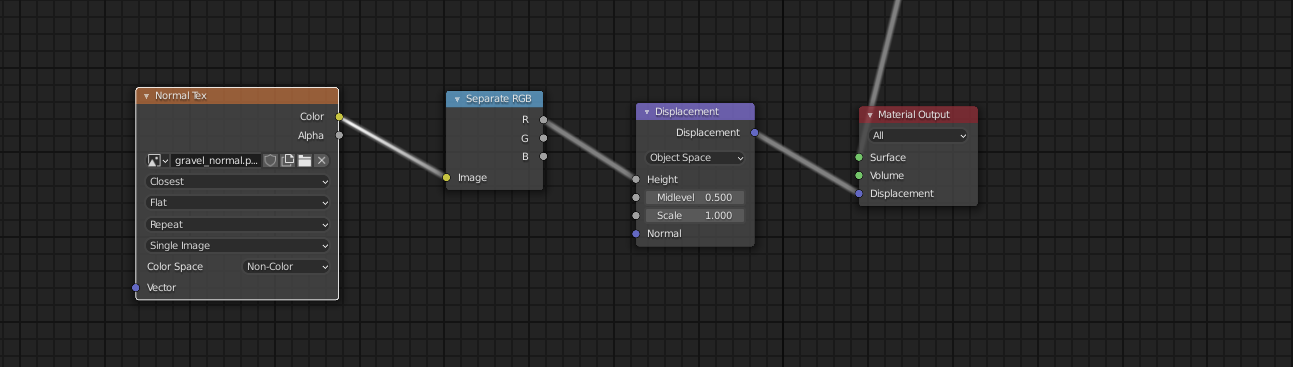

Sorry for my slow replies it's been a hectic week and I only just now got around to testing things fully. Hope my replies can be helpful should you decide to implement support for this new texture system. Let me know if you have further questions
Thanks for sharing the examples.
Point 1: Curious, when it mixed up stone and stone_slab, what version of MCprep were you running? I think there was a general bug that was resolved for this in v3.2.4 (specifically, normal/spec maps being mistaken for wrong blocks Point 2: An interesting point, linear vs closest for normal maps. I wonder if using is even the same thing that should be done with java resource packs, possibly dependent on the block resolution? Point 3: As I understand, the packs switch from displacement vs normal map based on the resolution of the pack I believe, which makes it a little tricky to decide how it will be implemented.