

 TheAssassin
UX improvements
I think this launcher is the better option for integrating AppImage-packaged applications into the system (see my comment in AppImage/appimaged#5), however, there are a few tweaks which I believe will improve User Experience in using the launcher and AppImage in general.
I think the most "visible" tweak would be an overhaul of the integration prompt. Right now there is too much text, and especially when it comes to computers, reading is hard; as a result, users will just click through the prompt without reading. Instead, by presenting information about what matters to the user (mainly, Application metadata), with an expendable "more info" panel with some information, and a link to appimage.org. I've designed an example prompt in Glade, using GTK - maybe a version of that could be made in Qt following KDE design guidelines (for best results, both prompts could be available in -gtk and -qt packages).
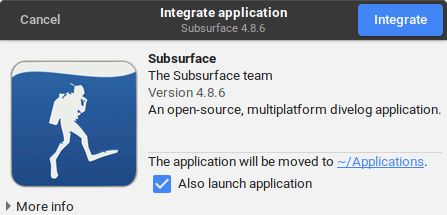
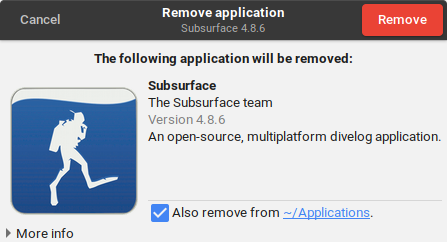
A similar prompt could be shown before removing the application:
In order to bypass the integration step, the user could manually set the executable bit, allowing the application to be launched directly.

a bit limited. should ask if the user actually wants to integrate / uninstall. make them think before doing.

That's what the prompt is doing. Users don't really care or want to know the specifics of AppImage vs. other means of installation is. They want their app accessible like all others. This way, the launcher provides what the user expects (an installation process, even though technically it's just the integration to the system), and besides, the action is really not critical since all the launcher does is put a desktop file and move the AppImage to the Applications folder. Clearer information on how to remove the application could be needed, but if the option is there in the desktop file it's a non-issue since "right-clicking for more options" is behavior that's learned pretty quickly when using a computer (but that doesn't prevent documenting the feature).
Also, I should add that it being limited is the point. Too much text or information and the user will more likely refrain from doing anything rather than read.
"That's what the prompt is doing", that's pure bull. do you have any idea how many peeps need that? i deal with people not thinking before they click through on a daily basis.
But what's the worst that could happen as a result here? The launcher moves the AppImage file into ~/Applications and copies the desktop file from within it. That's nothing so critical it should have a warning dialog.
Furthermore, non-legitimate uses of warning and error dialogs is what causes users to "not think before they click through". By putting a warning dialog here I would make the problem worse, not better.
it's not a warning dualog and you know it. and the bottom half of your post is a flat out lie.
¯\_(ツ)_/¯ man, please put forward arguments on why having a "warning dialog" (that's the name I'll stick with unless you tell me what it is) is good in this case, despite the low-risk integration step.

The UI looks nice, no questions there. Also, @azubieta's old PR contained a lot of what's needed to make something like that.
UX wise, a few remarks:
- we may not lose the "run once" feature, I'd rather have "run once" instead of "integrate without running"
- you're double clicking an AppImage, so anything you'd be prompted there should eventually lead to an execution of that app
- please consider adding a "don't ask again" question, so people can permanently opt out of the dialog when they don't want to integrate the AppImage at all
- do buttons really have to be on top? is that modern nowadays; can you please link a reference where this is discussed?

you're double clicking an AppImage, so anything you'd be prompted there should eventually lead to an execution of that app
That is a good point. My point of view was that the user wants to integrate the apps, and optionally use them as well. Since the Launcher would only register a MIME handler, making the AppImage executable would bypass the Launcher entirely and just run the application once. However if the Launcher also hooks into binfmt, this point is moot.
If we are to "reverse" the action/checkbox, I'd need to find a good label text for the checkbox ("Also make available to the system"? "Also install into the system"?). Remember that the user isn't expected to either know or care about AppImage, therefore any technical jargon or AppImage-specific language should be avoided.
please consider adding a "don't ask again" question, so people can permanently opt out of the dialog when they don't want to integrate the AppImage at all
I don't think that is a good idea. The use needs an explicit call to action because the change is significant (installers on Windows are never silent, and the various software centers at least ask for root access (as necessary) therefore teaching users the behavior that it will be asked to confirm before continuing. Therefore even though integration in AppImage isn't really a critical action, it helps feeding into that learned behavior. Also, adding an option to not show again means we need a way to undo that setting - which is hard without having a settings page, which in turn might be overkill for just a launcher.
Even in the case where we finally add a "don't ask again" checkbox, we'd still need to notify the user about doing something (through a notification, most probably).
do buttons really have to be on top? is that modern nowadays; can you please link a reference where this is discussed?
This is me using the GTK Header bar because I like it, and it follows the GNOME HIG. As I mentioned in the issue the most important issue is that the dialog feels integrated with the DE, and therefore it must respect GTK/Qt HIGs for the respective dialogs.
If we are to "reverse" the action/checkbox, I'd need to find a good label text for the checkbox ("Also make available to the system"? "Also install into the system"?). Remember that the user isn't expected to either know or care about AppImage, therefore any technical jargon or AppImage-specific language should be avoided.
"reverse" is the wrong term. What we call "integration" is basically a) move into ~/Applications and b) integrate into launcher. If you want to integrate, both actions will be executed. If not, the AppImage is left unmodified, and it's just run.
If you need a user story, think of mine: I often test AppImages I build locally, and many others do, too. I don't want each of them to be moved around and integrated: in 50% of all cases, the AppImages just shall be run once, and integration would make things only complicated. If there were no opt-out for the integration, I'd probably never consider installing/using AIL.
Regarding "do not ask again", that's a commonly requested UX element, and I can understand that very well. You don't necessarily want to be asked on every invocation whether to integrate or not; there should be a way to say "yes, I'm sure I never want this to be integrated". In the end, you can still move the file to ~/Applications and it'll be integrated by appimagelauncherd. It's not a "final" decision.
Even in the case where we finally add a "don't ask again" checkbox, we'd still need to notify the user about doing something (through a notification, most probably).
Not sure what you mean, can you elaborate please?
This is me using the GTK Header bar because I like it, and it follows the GNOME HIG. As I mentioned in the issue the most important issue is that the dialog feels integrated with the DE, and therefore it must respect GTK/Qt HIGs for the respective dialogs.
I see, this is a GNOME 3 weirdness then. Welp, I'm open to using whatever HIG is there. I am not a GNOME 3 user, so in the end, I won't see it, right? I can continue to use the Qt version of the app on my XFCE. And you're absolutely right, a consistent look and feel is important.
"reverse" is the wrong term. What we call "integration" is basically a) move into
~/Applicationsand b) integrate into launcher. If you want to integrate, both actions will be executed. If not, the AppImage is left unmodified, and it's just run.
Hah, I didn't write what I meant - by "reversing" I meant "Making the button be 'Launch' and the checkbox be 'integrate', instead of the currently proposed way". I do agree that launching the application is important, however, this is why I initially thought of letting the user chmod +x the AppImage as a power user feature to run without integrating. I don't think anybody not working with AppImages would need that feature.
The problem with having the button say "Run" is that the user will perceive the dialog as an unnecessary hurdle - however "Install" or "Integrate" would indicate more clearly the intent of the dialog, and of AppImageLauncher. I guess I could add a second button with "Just Run" instead.
Regarding "do not ask again", that's a commonly requested UX element, and I can understand that very well. You don't necessarily want to be asked on every invocation whether to integrate or not; there should be a way to say "yes, I'm sure I never want this to be integrated". In the end, you can still move the file to
~/Applicationsand it'll be integrated by appimagelauncherd. It's not a "final" decision.
So the daemon takes care of the actual integration? I guess manually moving the AppImage to ~/Applications might be a good way to bypass the dialog then. Also that means that the "move to ~/Applications` checkbox can't be effectively be tied to any dialog action since the daemon is what does the integration.
Not sure what you mean, can you elaborate please?
I'm going from the point of view of someone using the system without knowing anything about it - without any notifications, the user downloads an AppImage, double click it, and uses it once, and never realizes the system now has an entry pointing to the AppImage, and worst, AIL has moved the file away and the user doesn't know what happened to it. I can imagine one of two things happening:
- The user thinks the computer ate away the file, and redownloads it
- The user thinks the computer is broken ("clearly the file was there last time, why is it not showing it?")
In both cases this would lead to frustration, and for some users with the know-how, a bug report on the file manager, the DE or the distribution, which is a waste of their time. Therefore AIL needs to notify the user about what it's doing in a way that is intuitive (read: doesn't need the user to think). The dialog is the most expressive way to deal with this, as it clearly shows the user something is going to happen when it clicks the "integrate" button, but in the case where a "don't show again" option exists, we'd need to still notify the user about taking action, because they might not be the user who configured the machine or AIL / might not remember AIL is installed or that they checked the box.
I see, this is a GNOME 3 weirdness then. Welp, I'm open to using whatever HIG is there. I am not a GNOME 3 user, so in the end, I won't see it, right? I can continue to use the Qt version of the app on my XFCE. And you're absolutely right, a consistent look and feel is important.
Agreed. I see the headerbar is a bit controversial, but I actually like it and since it's used throughout GNOME, I'd figure I'd use it.
Check how it works on the Mac. No such dialogs needed at all. Much more elegant.

Check how it works on the Mac. No such dialogs needed at all. Much more elegant.
No, instead the user has to know where to put the .app file. As discussed, this is prone to errors and a nightmare for maintainers and support people. Having an entry point where the user lets the system do its thing leads to less uncertainty and more reproducibility.
For better or for worse, Desktop Linux is centralized - therefore the integration of decentralized and portable solutions is something that will not go 100% smoothly. But I think with the solution of the AppImage Launcher we give up the right amount of decentralization towards better user convenience. And that integration should be user-driven for them to understand what is going on - hence the dialog.
No, instead the user has to know where to put the .app file.
Have you actually used a Mac? You can put an .app file anywhere, and just double-click it to launch. It is generally recommended to copy apps to /Applications but they usually work from just about any location.
Having an entry point where the user lets the system do its thing leads to less uncertainty and more reproducibility.
If done wrong, it also limits the (perceived) flexibility. E.g., can I put an application onto a network share rather a local machine? How about a DVD? USB drive? Etc.
For better or for worse, Desktop Linux is centralized
AppImage is there to decentralize it.
integration should be user-driven for them to understand what is going on
Fully agree that the user should have a chance of understanding what is going on. So I would never argue, for example, that something should be moved without the user actually moving it. On the Mac, the user is instructed to move/copy applications by drag-and-drop in the file manager.
If done wrong, it also limits the (perceived) flexibility. E.g., can I put an application onto a network share rather a local machine? How about a DVD? USB drive? Etc.
AppImage is there to decentralize it.
This project is not an attempt at crippling the portability of AppImage - it will always be the distribution method of "chmod +x and off we go" - under the current implementation, the AppImage intercepts launches even when chmodded but I would like to convince @TheAssassin to only hook as a MIME handler. This way "naive" users would just double click to integrate, and enjoy their application leaving AppImage be an implementation detail, while power users can enable the executable bit and enjoy the portability.
Fully agree that the user should have a chance of understanding what is going on. So I would never argue, for example, that something should be moved without the user actually moving it. On the Mac, the user is instructed to move/copy applications by drag-and-drop in the file manager.
This is what I was talking about in my previous comment. Instructing the user to drag-n-drop manually is what leads to poor application management.
@probonopd
Check how it works on the Mac. No such dialogs needed at all. Much more elegant.
Not quite true. Double-clicking the .dmg brings up a prompt to drag the .app file to /Applications. Sure, if you drag it elsewhere you can then double-click on the .app and it will run without a prompt, but that is like clicking a "never ask again" button for an AppImage. First time: prompt; all subsequent times: no prompt.

Some thoughts:
- Regarding the @SolarLiner screenshots in the first post: Moving and integrating are different. Even if you don't move you may want to have integration. Hence the question should clearly be about either moving or about integrating, but not about both. I think we should ask before moving (if we insist in moving), but don't need to ask about integrating (it should "just work", even if the user does not agree to move)
- @shoogle on the Mac, there is no dialog box "Do you want to move - Yes/No". Some disk images graphically suggest the user to copy the application to
/Applicationsusing the file manager. For me this is an entirely different thing, since the user may copy the application if they so desire. A user never has to click "no" if they don't want anything to be moved or copied - @SolarLiner I also think a MIME handler should be sufficient to catch all relevant cases and
binfmtis too intrusive but I think @TheAssassin was considering some edge cases that are not caught by a MIME handler (which?)
- Regarding the @SolarLiner screenshots in the first post: Moving and integrating are different. Even if you don't move you may want to have integration. Hence the question should clearly be about either moving or about integrating, but not about both. I think we should ask before moving (if we insist in moving), but don't need to ask about integrating (it should "just work", even if the user does not agree to move)
Interesting thought indeed. I wonder about some directories that hypothetical "system cleaners" might wipe clean to reclaim space. In most cases the AppImage will be downloaded from a browser, and most browsers' default directory for downloads is, well, the Downloads directory - a directory that isn't particularly meant for long-term storage; we could run into the issue that the user (or an automated tool such as a system cleaner) deletes the content of Downloads and leaves dangling desktop files that won't work anymore. I know that moving and integrating are two different things but it might be better for stability issues to do both. Instructing the user to keep a mental list of their AppImage applications' path is bad UX and is something that can be taken care of.
I am working on the premise that "power users" would generally not use the Launcher since they have to deal with advanced use-cases (AppImage creation, multiple version testing, portability, etc.) - this allows the Launcher to stay minimalistic, fast and out of the way (check application details, integrate, done); but maybe there is a design path for some "power user" features to be added in.
the user may copy the application if they so desire
Well, we just provide that option in a dialog, since there is no "Applications dir" that would pop up when you "run" a .dmg file. Slightly different, but functionally the same idea, just in a way that fits the reality better.
I am working on the premise that "power users" would generally not use the Launcher since they have to deal with advanced use-cases (AppImage creation, multiple version testing, portability, etc.) - this allows the Launcher to stay minimalistic, fast and out of the way (check application details, integrate, done); but maybe there is a design path for some "power user" features to be added in.
I'm actually using the whole thing and make lots of AppImages, it's not like having AppImageLauncher installed would be a big problem. I just hit "run once" all the time, and for CLI stuff the launcher isn't triggered anyway.
I don't really differentiate between "power users" and "normal users", because I think that's a kind of awkward thinking. Every user is "worth the same". And integration should work for all people, consistently. I only consider adding exceptions where asking the user for instance would be pointless anyway (see #153 for instance).
@SolarLiner I also think a MIME handler should be sufficient to catch all relevant cases and binfmt is too intrusive but I think @TheAssassin was considering some edge cases that are not caught by a MIME handler (which?)
The idea is to like, get rid of the executable bit from the user's perspective. There are cases in which AppImages are executable already but shall be re-integrated. The most important ones involve:
- integration directory was changed to non-default directory -> ask whether to move to new location
- shared directories of any kind, with executable AppImages -> the user can choose to move (or, if not possible, which will most likely be the case) copy the AppImage to a local directory
- copying already executable AppImages around, e.g., to USB disks, to hand them to friends -> integration wouldn't be triggered
- ...
If you have both binfmt_misc and MIME, you catch all first launches. I agree that would be much more useful if you had a "don't ask again" kind of thing, but that's handled in another issue.
By the way, I don't think "auto cleanup optimize" kind of bullshit is something a Linux user would install... I don't even know any tool that would work like you described. Got some examples? I'm curious.
A user never has to click "no" if they don't want anything to be moved or copied
They have to close the prompt, which is essentially the same thing. Really the only difference is that the prompt is graphical rather than a question. The AIL prompt could be made more graphical if you prefer it that way, but we probably couldn't lose the text entirely.
Anyway, I'd rather have a question that I can answer "yes" or "no" to rather than going to the effort of clicking and dragging the mouse across the screen. Seriously, the macOS way of doing things is weird! It's so nearly perfect, but not quite. Then there's the whole idea that you download a .dmg which is entirely useless once you've extracted the .app. At least we don't have that problem with AppImages!
@SolarLiner
we could run into the issue that the user (or an automated tool such as a system cleaner) deletes the content of Downloads and leaves dangling desktop files that won't work anymore.
No, because a system integration tool needs to remove the system integration when the AppImage is deleted. If the system integration tool does not do so, then it is broken.
I know that moving and integrating are two different things but it might be better for stability issues to do both.
Let's say, if the user moves, then system integration should occur. But that does not mean that in order for (at least partial) system integration to occur, the user has to move the application.
Personally, I run many AppImages from the Downloads directory, which in my case even gets deleted on each reboot. Only those which I want to keep for productive work get copied in some other location.
Instructing the user to keep a mental list of their AppImage applications' path is bad UX
Why do you think that? The filesystem is not your enemy, it's your friend. Just like users should know where they store a .jpg or .mp3 or any other sort of file, of course they should know exactly where an app is stored. This is the core idea of AppImage - applications are managed in the file manager, just like any other type of file. If users does not even know where the files are - how are they supposed to manage them? Not knowing where stuff is drives me crazy because then I feel I have lost control over the machine.
this allows the Launcher to stay minimalistic
"the Launcher" being whatever the particular desktop manager offers, right (application menus etc.)? We have no influence over the UX of that. What we certainly don't want is an AppImage-specific launcher UX. AppImages should feel "native", not "alien" or "special". They should "just work".
@TheAssassin
I just hit "run once" all the time
Which shows imho that this should be the default action :-)
I don't really differentiate between "power users" and "normal users", because I think that's a kind of awkward thinking.
[UX philosophy point] Well, it's a fact that there are more and less knowledgable users but all want to get things done with minimal effort.
What is important in my opinion, though, is to implicitly educate users by showing them what is going on, especially what goes where in the filesystem, so that they can advance from less to more knowledgable just by observing things (without having to explicitly "study" things).
integration directory was changed to non-default directory -> ask whether to move to new location
How come that on the Mac there is /Applications (let's call this the "integration directory") but there is absolutely no way nor need to change that directory? I think we can pick one or more directories and just make them unchangeable, like appimaged intentionally does. This removes this case. Configurability is the root of complexity, errors, and frustration.
shared directories of any kind, with executable AppImages -> the user can choose to move (or, if not possible, which will most likely be the case) copy the AppImage to a local directory
By doing that, the executable bit is copied/moved too. So no need to set it again. Also, the user chooses where to copied/moved to - either to the "integration directory" or not. Their choice. No need for a dialog in this case. So we can remove this case, too.
copying already executable AppImages around, e.g., to USB disks, to hand them to friends -> integration wouldn't be triggered
Like above, the user is intentionally copying/moving from/to somewhere. They decide where. No need to tell them in a dialog.
Note that with the Mac, some (limited) integration always occurs, even when the application is not in the "integration directory". This point we are missing so far, and I think that's what we need for everyone to be happy.
By the way, I don't think "auto cleanup optimize" kind of bullshit is something a Linux user would install...
In general I agree, but then... think of my setup, where I don't keep $HOME between boots, which kinda has a similar effect. But I do that intentionally because I know what I am doing - so every tool that would try to be super smart and would work around this would just make it harder for me.
@shoogle
(macOS) It's so nearly perfect, but not quite. Then there's the whole idea that you download a .dmg which is entirely useless once you've extracted the .app. At least we don't have that problem with AppImages!
Indeed, I fully agree to the points you are making. Also, with AppImage a core idea is that "the installer" == "the installed application".
How come that on the Mac there is /Applications (let's call this the "integration directory") but there is absolutely no way nor need to change that directory? I think we can pick one or more directories and just make them unchangeable, like appimaged intentionally does. This removes this case. Configurability is the root of complexity, errors, and frustration.
Some people don't want their apps in their $HOME (@2635599 I think was one of them), but collecting them centrally is a neat UX element. So, it's nice to be able to change that directory, e.g., to use an external hard drive.
In universities for instance, your home directory is often limited by a strict quota (sometimes only a few 100 MiB), but there are often secondary locations (with less reliable/no backup for instance) where files can be stored. Or you just choose a USB disk for that purpose, and when you plug it in, the AppImages will automatically be put on there.
/Applications is a Mac thing, that isn't very well made IMO. We just picked the name ~/Applications because the files being AppImages is an "implementation detail" in terms of UX. The two names being equal is just a coincidence, to be honest. ~/AppImages didn't sound right.
I think we can agree that a combination of /Applications, $HOME/Applications, and <any mountpoint>/Applications should cover most use cases ;-)