

 TheAssassin
Simplify dialog boxes and add "do not ask again"
Let's make these dialogs simpler, shorter, and less frightening. Many people don't read more than 1-2 simple sentences.
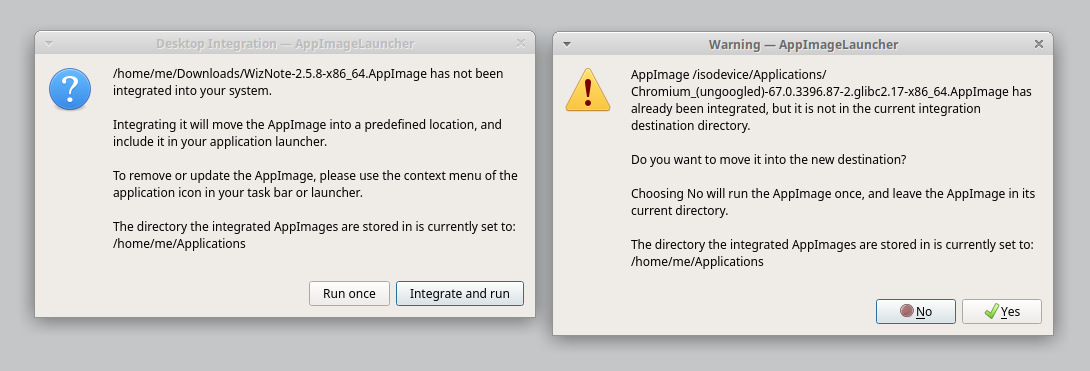
First dialog
Do you want to integrate WizNote-2.5.8-x86_64.AppImage into your system?

This will move it to /home/me/Applications, and include it in the application menu.

[x] Do not ask again     [Run without integrating] [Integrate and run]
Second dialog
Do you want to move Chromium_(ungoogled)-67.0.3396.87-2.glibc2.17-x86_64.AppImage
to /home/me/Applications?

[x] Do not ask again     [Run without moving] [Move and run]
This screen should not be a warning. A warning implies a problem waiting to happen, or something dangerous. It frightens casual users. In fact, I would question whether this screen should exist at all. After all, in which situation can a user end up with an AppImage that is integrated into the system but resides in a different location? I'd say, only in cases where that's exactly what the user wants...
Which means we could ask instead, in this situation:
Do you want to watch /isodevice/Applications for AppImages and integrate any AppImages
in that directory into the system?

[x] Do not ask again     [No] [Yes]

in which situation can a user end up with an AppImage that is integrated into the system but resides in a different location?
If the integration directory is changed? If appimaged or something is being run as well (although it shouldn't)? I hate implicit behavior. I want users to know what's going on. And users like that, apparently.

... will be looked into if I find 5 minutes. The issue is still open, but you might have noticed there's tons of older issues that I want to look into first.
The "do not ask again" part is planned for the new UI. We have not thought of a usable mechanism so far, but I guess that'll be another nice use case for the content-aware filenames.
Filenames that depend on the content. kdenlive-18.04.1-x86_64_db228740f982bb2cace6b70a4dd494ca.AppImage would be such a name. The idea is that even if two AppImages had the same filename, but differed content-wise, adding such a hash built from the contents makes the filenames comparable (as in, files which are equal in both filename and contents would receive the same name).
We are not suggesting that people stick stuff like "db228740f982bb2cace6b70a4dd494ca" into filenames, are we?
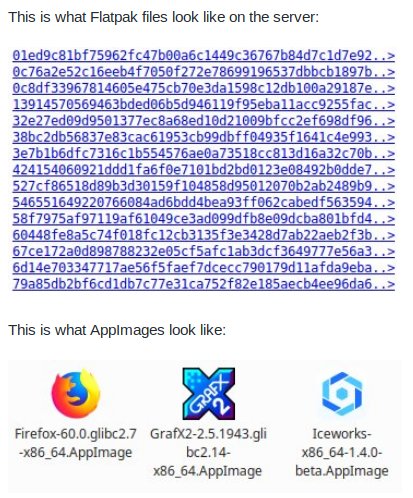
Why should that be a joke? What the heck? This is actually an important feature. The files can still be recognized by their original filename in ~/Applications.
Stuff like "db228740f982bb2cace6b70a4dd494ca" has no business in filenames since filenames are user-visible and such strings are confusing users. Let's put this string in some place where computers, but not humans, see it.
https://www.youtube.com/watch?v=qQsnqWJ8D2c around 9:50.
That sentence doesn't make any sense. This is the only way to allow multiple apps which don't put a version in their AppImage filename in parallel. Users don't have any issues with that. In fact, the least people look into ~/Applications, since the app launcher provides all the management features already.
That is entirely not the kind of user experience I am aiming for. Check how the Mac does things, please.
What does that have to do with any mac? You don't seem to understand the technical need for a collision avoidance system.
The user experience should be at least as good as the Mac's. Having random numbers in user-visible file names is not part of that user experience.
Users won't need to see any of those files anyway, only in exceptional cases...
I see my AppImages every day. I double-click them to launch applications, I drag them to the trash to remove them, and so on. Interacting with AppImages directly using the file manager is a core principle of AppImage.
Please read the AppImageSpec. Filenames must not matter. People are placing AppImages e.g., in /usr/local/bin/firefox.
That's a totally different use case... comparing apples and bags of wheat...
Why? AppImages are meant to be "managed" by the file manager, and nothing but the file manager.
AppImageLauncher != AppImage. You don't like the UX? You don't need to use it, it's purely optional.
I think if two AppImages have the same name, the user expects them to be the same program. Also, altering file names is exactly one of these implicit behaviours...
I also second the request for a "don't ask again" option. I have AppImages that are meant to be run on the command line - like vagrant. And each and every time I get this dialog asking me to integrate it. But it won't work anymore if I do that. So I have to decline it every single time.
@zilti if the vagrant AppImage doesn't "just run" but triggers AppImageLauncher, then it's an issue in the AppImage, actually. Any CLI AppImage (i.e., Terminal=true in the desktop file) is ignored by AppImageLauncher (also, there's a X-AppImage-Integrate=false option that can be set).
This is needed. AppImages are also used for some games to package modified wine version easily, clicking "Run once" every time you launch the game is a little annoying.
