

 The-OpenROAD-Project
gds streaming should handle macro with different units
Description
It seems that final gds streaming always assume that macros UNITS are the same as the main gds ones (0.001) resulting in the macro being scaled down during the final merge.
See the following example with UNITS 0.005 5e-09 of a macro being merged in a bigger layout:
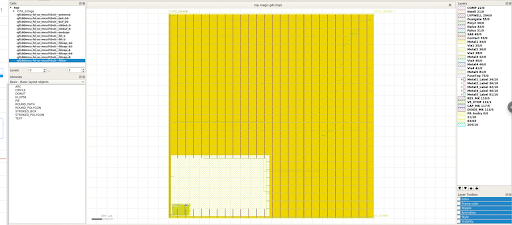 effectively resulting in the merged polygons being 5 times smaller.
Expected Behavior
Appropriate scaling is applied on the polygon from the gds before merging them.
Re-importing the macro in a new layout in klayout with a database unit of 0.001 does allow to workaround this issue.
Environment report
openlane                  2023.02.19_0_g95580b00 20230222_073528    litex-hub
open_pdks.gf180mcuc       1.0.393_0_ge6f9c88 20230222_150152    file:///tmp/conda-bld
openroad                  2.0_6924_g037e4e3a4 20230222_073528    litex-hub
klayout                   0.28.5_30_ga04f2940a 20230222_073528_py37    litex-hub
Reproduction material
attached the resulting gds for the layout and the original macro (with a different database units).
Relevant log output
[STEP 29]
[INFO]: Streaming out GDSII with KLayout (log: digital/runs/RUN_2023.02.23_14.04.05/logs/signoff/29-gdsii-klayout.log)...
Warning: No mapping for layer 'Metal1', purpose 'LEFPIN' - layer is ignored
Warning: No mapping for layer 'Metal1', purpose 'LEFLABEL' - layer is ignored
Warning: No mapping for layer 'Nwell', purpose 'LEFPIN' - layer is ignored
Warning: No mapping for layer 'Nwell', purpose 'LEFLABEL' - layer is ignored
Warning: No mapping for layer 'Pwell', purpose 'LEFPIN' - layer is ignored
Warning: No mapping for layer 'Pwell', purpose 'LEFLABEL' - layer is ignored
Warning: No mapping for layer 'Metal1', purpose 'LEFOBS' - layer is ignored
Warning: No mapping for layer 'Metal2', purpose 'LEFOBS' - layer is ignored
Warning: No mapping for layer 'Metal3', purpose 'LEFOBS' - layer is ignored
Warning: No mapping for layer 'Metal4', purpose 'LEFOBS' - layer is ignored
Warning: No mapping for layer 'Metal5', purpose 'LEFOBS' - layer is ignored
[INFO] Clearing cells...
[INFO] Merging GDS files...
	/home/proppy/silicon-gf180mcuC-env/share/pdk/gf180mcuC/libs.ref/gf180mcu_fd_sc_mcu7t5v0/gds/gf180mcu_fd_sc_mcu7t5v0.gds
	/home/proppy/src/github.com/spnadig/GF180_GAFE_1/digital/../TopLevel_oscillator.gds
	/home/proppy/src/github.com/spnadig/GF180_GAFE_1/digital/../OTA_2stage.gds
[INFO] Copying top level cell 'top'...
[INFO] Checking for missing GDS...
[INFO] All LEF cells have matching GDS cells.
[INFO] Writing out GDS '/home/proppy/src/github.com/spnadig/GF180_GAFE_1/digital/runs/RUN_2023.02.23_14.04.05/results/signoff/top.klayout.gds'...
[INFO] Done.

@proppy I think this is the line where merge happens: https://github.com/The-OpenROAD-Project/OpenLane/blob/master/scripts/klayout/stream_out.py#L174
Correct?
I think there is a problem here not only with DBU translation: the "read into existing layout" function is not very smart when it comes to resolving child cell conflicts. In the given example, the "OTA_2stage" macro contains child cells representing devices. Their GDS names are "pfet", "pfet$2", "nfet", "nfet$2" etc. If you read two such macros, the "read into existing layout" function will add the contents of a "pfet" cell from the second macro to the "pfet" cell from the first macro. As the cell names are not specific for the device parameters, these cells may actually represent different devices which messes up your layout. But even if "pfet" is always the same kind of device, it will duplicate the shapes there. The strategy to avoid this problem is to treat all cells from different macros as separate entities and create separate cell trees for each of the them. In that case there is no cell reuse - e.g. a standard cell from macro1 will be a different cell than that from macro2 even if they are the same thing, but I guess that is a cheap price to pay for avoiding the mentioned cell class issues.
Technically, the implementation is this (disclaimer: code not tested):
for gds in in_gds.split(";"):
  print(f"\t{gds}")
  macro_layout = pya.Layout()
  macro_layout.read(gds)
  hook_into = main_layout.cell(macro_layout.top_cell().name)
  hook_into.copy_tree(macro_layout.top_cell())
This should also solve the DBU problem as during "copy_tree", DBU scaling is done.
Matthias
