Terminals

Terminals copied to clipboard
 Terminals-Origin
SSH connection not working in v4.0.1
I am having an issue with v4.0.1 and an SSH connection. When I attempt to connect I get:
Sorry, Terminals was unable to connect to the remote machine.  Try again, or check the log for more information.

Details:
Object reference not set to an instance of an object.
The log file looks like this:
FATAL 2017-08-16 09:15:11,408 52718ms Terminals              Connect            - Connecting to unknown Connection
System.NullReferenceException: Object reference not set to an instance of an object.
   at SSHClient.Protocol.Connect(Socket s)
   at Terminals.Connections.TerminalConnection.ConfigureSshConnection(IGuardedSecurity security)
   at Terminals.Connections.TerminalConnection.Connect()
My SSH connection is using "Password".
Any ideas?


I get the same error if I don't save a password before connect to the machine.


same problem here - connection is set to password, generating ssh key doesnt change anything - and why do i need a ssh key when the hosts doesnt support that and is set to password and i dont want to save the password ?


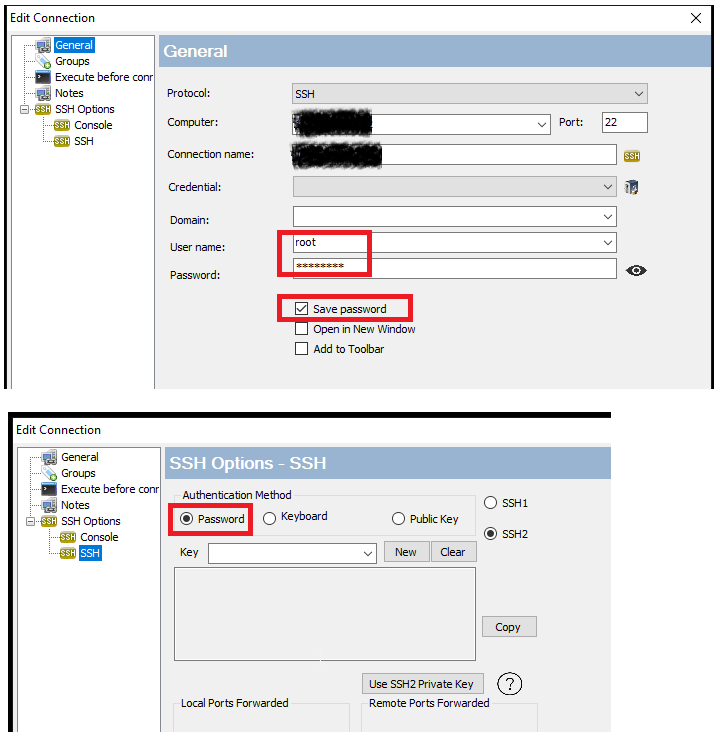
I had the same issue , resolved it like this :
- set your username & pass
- Change SSH options to "Password"