
tdesign-miniprogram

tdesign-miniprogram copied to clipboard
 Tencent
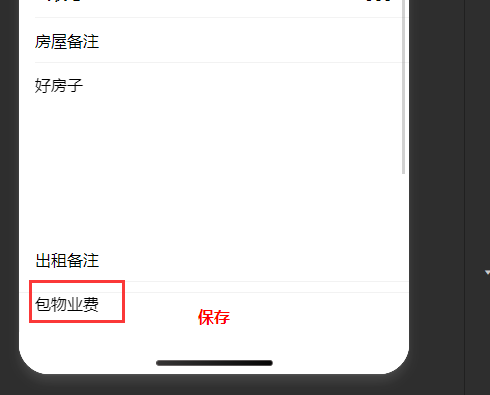
当t-textarea 组件滚动到t-tab-bar下面的时候,发生了t-textarea穿透了t-tab-bar
tdesign-miniprogram 版本
0.23.0
重现链接
No response
重现步骤
<view class="pannel-item">
  <view class="pannel-label">状态<text style="color: #e34d59"> *</text></view>
  <view class="pannel-right">
    <t-check-tag id="0" bind:change="onClickStatusPicker" disabled="{{formData.status==0}}" checked="{{formData.status==0}}">空闲</t-check-tag>
    <t-check-tag id="20" bind:change="onClickStatusPicker" disabled="{{formData.status==20}}" checked="{{formData.status==20}}">整备</t-check-tag>
    <t-check-tag id="30" bind:change="onClickStatusPicker" disabled="{{formData.status==30}}" checked="{{formData.status==30}}">自用</t-check-tag>
  </view>
</view>
<view class="pannel-item">
  <view class="pannel-label">类型<text style="color: #e34d59"> *</text></view>
  <view class="pannel-right">
    <t-check-tag id="1" bind:change="onClickTypePicker" disabled="{{formData.type==1}}" checked="{{formData.type==1}}">房屋</t-check-tag>
    <t-check-tag id="2" bind:change="onClickTypePicker" disabled="{{formData.type==2}}" checked="{{formData.type==2}}">车位</t-check-tag>
    <t-check-tag id="3" bind:change="onClickTypePicker" disabled="{{formData.type==3}}" checked="{{formData.type==3}}">门面</t-check-tag>
  </view>
</view>
<t-input label="slot" align="right" placeholder="地址" value="{{formData.address}}" bindchange="inputChange" id="address" t-class-error-msg="error-msg">
  <text slot="label">地址 </text>
</t-input>
<t-input label="slot" align="right" placeholder="水表号" value="{{formData.water_meter_no}}" bindchange="inputChange" id="water_meter_no" t-class-error-msg="error-msg">
  <text slot="label">水表号 </text>
</t-input>
<t-input label="slot" align="right" placeholder="电表号" value="{{formData.electric_meter_no}}" bindchange="inputChange" id="electric_meter_no" t-class-error-msg="error-msg">
  <text slot="label">电表号 </text>
</t-input>
<t-input label="slot" align="right" placeholder="气表号" value="{{formData.gas_meter_no}}" bindchange="inputChange" id="gas_meter_no" t-class-error-msg="error-msg">
  <text slot="label">气表号 </text>
</t-input>
<t-textarea label="房屋备注" value="{{formData.remark}}" bindchange="inputChange" id="remark" placeholder="房屋的备注" />
<t-textarea label="出租备注" value="{{formData.rent_remark}}" bindchange="inputChange" id="rent_remark" placeholder="默认在出租合同中显示。" />

<view class="item">
  <view class="item__title">附件</view>
  <view class="upload-wrapper">
    <t-upload mediaType="{{['image']}}" gridConfig="{{gridConfig}}" files="{{formData.files}}" bind:add="handleAdd" bind:remove="handleRemove" bind:success="handleSuccess">
      <t-icon slot="addContent" name="add" size="40rpx" color="rgba(0,0,0,0.26)" />
    </t-upload>
  </view>
</view>
期望结果
t-tab-bar遮挡住t-textarea
实际结果
框架版本
No response
浏览器版本
No response
系统版本
No response
Node版本
No response
补充说明
No response

👋 @cqjdcheng,感谢给 TDesign 提出了 issue。 请根据 issue 模版确保背景信息的完善,我们将调查并尽快回复你。
![github-actions[bot] avatar](https://avatars.githubusercontent.com/in/15368?v=4 "Published by a pub.dev verified publisher")

