

 Tencent
为什么最大的深度是5呢?

可以根据需求重写 Parser.getMaxQueryDepth 或修改默认值 MAX_QUERY_DEPTH。
嵌套过深容易造成 SQL 执行次数暴增,严重降低数据库性能、导致接口超时。 默认值 5 可以满足大部分中小型互联网 to C 应用的绝大部分需求, 一般结构最复杂的查询 API 就是类似 QQ空间/微信朋友圈 的查询 API,正好 5 层。 http://apijson.cn:8081/get
{
    "[]": {
        "page": 0,
        "count": 5,
        "Moment": {  // Moment 中冗余 userName, userHead 可减少一个对象
            "@order": "date-"
        },
        "User": {
            "id@": "/Moment/userId",
            "@column": "id,name,head"
        },
        "User:praised[]": {
            "count": 11,  // 多出分页数量 1 个,用来确定是否还有更多,如果需要具体数量可以用 query: 2 查 total 或者单独 SELECT count(id)
            "User": {
                "id{}@": "[]/Moment/praiseUserIdList",
                "@column": "id,name"
            }
        },
        "[]": {
            "count": 6,
            "Comment": {  // Comment 中冗余 userName 可减少一个对象
                "momentId@": "[]/Moment/id"
            },
            "User": {
                "id@": "/Comment/userId",
                "@column": "id,name"
            }
        }
    }
}
返回(省略部分)
{
    "[]": [
        {
            "Moment": {
                "id": 1602956763783,
                "userId": 82001,
                "date": "2020-10-18 01:46:03.0",
                "content": "APIJSON is a JSON Transmission Structure Protocol…",
                "praiseUserIdList": [
                    82002,
                    82003,
                    82001
                ],
                "pictureList": [
                    "http://static.oschina.net/uploads/user/1218/2437072_100.jpg?t=1461076033000",
                    "http://common.cnblogs.com/images/icon_weibo_24.png"
                ]
            },
            "User": {
                "id": 82001,
                "name": "测试账号",
                "head": "https://raw.githubusercontent.com/TommyLemon/StaticResources/master/APIJSON_Logo.png"
            },
            "User:praised[]": [
                {
                    "id": 82001,
                    "name": "测试账号"
                },
                {
                    "id": 82002,
                    "name": "Happy~"
                },
                {
                    "id": 82003,
                    "name": "Wechat"
                }
            ],
            "[]": [
                {
                    "Comment": {
                        "id": 1603248518081,
                        "toId": 0,
                        "userId": 82001,
                        "momentId": 1602956763783,
                        "date": "2020-10-21 10:48:38.0",
                        "content": "路太远"
                    },
                    "User": {
                        "id": 82001,
                        "name": "测试账号"
                    }
                },
                {
                    "Comment": {
                        "id": 1603330060778,
                        "toId": 1603248518081,
                        "userId": 82001,
                        "momentId": 1602956763783,
                        "date": "2020-10-22 09:27:40.0",
                        "content": "远么"
                    },
                    "User": {
                        "id": 82001,
                        "name": "测试账号"
                    }
                }
            ]
        }
    ],
    "code": 200,
    "msg": "success",  //因为缓存命中部分重复的 User 和 Comment,所以执行的 SQL 比生成的少
    "sql:generate|cache|execute|maxExecute": "33|23|10|200" ,
    "depth:count|max": "5|5",
    "time:start|duration|end": "1603802292911|8|1603802292919"
}
还可以用自动化 JOIN 来减少需要执行的 SQL 语句
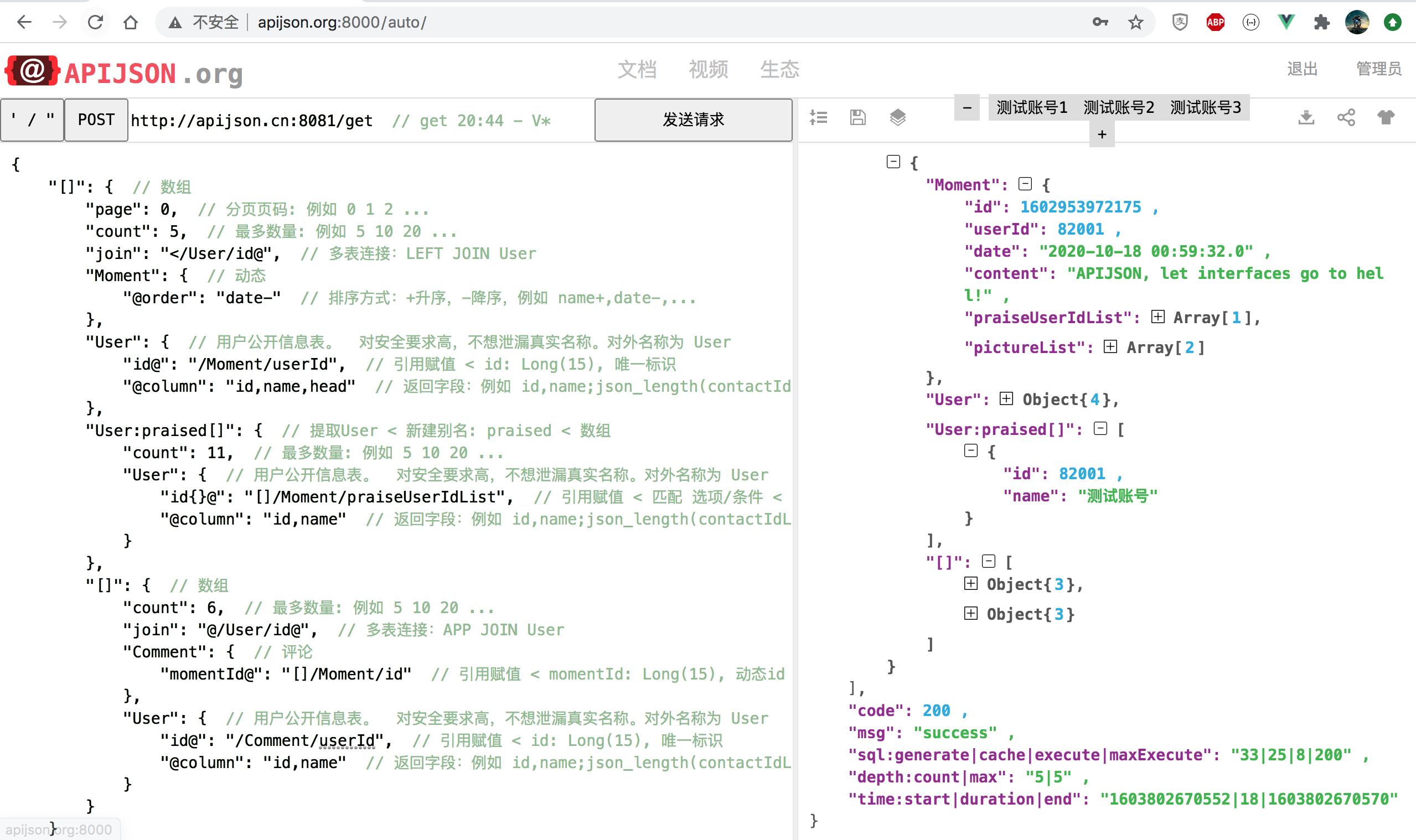

可以根据需求重写 Parser.getMaxQueryDepth 或修改默认值 MAX_QUERY_DEPTH。
嵌套过深容易造成 SQL 执行次数暴增,严重降低数据库性能、导致接口超时。 默认值 5 可以满足大部分中小型互联网 to C 应用的绝大部分需求, 一般结构最复杂的查询 API 就是类似 QQ空间/微信朋友圈 的查询 API,正好 5 层。 http://apijson.cn:8081/get
{
    "[]": {
        "page": 0,
        "count": 5,
        "Moment": {  // Moment 中冗余 userName, userHead 可减少一个对象
            "@order": "date-"
        },
        "User": {
            "id@": "/Moment/userId",
            "@column": "id,name,head"
        },
        "User:praised[]": {
            "count": 11,  // 多出分页数量 1 个,用来确定是否还有更多,如果需要具体数量可以用 query: 2 查 total 或者单独 SELECT count(id)
            "User": {
                "id{}@": "[]/Moment/praiseUserIdList",
                "@column": "id,name"
            }
        },
        "[]": {
            "count": 6,
            "Comment": {  // Comment 中冗余 userName 可减少一个对象
                "momentId@": "[]/Moment/id"
            },
            "User": {
                "id@": "/Comment/userId",
                "@column": "id,name"
            }
        }
    }
}
返回(省略部分)
{
    "[]": [
        {
            "Moment": {
                "id": 1602956763783,
                "userId": 82001,
                "date": "2020-10-18 01:46:03.0",
                "content": "APIJSON is a JSON Transmission Structure Protocol…",
                "praiseUserIdList": [
                    82002,
                    82003,
                    82001
                ],
                "pictureList": [
                    "http://static.oschina.net/uploads/user/1218/2437072_100.jpg?t=1461076033000",
                    "http://common.cnblogs.com/images/icon_weibo_24.png"
                ]
            },
            "User": {
                "id": 82001,
                "name": "测试账号",
                "head": "https://raw.githubusercontent.com/TommyLemon/StaticResources/master/APIJSON_Logo.png"
            },
            "User:praised[]": [
                {
                    "id": 82001,
                    "name": "测试账号"
                },
                {
                    "id": 82002,
                    "name": "Happy~"
                },
                {
                    "id": 82003,
                    "name": "Wechat"
                }
            ],
            "[]": [
                {
                    "Comment": {
                        "id": 1603248518081,
                        "toId": 0,
                        "userId": 82001,
                        "momentId": 1602956763783,
                        "date": "2020-10-21 10:48:38.0",
                        "content": "路太远"
                    },
                    "User": {
                        "id": 82001,
                        "name": "测试账号"
                    }
                },
                {
                    "Comment": {
                        "id": 1603330060778,
                        "toId": 1603248518081,
                        "userId": 82001,
                        "momentId": 1602956763783,
                        "date": "2020-10-22 09:27:40.0",
                        "content": "远么"
                    },
                    "User": {
                        "id": 82001,
                        "name": "测试账号"
                    }
                }
            ]
        }
    ],
    "code": 200,
    "msg": "success",  //因为缓存命中部分重复的 User 和 Comment,所以执行的 SQL 比生成的少
    "sql:generate|cache|execute|maxExecute": "33|23|10|200" ,
    "depth:count|max": "5|5",
    "time:start|duration|end": "1603802292911|8|1603802292919"
}
还可以用自动化 JOIN 来减少需要执行的 SQL 语句
作者,这个例子中的5是怎么算的? 没看懂怎么得出来的,最大嵌套层数不是三层么? 例如moment -》comment -〉user

可以根据需求重写 Parser.getMaxQueryDepth 或修改默认值 MAX_QUERY_DEPTH。 嵌套过深容易造成 SQL 执行次数暴增,严重降低数据库性能、导致接口超时。 默认值 5 可以满足大部分中小型互联网 to C 应用的绝大部分需求, 一般结构最复杂的查询 API 就是类似 QQ空间/微信朋友圈 的查询 API,正好 5 层。 http://apijson.cn:8081/get
{
    "[]": {
        "page": 0,
        "count": 5,
        "Moment": {  // Moment 中冗余 userName, userHead 可减少一个对象
            "@order": "date-"
        },
        "User": {
            "id@": "/Moment/userId",
            "@column": "id,name,head"
        },
        "User:praised[]": {
            "count": 11,  // 多出分页数量 1 个,用来确定是否还有更多,如果需要具体数量可以用 query: 2 查 total 或者单独 SELECT count(id)
            "User": {
                "id{}@": "[]/Moment/praiseUserIdList",
                "@column": "id,name"
            }
        },
        "[]": {
            "count": 6,
            "Comment": {  // Comment 中冗余 userName 可减少一个对象
                "momentId@": "[]/Moment/id"
            },
            "User": {
                "id@": "/Comment/userId",
                "@column": "id,name"
            }
        }
    }
}
返回(省略部分)
{
    "[]": [
        {
            "Moment": {
                "id": 1602956763783,
                "userId": 82001,
                "date": "2020-10-18 01:46:03.0",
                "content": "APIJSON is a JSON Transmission Structure Protocol…",
                "praiseUserIdList": [
                    82002,
                    82003,
                    82001
                ],
                "pictureList": [
                    "http://static.oschina.net/uploads/user/1218/2437072_100.jpg?t=1461076033000",
                    "http://common.cnblogs.com/images/icon_weibo_24.png"
                ]
            },
            "User": {
                "id": 82001,
                "name": "测试账号",
                "head": "https://raw.githubusercontent.com/TommyLemon/StaticResources/master/APIJSON_Logo.png"
            },
            "User:praised[]": [
                {
                    "id": 82001,
                    "name": "测试账号"
                },
                {
                    "id": 82002,
                    "name": "Happy~"
                },
                {
                    "id": 82003,
                    "name": "Wechat"
                }
            ],
            "[]": [
                {
                    "Comment": {
                        "id": 1603248518081,
                        "toId": 0,
                        "userId": 82001,
                        "momentId": 1602956763783,
                        "date": "2020-10-21 10:48:38.0",
                        "content": "路太远"
                    },
                    "User": {
                        "id": 82001,
                        "name": "测试账号"
                    }
                },
                {
                    "Comment": {
                        "id": 1603330060778,
                        "toId": 1603248518081,
                        "userId": 82001,
                        "momentId": 1602956763783,
                        "date": "2020-10-22 09:27:40.0",
                        "content": "远么"
                    },
                    "User": {
                        "id": 82001,
                        "name": "测试账号"
                    }
                }
            ]
        }
    ],
    "code": 200,
    "msg": "success",  //因为缓存命中部分重复的 User 和 Comment,所以执行的 SQL 比生成的少
    "sql:generate|cache|execute|maxExecute": "33|23|10|200" ,
    "depth:count|max": "5|5",
    "time:start|duration|end": "1603802292911|8|1603802292919"
}
还可以用自动化 JOIN 来减少需要执行的 SQL 语句
作者,这个例子中的5是怎么算的? 没看懂怎么得出来的,最大嵌套层数不是三层么? 例如moment -》comment -〉user
Moment 并不包含 Comment 和 User。
你可以多嵌套一层,让 API 报错,msg 里面就有类似以下的执行路径: []/0/User:praised[]/0/User []/0/[]/0/Comment []/0/[]/0/User key 的数量就是深度
可以根据需求重写 Parser.getMaxQueryDepth 或修改默认值 MAX_QUERY_DEPTH。 嵌套过深容易造成 SQL 执行次数暴增,严重降低数据库性能、导致接口超时。 默认值 5 可以满足大部分中小型互联网 to C 应用的绝大部分需求, 一般结构最复杂的查询 API 就是类似 QQ空间/微信朋友圈 的查询 API,正好 5 层。 http://apijson.cn:8081/get
{
    "[]": {
        "page": 0,
        "count": 5,
        "Moment": {  // Moment 中冗余 userName, userHead 可减少一个对象
            "@order": "date-"
        },
        "User": {
            "id@": "/Moment/userId",
            "@column": "id,name,head"
        },
        "User:praised[]": {
            "count": 11,  // 多出分页数量 1 个,用来确定是否还有更多,如果需要具体数量可以用 query: 2 查 total 或者单独 SELECT count(id)
            "User": {
                "id{}@": "[]/Moment/praiseUserIdList",
                "@column": "id,name"
            }
        },
        "[]": {
            "count": 6,
            "Comment": {  // Comment 中冗余 userName 可减少一个对象
                "momentId@": "[]/Moment/id"
            },
            "User": {
                "id@": "/Comment/userId",
                "@column": "id,name"
            }
        }
    }
}
返回(省略部分)
{
    "[]": [
        {
            "Moment": {
                "id": 1602956763783,
                "userId": 82001,
                "date": "2020-10-18 01:46:03.0",
                "content": "APIJSON is a JSON Transmission Structure Protocol…",
                "praiseUserIdList": [
                    82002,
                    82003,
                    82001
                ],
                "pictureList": [
                    "http://static.oschina.net/uploads/user/1218/2437072_100.jpg?t=1461076033000",
                    "http://common.cnblogs.com/images/icon_weibo_24.png"
                ]
            },
            "User": {
                "id": 82001,
                "name": "测试账号",
                "head": "https://raw.githubusercontent.com/TommyLemon/StaticResources/master/APIJSON_Logo.png"
            },
            "User:praised[]": [
                {
                    "id": 82001,
                    "name": "测试账号"
                },
                {
                    "id": 82002,
                    "name": "Happy~"
                },
                {
                    "id": 82003,
                    "name": "Wechat"
                }
            ],
            "[]": [
                {
                    "Comment": {
                        "id": 1603248518081,
                        "toId": 0,
                        "userId": 82001,
                        "momentId": 1602956763783,
                        "date": "2020-10-21 10:48:38.0",
                        "content": "路太远"
                    },
                    "User": {
                        "id": 82001,
                        "name": "测试账号"
                    }
                },
                {
                    "Comment": {
                        "id": 1603330060778,
                        "toId": 1603248518081,
                        "userId": 82001,
                        "momentId": 1602956763783,
                        "date": "2020-10-22 09:27:40.0",
                        "content": "远么"
                    },
                    "User": {
                        "id": 82001,
                        "name": "测试账号"
                    }
                }
            ]
        }
    ],
    "code": 200,
    "msg": "success",  //因为缓存命中部分重复的 User 和 Comment,所以执行的 SQL 比生成的少
    "sql:generate|cache|execute|maxExecute": "33|23|10|200" ,
    "depth:count|max": "5|5",
    "time:start|duration|end": "1603802292911|8|1603802292919"
}
还可以用自动化 JOIN 来减少需要执行的 SQL 语句
作者,这个例子中的5是怎么算的? 没看懂怎么得出来的,最大嵌套层数不是三层么? 例如moment -》comment -〉user
Moment 并不包含 Comment 和 User。
你可以多嵌套一层,让 API 报错,msg 里面就有类似以下的执行路径: []/0/User:praised[]/0/User []/0/[]/0/Comment []/0/[]/0/User key 的数量就是深度
谢谢tommy!
可以根据需求重写 Parser.getMaxQueryDepth 或修改默认值 MAX_QUERY_DEPTH的代码如下:
1、创建自定义的json解析器: public class MyApiJSONParse extends APIJSONParser { @Override public int getMaxQueryDepth() { return 10; } }
2、在DemoController中使用自定义的接下去 @Override public Parser<Long> newParser(HttpSession session, RequestMethod method) { Parser<Long> parser = new MyApiJSONParse(); parser.setMethod(method); if (parser instanceof APIJSONParser) { ((APIJSONParser)parser).setSession(session); } parser.setNeedVerify(false); return parser;//TODO 这里关闭校验,方便新手快速测试,实际线上项目建议开启 }
