

 TekkaGB
DMM hangs on update checking for existing mods.
This issue is regarding the Diva Mod Manager's auto mod update feature, once open, it should search for updates of existing mods, but as of late, it has been not letting me tick any boxes of my mods to enable or disable them, nor allow me to start the game from the Mod Manager. I can still install mods from GameBanana's 1-click Install button or directly from the GameBanana Mod Manager tab, but i cannot remove the mods within the Mods tab, as it is completely grayed out and the console only says "Refreshed" without giving me other text like it usually does. (As per the image provided)
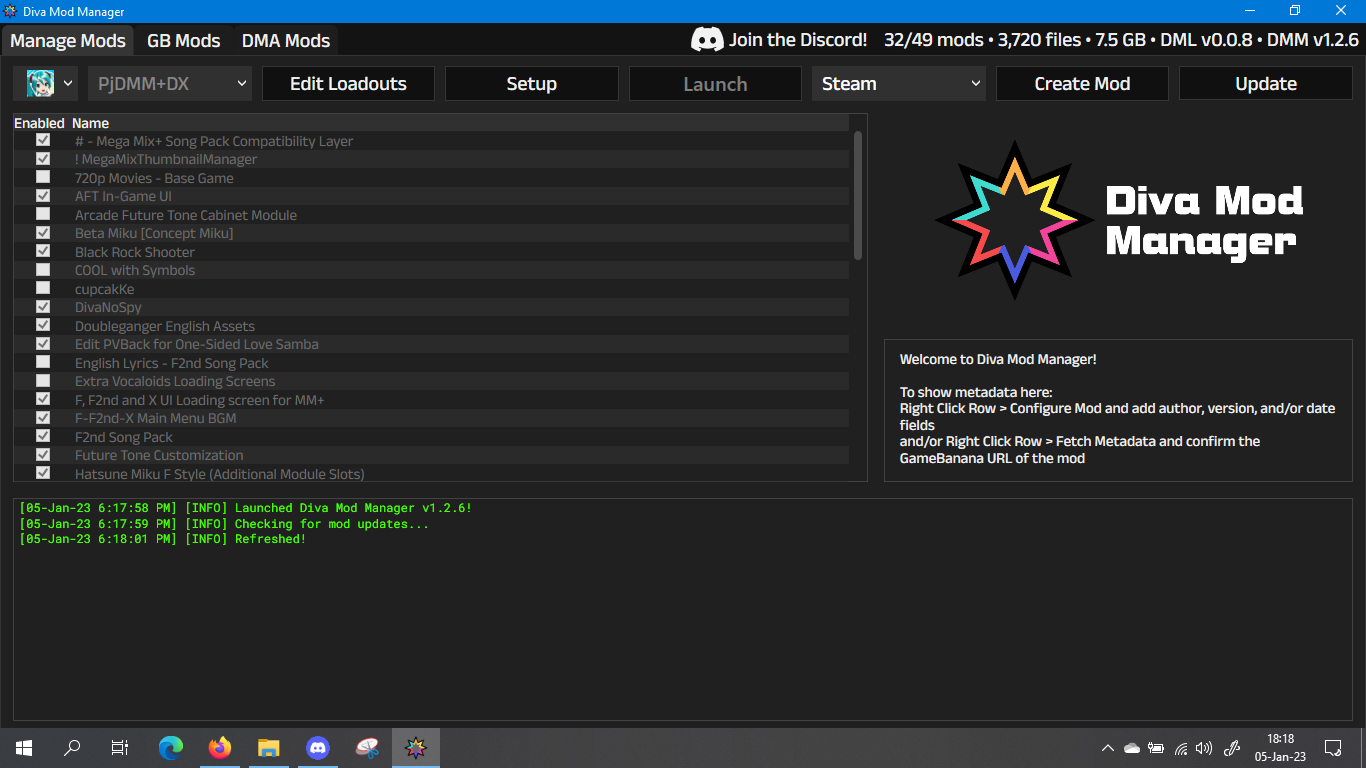
In order to let me boot the game, or tick the boxes or remove mods, it should say "Ready" on the console, but unfortunately it just stays there indefinitely.

Had the same issue. Fixed by downloading newest release from github (1.2.7) in order to get it to work. I think that it broke when they removed DMA mods. Weird that it doesn't give you an option to update DMM or even check that there is an update.
