
Piped
 Piped copied to clipboard
 TeamPiped
[Question] Pattern for redirecting embedded YT videos to Piped redirect
Hi,
Both Privacy Redirect or LibRedirect browser extensions include redirecting YouTube videos, though to Invidious instances but selecting a Piped instance works as fine, embedded YT videos included.
I use neither of these extensions because I handle redirections (Instagram, Medium, Reddit, Twitter) as well as YouTube with the REDIRECT extension (Firefox). I have a REDIRECT pattern for YouTube videos which works fine (see hereafter) though may miss exceptions. This pattern is not for embedded YT videos, it wouldn't work, it applies only to Main Window (address bar) whilst a dedicated pattern to embedded YT videos should include IFrames in place of Main Window.
It is this pattern for IFrames I'm searching for. I'm not sufficiently skilled to elaborate it myself. Help would be most appreciated. Here's the filter I use with the REDIRECT extension to redirect all YT videos (except embedded/IFrame ones) :

What i'm eagerly aiming at is to use REDIRECT for embedded YT videos. Muchas gracias if you can help with that!


You should enable the "IFrames" option too, that should help.
That's what I meant went I wrote above, "I have a REDIRECT pattern for YouTube videos which works fine (see hereafter) though may miss exceptions. This pattern is not for embedded YT videos, it wouldn't work, it applies only to Main Window (address bar) whilst a dedicated pattern to embedded YT videos should include IFrames in place of Main Window."
I've come up with a new pattern dedicated to embedded (IFramed) YouTube videos which works (testing page) on https://wn.com/#/live but I'm far from certain that this pattern is sufficiently elaborated. But even with Privacy Redirect and LibRedirect extensions (replacing an Invidious instance with piped.kavin.rocks) some connections to YouTube images are still established (i.e. i.ytimg.com in the case of https://wn.com/#/live) ...
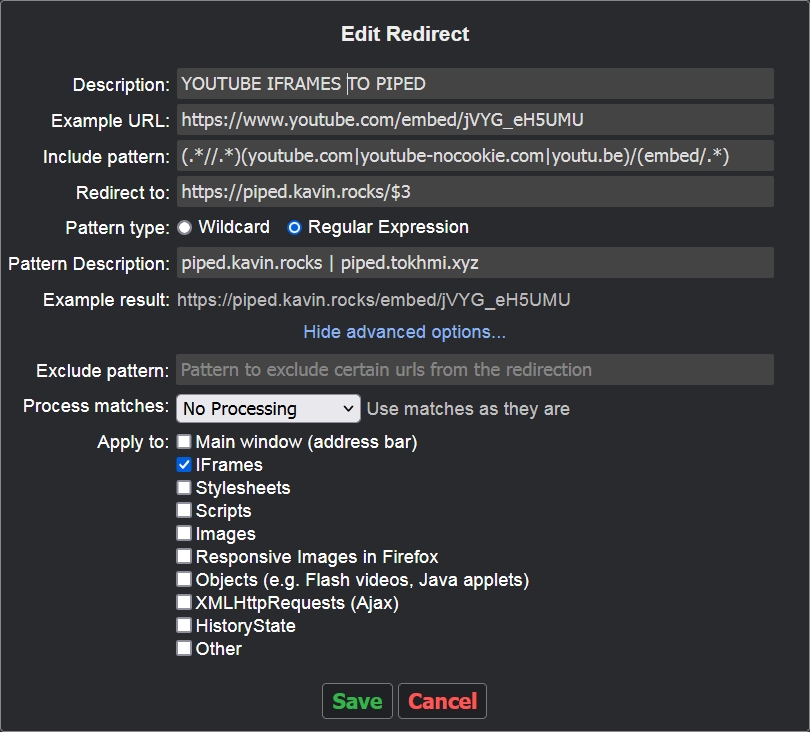
For the time being I'll avoid redirecting embedded YouTube videos. I'm not too fond of approximations.
But even with Privacy Redirect and LibRedirect extensions (replacing an Invidious instance with piped.kavin.rocks) some connections to YouTube images are still established (i.e. i.ytimg.com in the case of https://wn.com/#/live) ...
This is a valid argument.
ome connections to YouTube images are still established (i.e. i.ytimg.com in the case of https://wn.com/#/live)
I didn't know that this url exists too, added it to the targets list: https://github.com/libredirect/libredirect/commit/23be155b204ae2806e5ff276a3c27b67f50748bc

Also, added a hard cancel to requests that can't be handled by either invidious or piped
Also, added a hard cancel to requests that can't be handled by either invidious or piped
@ManeraKai You made the code to Block Google Connections - Am I getting it right ?
I made it block the every domain that matches the list. In youtube's case it is: https://github.com/libredirect/libredirect/blob/master/src/assets/javascripts/helpers/youtube/youtube.js#L7-L19 All this if the redirection was enabled.
Redirecting embedded videos with no connection to the video issuer, especially YouTube ones, is obviously an extremely tough challenge if aiming 100% reliability. Simple embedded links are easy, others are extremely complicated, i.e. those of france24.com which not only access YouTube images servers but youtube.com itself EVEN if the redirect is functional. As I see it (or wish it) a true redirection means that the redirection should work even if the redirected source is blocked at the OS level (not within the browser because the redirector code needs the called source data) ... and this is extremely hard to achieve, not sure (but I'm a neophyte) it is even possible.
I'll consider that tools (Piped, Invidious, LibRedirct) which redirect YouTube links (live ones included) and channels correctly are by themselves most worthy. Of course, if the aim of redirecting is not only for page rendering speed, not only for the fact that such redirections avoid privacy+1 data to be sent to YT, but as well avoiding any contact (cyber, not social!) with Big YT, then we're dealing with dreams, I guess.
Redirecting embedded videos with no connection to the video issuer, especially YouTube ones, is obviously an extremely tough challenge if aiming 100% reliability. Simple embedded links are easy, others are extremely complicated, i.e. those of
france24.comwhich not only access YouTube images servers butyoutube.comitself EVEN if the redirect is functional. As I see it (or wish it) a true redirection means that the redirection should work even if the redirected source is blocked at the OS level (not within the browser because the redirector code needs the called source data) ... and this is extremely hard to achieve, not sure (but I'm a neophyte) it is even possible.I'll consider that tools (Piped, Invidious, LibRedirct) which redirect YouTube links (live ones included) and channels correctly are by themselves most worthy. Of course, if the aim of redirecting is not only for page rendering speed, not only for the fact that such redirections avoid privacy+1 data to be sent to YT, but as well avoiding any contact (cyber, not social!) with Big YT, then we're dealing with dreams, I guess.
As far as I tested, there are no youtube connections being sent if using the redirected extensions, as they are blocked right after fired from the browser. All the websites could know is that the connections they sent (for embedding) can't reach YouTube. Blocking at OS level doesn't mean much since browsers' extensions are the first things that see the connections fired by the websites before allowing/blocking/defusing them. OS could only see connections after extensions.

The 100% reliability I mentioned concerns few sites in my experience and within embedded YouTube videos only.
I've just tested again with latest LibRedirect 1.3.3 (but it confirms all versions of LibRedirect, Privacy Redirect, as well as redirect with the Redirector extension) on two sites with embedded YouTube videos : france24.com and euronews.com.
I use an extension called SixIndicator which displays the established connections for the actual displayed page. We have set LibRedirect to redirect YouTube to Piped (piped.kavin.rocks). In the two following screenshots you can see that YouTube.com is accessed at least with France24.com and Euronews.com pages including embedded YouTube videos.
Again, this discriminates in no way LibRedirect or Privacy Redirect, it only notes that redirecting embedded YouTube videos is maybe 100% reliable in the redirection itself but not in the fact that these redirections bypass all connections to YouTube servers from the user's device.
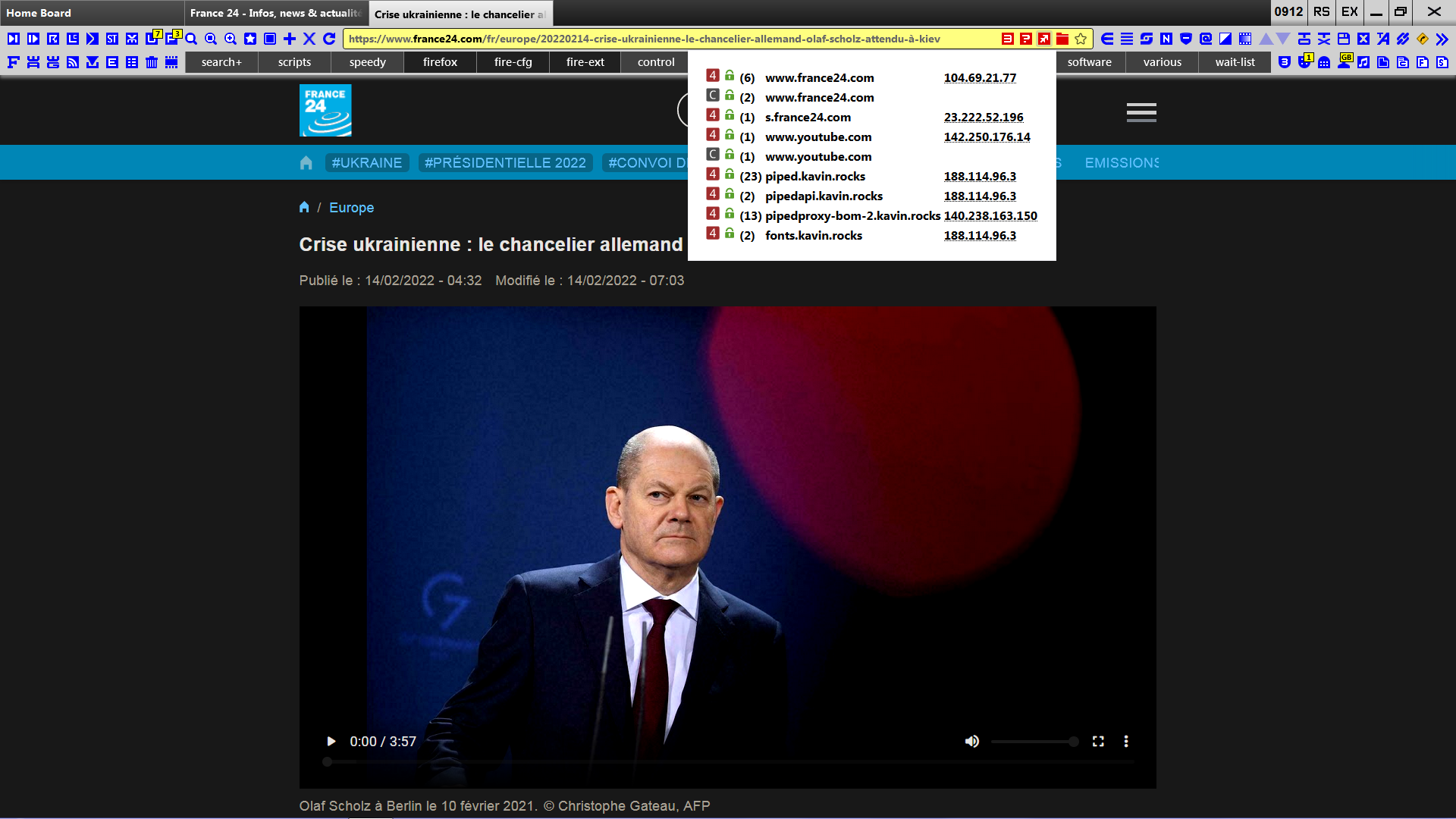
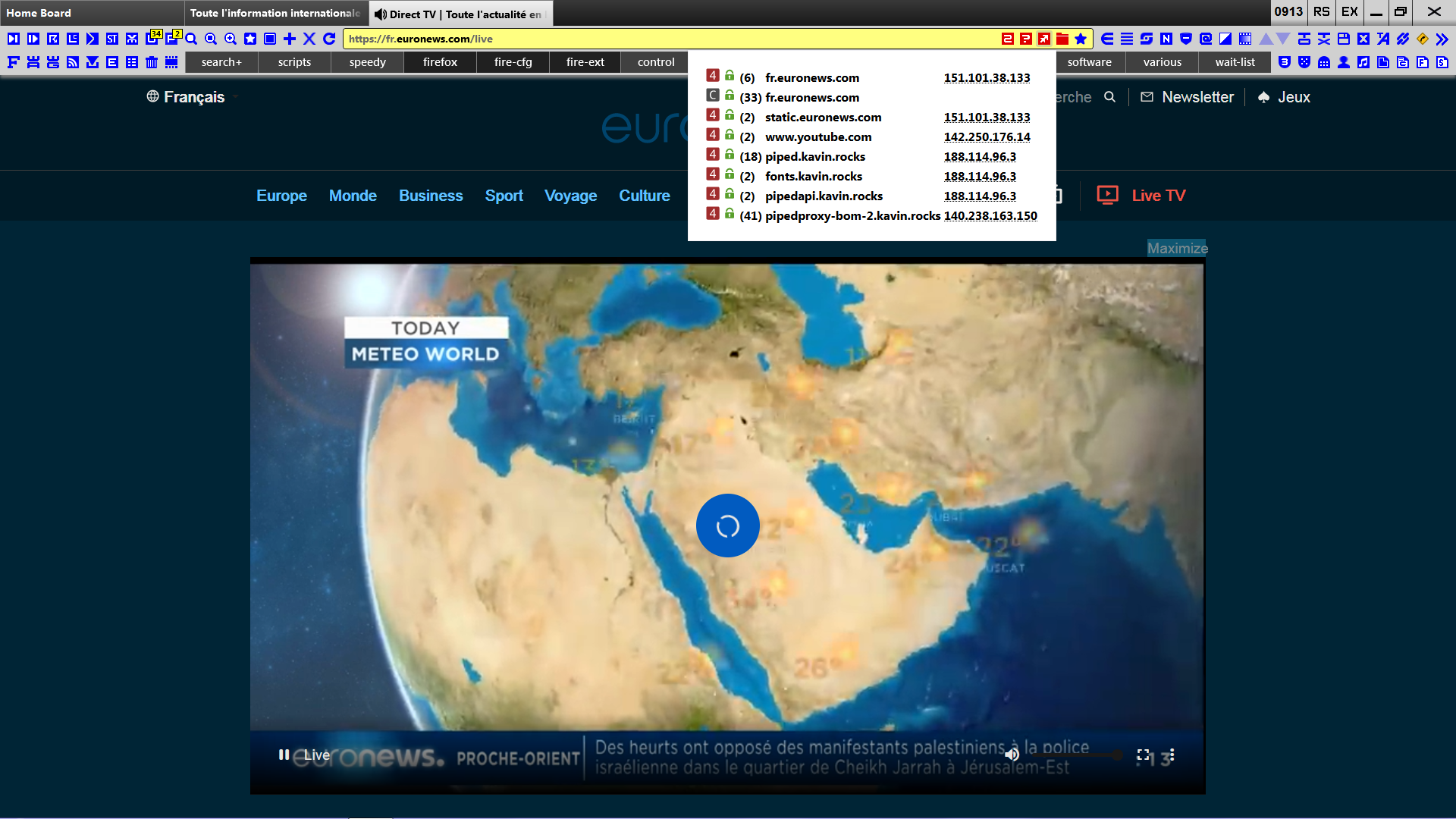
I see, I think you should provide exact URL and steps to reproduce so extensions' maintainers can address this issue.
From this URL, I guess it's because of the tag preconnect in view-source:
https://www.france24.com/en/europe/20220214-us-reaffirms-warning-russia-could-invade-ukraine-as-scholz-heads-to-kyiv
<link rel="preconnect" href="https://www.youtube.com/iframe_api" as="script"/>
To address this, I think it's related to webRequest.filterResponseData() API but only Firefox supports it now
Use this function to create a webRequest.StreamFilter object for a request. The stream filter gives the web extension full control over the stream, with the ability to monitor and modify the response. It's the extension's responsibility to write and close or disconnect the stream, as the default behavior is to keep the request open without a response.
Similar to how ublock is dealing with by HTML Filtering. Related ublock's issue: https://github.com/uBlockOrigin/uBlock-issues/issues/548.
Chromium still has problems of preventing the preconnections here, while Firefox is more reliable. https://github.com/gorhill/uBlock/issues/3219 https://bugs.chromium.org/p/chromium/issues/detail?id=785125
I'm not sure if it can be addressed by Libredirect, but sorry for tagging you @ManeraKai . I'll leave the references here in case you want to take a look.
I see, I think you should provide exact URL and steps to reproduce so extensions' maintainers can address this issue
The urls are visible on the screenshots, but to be explicit :
https://www.france24.com/fr/europe/20220214-crise-ukrainienne-le-chancelier-allemand-olaf-scholz-attendu-à-kiev
https://fr.euronews.com/live
In fact, all YouTube embedded videos (live or not) on both https://www.france24.com/ and https://fr.euronews.com/
To reproduce : redirect YouTube embedded videos with either LibRedirect, Privacy Redirect or Redirector (with a valid pattern of course) open above-mentioned links
Many thanks for your analysis; though i'm far from being a techie I'd be willing to understand the webRequest.filterResponseData() API culprit.
I'm not sure if it can be addressed by Libredirect
I'm not sure any redirect code can handle this. That's what I had in mind when I wrote above (sorry for quoting myself) :
Of course, if the aim of redirecting is not only for page rendering speed, not only for the fact that such redirections avoid privacy+1 data to be sent to YT, but as well avoiding any contact (cyber, not social!) with Big YT, then we're dealing with dreams, I guess.
This is why as much I appreciate redirecting non-embedded videos, as much I remain doubtful about the pertinence of redirecting embedded videos.
For helping projects' maintainers, I think it's always better to give exact URL besides screenshots or instead of mentioning it unclearly since it might give more burdens to the volunteers.
Actually redirectors can stop connections or modify the embedded links, but it would require more efforts into manipulating the sites' view-source and might go beyond maintainers' purposes.
I don't quite really get your definitions of embedded and non-embedded videos. Do you mean non-embedded is when we open the main page of www.youtube.com? I think redirectors address 2 types:
main frameas when we open the websites as first party URL (for example main site ofwww.youtube.com)sub frameas when websites embed theiframeof 3rd-party links (for examplewww.youtube.comframe infrance24.comsite).
By non-embeded videos I mean the reverse of what is considered by LibRedirect and Privacy Redirect extensions with the option Redirect only embedded videos., that is any url related to Youtube that is not IFramed being sent to an Invidious or a Piped instance. The logic in my case is that of the Redirector extension redirect pattern I currently use :
Include pattern: (.*//.*)(youtube.com|youtube-nocookie.com|youtu.be)/(.*)
Redirect to: https://piped.kavin.rocks/$3
Pattern type: Regular Expression
Apply to: Main window (address bar) [ONLY, not to IFrames]
In fact any YouTube url appearing in the address bar (before any connection to YouTube in the same way LibRedirect and Privacy Redirector perform it)
So I think what you mean is the main frame or when www.youtube.com is the 1st-party URL (when we open directly in the main site). Yeah I think it's a good suggestions since more options is always better. I used to modify the code to stop it working with embeds (or iframes) since it's hard to see the videos' titles.
I agree reproducibility must be clearly explained.
I agree that embedded, hence non-embedded is ambiguous (for instance https://www.youtube.com/embed/[VIDEOID] is not embedded in my conception.
I should rather use the term IFramed/non-IFramed. In fact I reproduced the wording included in LibRedirect's Option which is Redirect only embedded videos.
So I think what you mean is the main frame or when www.youtube.com is the 1st-party URL (when we open directly in the main site).
Correct! I'm no techie and one of the consequences is that terminology, which is essential to explain and be understood, often lacks!
Actually all youtube video on other sites use the same https://www.youtube.com/embed/[VIDEOID] link. The difference is just how each site embeds them:
- If they just embed like
<iframe src="https://www.youtube.com/embed/UTv7l6czu5s?wmode=opaque" width="560" height="315" frameborder="0" allowfullscreen="true"></iframe>
then no youtube connections will be fired from the website.
- However, if they use YouTube Player API to deliver the videos (similar to the case of
france24.com), it would requirehttps://www.youtube.com/iframe_apiconnection to be made to load the links in the form
https://www.youtube.com/embed/M7lc1UVf-VE?enablejsapi=1
and I'm not sure if it's some bugs or not that the above URL can't be blocked yet. Maybe this regex has some problems?
/https?:\/\/(www\.|)(youtube|youtube-nocookie)\.com\/embed\/..*/
That's all I can see right now.
Got it. I considered https://www.youtube.com/embed/[VIDEOID] as non-embedded because assuming this format sent to the main frame when in fact can be included in an IFrame and actually is, at least most of the tiime.
https://www.youtube.com/embed/M7lc1UVf-VE?enablejsapi=1 redirected to YouTube with my (.*//.*)(youtube.com|youtube-nocookie.com|youtu.be|youtube.nored)/(.*) Redirector pattern keeps the ?enablejsapi=1 of course.
Redirected to piped.kavin.rocks works, no page rendering difference with or without ?enablejsapi=1
Redirected to yewtu.be (Invidious instance) works as well except that ?enablejsapi=1 is removed by yewtu.be
Your /https?:\/\/(www\.|)(youtube|youtube-nocookie)\.com\/embed\/..*/ pattern doesn't include the essential watch ...
This can become complicated. Exceptions bother principles, as always ... and fortunately, because life is diversity and its surprises.
However, if they use YouTube Player API to deliver the videos (similar to the case of france24.com), it would require https://www.youtube.com/iframe_api connection to be made to load the links in the form
Seems this is the major point. Not all IFramed videos use it which is why, I assume, redirecting IFramed videos is sometimes flawless, quick and 100% private. Looks like this API is the next challenge for redirectors, should it be feasible.
Your
/https?:\/\/(www\.|)(youtube|youtube-nocookie)\.com\/embed\/..*/pattern doesn't include the essential watch
Actually that's from Libredirect code: https://github.com/libredirect/libredirect/blob/7b54087a638161a702c818d5aecb59d91a0a25f1/src/assets/javascripts/helpers/youtube/youtube.js#L17.
But that's not very important issue right now. As far as I can see, the link https://www.youtube.com/iframe_api is just a script:
var scriptUrl = 'https:\/\/www.youtube.com\/s\/player\/96dcbc8c\/www-widgetapi.vflset\/www-widgetapi.js';try{var ttPolicy=window.trustedTypes.createPolicy("youtube-widget-api",{createScriptURL:function(x){return x}});scriptUrl=ttPolicy.createScriptURL(scriptUrl)}catch(e){}if(!window["YT"])var YT={loading:0,loaded:0};if(!window["YTConfig"])var YTConfig={"host":"https://www.youtube.com"};
if(!YT.loading){YT.loading=1;(function(){var l=[];YT.ready=function(f){if(YT.loaded)f();else l.push(f)};window.onYTReady=function(){YT.loaded=1;for(var i=0;i<l.length;i++)try{l[i]()}catch(e$0){}};YT.setConfig=function(c){for(var k in c)if(c.hasOwnProperty(k))YTConfig[k]=c[k]};var a=document.createElement("script");a.type="text/javascript";a.id="www-widgetapi-script";a.src=scriptUrl;a.async=true;var c=document.currentScript;if(c){var n=c.nonce||c.getAttribute("nonce");if(n)a.setAttribute("nonce",n)}var b=
document.getElementsByTagName("script")[0];b.parentNode.insertBefore(a,b)})()};
which calls this widgetapi script URL:
https://www.youtube.com/s/player/96dcbc8c/www-widgetapi.vflset/www-widgetapi.js
Looks like the scripts are the same among sites/IDs, so I think they can be redirected to neutral sources. I'm not 100% sure, and I have to check it more carefully again.
This is really weird. As of what I understood, you really should let the code run (Youtube Player API) before you can know which embed url it wants if you didn't want to tweak the JavaScript code.