TeamAmaze
Show storage space in navigation drawer
Since I have a local Nextcloud Server, I would like to see WebDAV support added. Since there's already SMB/and FTP/SFTP support, it would be nice to see support added for another popular NAS type.
Currently users could use the NextCloud app, but it's really not tightly integrated with the default Android File Manager.
Also I happen to notice there is an add-on for proprietary external cloud services, but it's paid only and only on Google Play. What if some user has a device without Google Play Services and no desire to give Google 30% of your payment, or the user is poor and can't afford to buy it? What are they supposed to do? My suggestion would be to implement this functionality free in the FDroid/IzzyOnDroid versions (keep it paid on Google Play), and maybe add a link to donate (like LiberaPay) so we can still support the project.
Third suggestion: It would be nice if the storage space was more upfront, like in Material Files (see screenshot) where users can just glance and see how much space if left without pressing buttons.
I bring this up since I'm currently working on a custom ROM and I've been trying out some FOSS file managers, and I am thinking of including Amaze as the default file manager, however it is lacking some features like I just mentioned.

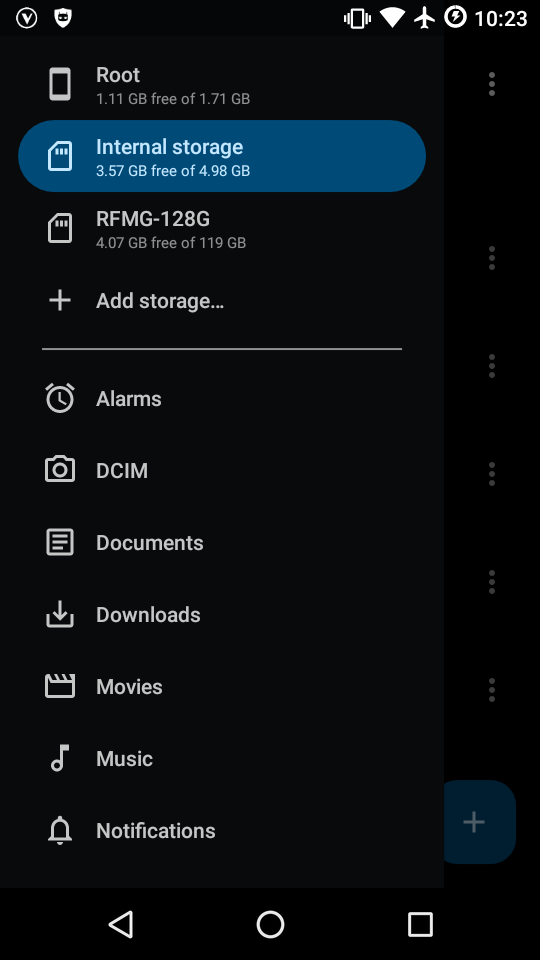

Dupe #376, i'm modifying this to make UI changes to include storage size in navigation drawer.