

 TIBCOSoftware
How to write only special characters like carriage return and / or newline within flogo - web ui?
Current behavior (how does the issue manifest): I want to write only carriage return line feed characters (or even only line feed) in a log message (or even to a file using the write file extension taken from Show cases). I tried with "\r\n" or "\n" but flogo (webui 0.5.6 version) removes those characters, same stuff with "\u000D\u000A". If instead I try with "Test\n" or "\nTest\n" then it works perfectly. Also the json of the application exported does not contain the message field.
More, if I use the concat functions like string.concat("\n","Test") or string.concat("\nTest","\n") the message printed is "\nTest" or "\nTest\n" so the special characters are treated as normal characters.
Expected behavior:
Simple content of the log message should print carriage return line feed as special character. For the string.concat the string printed should treat special characters correctly.
Minimal steps to reproduce the problem (not required if feature enhancement):
Create a simple flogo flow with Timer as trigger and a Log Message activity. Then insert into message field of Log Message activity the following values (one for each test): "Test\n" --> works perfectly "\nTest\n" --> works perfectly "\r\n" --> characters skipped - wrong! "\n" --> characters skipped - wrong! string.concat("\n","Test") --> print \nTest - wrong! string.concat("\nTest","\n") --> print \nTest\n - wrong!
Please tell us about your environment (Operating system, docker version, browser & web ui version, etc):
Macbook Pro Docker version Version 18.06.1-ce-mac73 (26764) Browser Google Chrome Version 70.0.3538.77 (Official Build) (64-bit) Flogo Web UI 0.5.6
Flogo version (CLI & contrib/lib. If unknown, leave empty or state unknown): 0.X.X
Additional information you deem important (e.g. issue happens only occasionally):

Thanks for the issue report, I can confirm these are bugs and unfortunately there's no workaround in the current release of the Web UI. The only alternative is to export the flogo.json and modify it manually.
There are two issues here:
- Some strings are considered empty and are not being exported (Like
"\n"or"\r\n"). This is a bug in the Web UI, we will fix it. - Handling of escape sequences in expressions (
string.concat("\n", "\r")): I feel this needs to be resolved in lib or contrib to handle the escape sequences as part of the string.
This mapping:
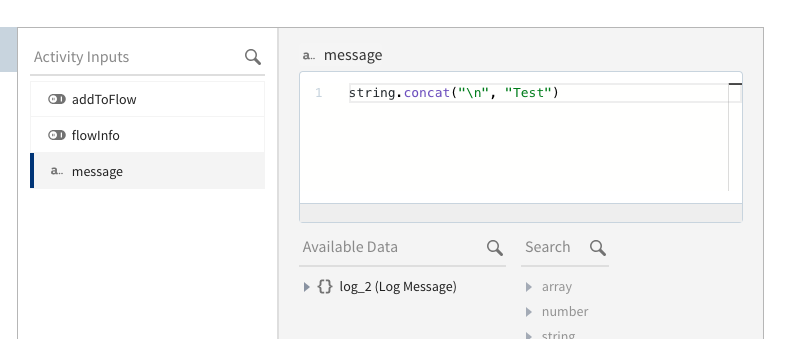
Is serialized as:
{
  ...,
  "mappings": {
    "input": [
      {
        "type": "expression",
        "value": "string.concat(\"\\n\",\"Test\")",
        "mapTo": "message"
      }
    ]
  }
}
Note the backslash is escaped, this is because the UI considers the expression as source code that is yet to be evaluated but it seems that when the mapping is applied the escape characters are treated differently.
Without the backslash escape ("string.concat(\"\n\",\"Test\")") the UI will consider the line break as part of the source code not as a sequence of characters in the inner string:
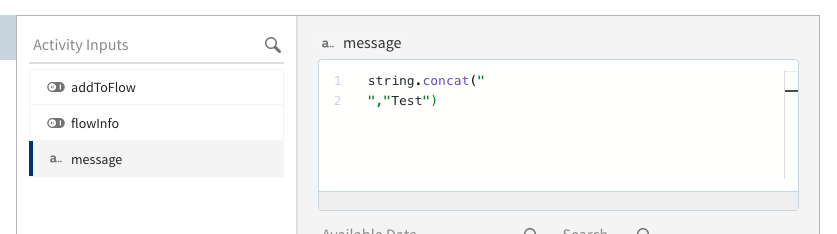

There are two issues here:
- Some strings are considered empty and are not being exported (Like "\n" or "\r\n"). This is a bug in the Web UI, we will fix it.
- Handling of escape sequences in expressions (string.concat("\n", "\r")): I feel this needs to be resolved in lib or contrib to handle the escape sequences as part of the string.
Problem 1 is fixed in the v0.5.7 release of the UI.
Problem number 2 still needs to be evaluated from the expression mapper side @lixingwang @fm-tibco