TESTARtool
[Webdriver] Doesn't ignore elements when they are clobbered with a higher level z-index overlay
The issue
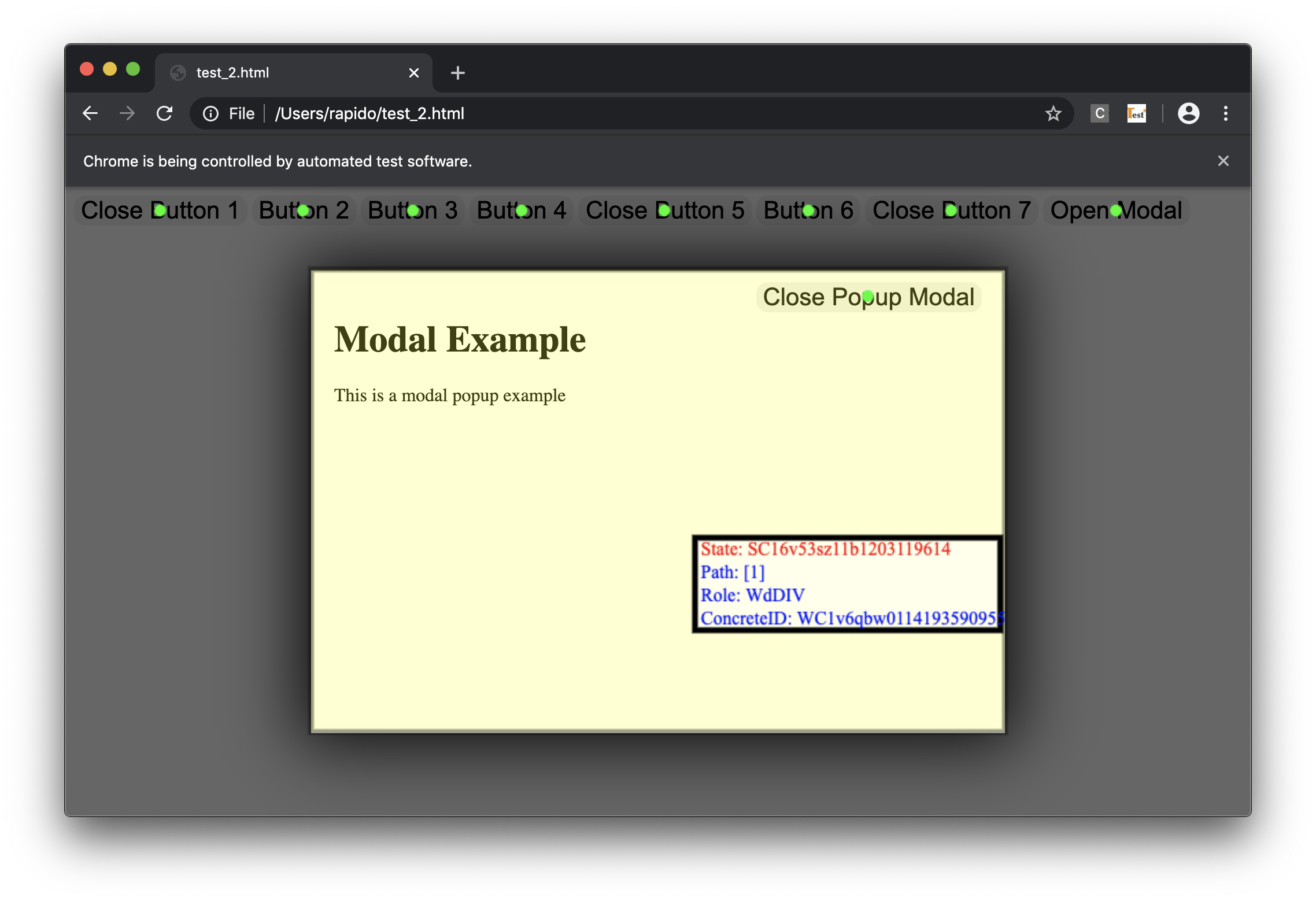
It appears that the TESTAR Webdriver doesn't ignore interactive elements when they are clobbered by other divs with higher z-index. The HTML section below shows the issue. TESTAR tries to interact with the clobbered buttons, but it cannot (as they are effectively disabled).
Why it is important
Modern web sites are using div overlays to emulate modal 'popups'.
Environment
- protocol: webdriver_generic
- SUT connector: WEB_DRIVER
Platform Environment 1
- Latest VM build
- ChromeDriver 83.0.4103.39 in C:\Windows\chromedriver.exe
- below HTML file in C:/testar/issues/overlay_issue.html
Platform Environment 2
- Mac OSX 10.14.6
- Latest TESTAR master 2.2.7 binaries
- Chrome 84.0.4147.38
- ChromeDriver 84.0.4147.30
- below HTML file in $HOME/tmp/overlay_issue.html
HTML
See overlay_issue.zip.
<!DOCTYPE html>
<html lang='en' class=''>
 <head>
 <meta charset='UTF-8'>
 <style class="mystyle">
   .modal {
    display: block;
    width: 600px;
    max-width: 100%;
    height: 400px;
    max-height: 100%;
    position: fixed;
    z-index: 100;
    left: 50%;
    top: 50%;
    transform: translate(-50%, -50%);
    background: white;
    box-shadow: 0 0 60px 10px rgba(0, 0, 0, 0.9);
   }

   .closed {
    display: none;
   }

   .modal-overlay {
    position: fixed;
    top: 0;
    left: 0;
    width: 100%;
    height: 100%;
    z-index: 50;
    background: rgba(0, 0, 0, 0.6);
   }

   .modal-guts {
    position: absolute;
    top: 0;
    left: 0;
    width: 100%;
    height: 100%;
    overflow: auto;
    padding: 20px 50px 20px 20px;
   }

   .modal .close-button {
    position: absolute;
    z-index: 1;
    top: 10px;
    right: 20px;
    border: 0;
    border-radius: 10px;
    font-size: 21px;
   }

   .a-button {
    border: 0;
    border-radius: 10px;
    font-size: 21px;
   }
  </style>
 </head>
 <body>
  <div class="modal-overlay" id="modal-overlay"></div>
  <div class="modal" id="modal">
   <button class="close-button" id="close-button">Close Popup Modal</button>
   <div class="modal-guts">
    <h1>Modal Example</h1>
    <p>This is a modal popup example </p>
   </div>
  </div>
  <button id="other-button1" class="a-button" onclick="this.style.display='none'">Close Button 1</button>
  <button id="other-button2" class="a-button">Button 2</button>
  <button id="other-button3" class="a-button" onclick="this.style.display='none'">Button 3</button>
  <button id="other-button4" class="a-button">Button 4</button>
  <button id="other-button5" class="a-button" onclick="this.style.display='none'">Close Button 5</button>
  <button id="other-button6" class="a-button">Button 6</button>
  <button id="other-button7" class="a-button" onclick="this.style.display='none'">Close Button 7</button>
  <button id="open-button" class="a-button">Open Modal</button>
  <script id="modal_code">
   var modal = document.querySelector("#modal");
   var modalOverlay = document.querySelector("#modal-overlay");
   var closeButton = document.querySelector("#close-button");
   var openButton = document.querySelector("#open-button");

   closeButton.addEventListener("click", function () { toggle(); });
   openButton.addEventListener("click", function () { toggle(); });

   function toggle() {
    modal.classList.toggle("closed");
    modalOverlay.classList.toggle("closed");
   }
  </script>
 </body>
</html>
Screenshot
Here is a screenshot of TESTAR in SPY mode, detecting the clobbered buttons while they should be ignored.

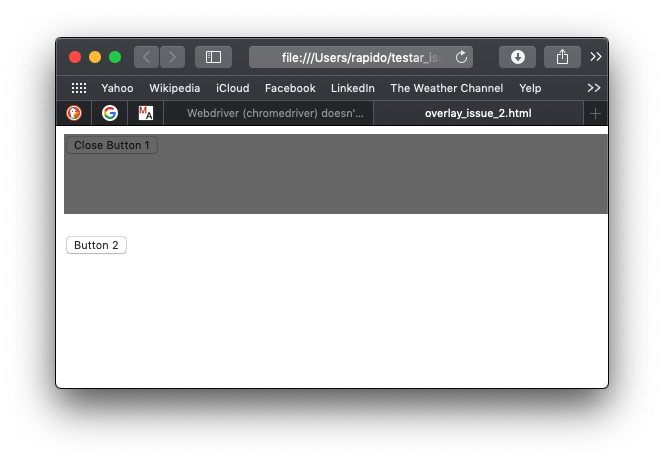
I think checking whether an element is blocked/clobbered by an overlay is a dynamic property of (relative)size and width. The current commit does not take that into account. See the attached HTML and screenshot example: "Button 2" is clickable, as the overlay is not covering it (due its height).
<!DOCTYPE html>
<html lang='en' class=''>
	<head>
	<meta charset='UTF-8'>
	<style class="mystyle">
		.modal-overlay {
			display: block;
			position: fixed;
			width: 100%;
			height: 80px;
			background: rgba(0, 0, 0, 0.6);
			z-index: 1;
		}
	</style>
	</head>
	<body>
		<div class="modal-overlay" id="modal-overlay"></div>
		<div style="height:100px">
			<button id="other-button1" onclick="this.style.display='none'">Close Button 1</button>
		</div>
		<div>
			<button id="other-button2">Button 2</button>
		</div>
		</div>
	</body>
</html>