

 TEAMMATES
Submitting responses: some users are not sure if the submission went through
v8.17
Context: After a user submits responses to a session, we show a success message (with an option to download a proof-of-submission) file. Despite this, based on user queries received, some are still not sure if their submission went through 'properly'. It seems their doubt is because the page stays in edit mode, exactly the same way it was before they clicked the submit button.

The reason we stay in the same page in edit mode is because it makes further edits to the submission easier.
Is there anything we can tweak the UX to eliminate this doubt, without losing the ease of further edits? Ideas welcome.


@damithc Would having an alert for each of the question be helpful?
Thanks for looking into this @thikhinab Not sure if this solution will work though. It's the 'page stays in edit mode' that seems to confuse some users. They expect to navigate to a different page upon successful submission.
@damithc we need to play devil's advocate here. We can't please every single user. Do we want to prioritize "easier edit after submission" or "go to other page but (hopefully) success is more guaranteed"? They're straight out conflicting requirements.

@damithc we need to play devil's advocate here. We can't please every single user. Do we want to prioritize "easier edit after submission" or "go to other page but (hopefully) success is more guaranteed"? They're straight out conflicting requirements.
As of now, we have prioritized ease of editing, which is probably the right thing. So, I'm fine to keep the status quo. But if we can achieve both goals, that would be a bonus. For example, something along this line: Rather than actually navigating to another page, we simply hide the form and replace it with a All done! message together with another link/button Edit answers further. If the user clicks the button, we hide the message and make the form visible again. To the user it looks like we navigated to a new page, but we are actually in the same page. I'm not sure that kind of client-side acrobatics is feasible and worth the added complexity though. To be weighed against the benefit of avoiding redundant repeated submission attempts (to ensure it went through) and avoiding related support requests.
@damithc
Should I try to make the frontend changes and see how it goes?
After the PR is up, we can discuss if we want to merge it.

Should I try to make the frontend changes and see how it goes?
After the PR is up, we can discuss if we want to merge it.
@sivayogasubramanian sure, feel free to give it a try.
Hello, may I ask if anyone is attempting to make the frontend changes? If not, I could possibly try it!
Also, in my opinion, I think it's a good improvement to the UX! To have a sense of security that my input has been saved.
May I clarify if the banner/alert is present the entire time for each question, till the user submits his/her input?
And if I am trying this out, do we implement prof's suggestions (the opening context and long comment)?

@sivayogasubramanian Alright, thanks Siva!
Also, updated my reply to clarify on some things. If you could please have a look! 🙇🏻
@damithc @domlimm I think the proposed solution by @thikhinab is good in my opinion. We can have two types of messages, "Awaiting your response" and "You previously submitted a response. You can submit again if you wish", or something along those lines.
This keeps the webpage in edit mode and allows the user to see some visual confirmation of the submission status if they are unsure.
we simply hide the form and replace it with an "All done!" message together with another link/button Edit answers further.
The alternative that is mentioned here is very disruptive for the user.
@sivayogasubramanian I agree with you on @thikhinab's proposed solution. Think it's the cleaner approach for now. I guess we could see how it goes! For a start, i'll attempt with the former one.
For a start, i'll attempt with the former one.
Let's wait for Prof's input as the alternative was suggested by him.
We already show this to the user
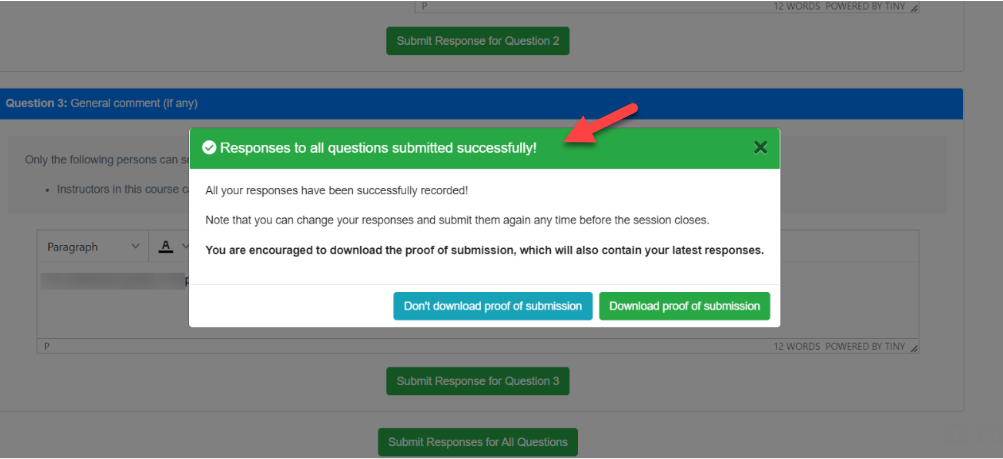
Showing similar messages in each question might help a bit (while adding more verbosity) but the issue here is that the form stays in edit mode which is different from the normal form submission behavior. So, as long as the we retain that behavior, some users will be confused about it.
Nevertheless, we can try this approach but perhaps in a more subtle way e.g., use green color for questions already saved. What do you think?

we simply hide the form and replace it with an "All done!" message together with another link/button Edit answers further.
The alternative that is mentioned here is very disruptive for the user.
yes, this won't work when saving one question at a time. I was thinking of the full form submission here.
@damithc works for me prof! Agree on a subtle indication to the user that a question's already saved. In my opinion, this is a great way of showing!
As for this below, maybe could see if we need it.
yes, this won't work when saving one question at a time. I was thinking of the full form submission here.
Will add your suggestion probably tomorrow 👍🏻 and ping back here when it's done.
Thank you both, prof and Siva! 🙂
EDIT (1am, 16/8): Will begin working on it today in the evening.
Hello prof, may I ask if the green background for the header & tick for each question will persistent (i.e. If user comes back another time to edit his/her submission, it will be green) OR it's only temporarily shown (i.e. Once the page refreshes, it's back to blue and the tick is not shown)?
Thank you!
Hello prof, may I ask if the green background for the header & tick for each question will persistent (i.e. If user comes back another time to edit his/her submission, it will be green) OR it's only temporarily shown (i.e. Once the page refreshes, it's back to blue and the tick is not shown)?
I think it should be persistent. Other suggestions welcome.
I think it should be persistent. Other suggestions welcome.
Same.
Hello, sorry this took awhile.
I would like to confirm on the behaviour regarding the persistency for the proposed suggestion on adding a Success header and a tick when a user submits his/her response for a question.
E.g., There are 3 questions. The user submits responses for Q1 and Q2 but leaves Q3 unsubmitted.
When user returns, Q1 and Q2 should have a Success header and a tick indicating that these questions' responses have been saved and submitted? This would mean creating another field to save into the database i.e., Adding an isSaved attribute to each questionSubmissionFormModel: QuestionSubmissionFormModel, more info on the line of code here, as we need to persist the state.
Thanks prof and Siva!
@domlimm persistent doesn't mean saving it as a separate field in the database. The front end should be able to determine which answers were loaded from the database (and hence, already 'saved'). e.g.,
- Not answered, or edited since the last save: blue
- Loaded the saved answer, or saved after the last edit: green
What do you think?
@damithc Ah! I see prof. Yes this clarifies, thank you so much! Will get it out by this weekend. 👍🏻