

 TASEmulators
System.IndexOutOfRangeException at BSNESv115 graphics debugger
This issue can be reproduced with World Class Service Super Nintendo Tester after reaching "Look for many Service Marios" screen in Character test. Opening the graphics debugger at that point might sometimes cause System.IndexOutOfRangeException when the output screen cuts to black. Visual Studio Breakpoints say that this is located at line 338 in BizHawk.Emulation.Cores.Nintendo.SNES.SNESGraphicsDecoder, which is just at the very end of RenderMode7TilesToScreen.

Do you mean here? https://github.com/TASEmulators/BizHawk/blob/9fa38b8d78aef698f29b09bda77889fc1f21a9b2/src/BizHawk.Emulation.Cores/Consoles/Nintendo/BSNES/SNESGraphicsDecoder.cs#L337-L338 If you could copy the stacktrace, that might be more helpful than a line number.

Yes. The stacktrace is not printed when debugging with Visual Studio, sorry. I have no idea what prevents stacktrace from printing.
Stacktrace I got:
System.IndexOutOfRangeException: Der Index war außerhalb des Arraybereichs.
   bei BizHawk.Emulation.Cores.Nintendo.BSNES.SNESGraphicsDecoder.RenderMode7TilesToScreen(Int32* screen, Int32 stride, Boolean ext, Boolean directColor, Int32 tilesWide, Int32 startTile, Int32 numTiles) in D:\GitHub\BizHawk\src\BizHawk.Emulation.Cores\Consoles\Nintendo\BSNES\SNESGraphicsDecoder.cs:Zeile 330.
   bei BizHawk.Client.EmuHawk.SNESGraphicsDebugger.RenderTileView()
   bei BizHawk.Client.EmuHawk.SNESGraphicsDebugger.InternalUpdateValues()
   bei BizHawk.Client.EmuHawk.SNESGraphicsDebugger.UpdateAfter()
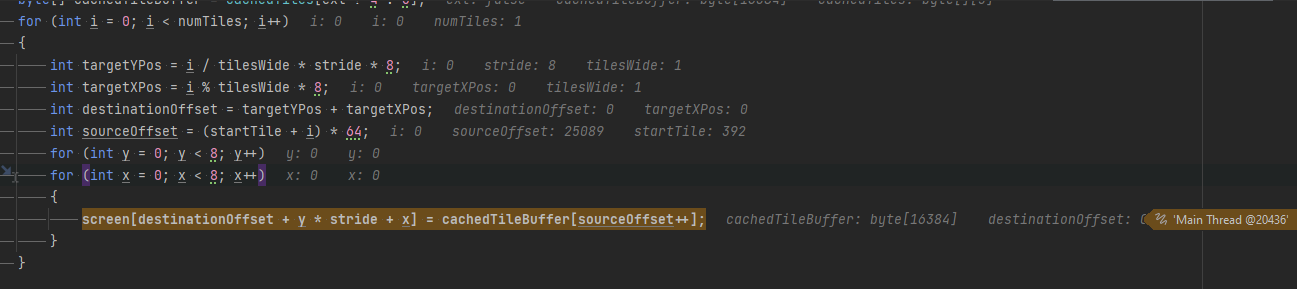 Can't investigate right now, but here it is for now.

Okay so this happens when the game is running and the mouse has hovered a tile in the graphics debugger's tileview that is sufficiently low on the screen (to actually cause the IndexOutOfRangeException). The thing going wrong in this scenario is the currMapEntryState because that is only updated on MouseMove, but when a new frame comes in that changes the TileEntry map, the currMapEntryState isn't updated immediately and can cause this incorrect behavior.
The way to fix this would probably be to update the TileEntry map on every frame update by calling the MouseMove function (or extract its functionality and call that).