

 TASEmulators
N64 Star Wars Episode I: Racer causes major breakdown of Sync behavior (AVI Dumping)
Summary
Star Wars Episode I: Racer represents a pathologically bad case for both AVI dump syncing methods. Dumping the game using clock sync causes the video to be correct, but the audio to be unsalvageable. Dumping using Alternate sync results in audio that is almost correct and salvageable, but results in poor quality video that is also "incorrect". The nature of the video being incorrect is complex and described below.
I am aware that the mupen64+ core has numerous issues especially regarding video dumping, and I am aware that everyone else is aware that it has many issues regarding video dumping. This issue's purpose is not to point this out or complain but to provide an example and data for a very specifically bad case for the core so that if work is to be done on it at some point this issue may be able to provide test data.
How Clock Sync Fails
The game's video output is correct, but the audio is extremely choppy and painful to listen to:
https://user-images.githubusercontent.com/1929934/106404266-26886400-63e7-11eb-83b2-b5e0f6e1532a.mp4
This appears to be because of known issue with the way mupen64+ deals with audio - namely, it doesn't output a sane amount of audio samples every frame to match up with the frame data being output. This can be visualized in this image:
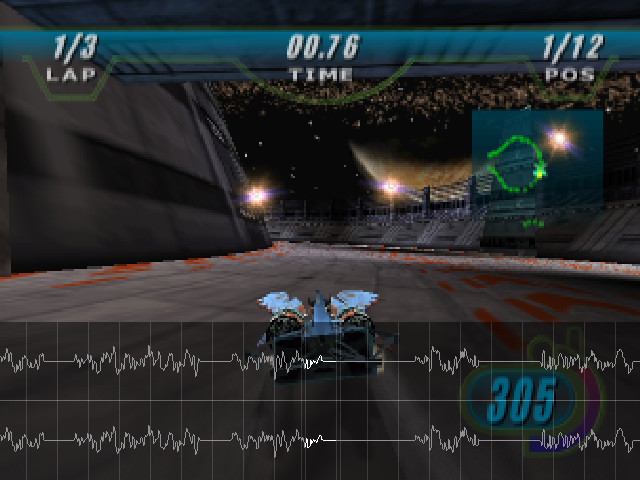 You can see that audio samples show up in "clumps" but then just disappear for several frames before showing up again, resulting in choppy audio. I don't know enough about mupen64+'s audio problems to speculate on why the audio track ends up like this.
How Alt Sync Fails
This is the interesting (read: extremely bad) case. With alt sync, both the video and audio output are incorrect in non-trivial ways. The output video's framerate is reduced due to duplication and dropping of frames, but a much more serious problem is that the actual duration of events in the video is changed. That is to say, certain screens, loading points, and other game elements are actually dumped with a different duration than they are supposed to have.
Reduced Framerate
When the log window for BizHawk is visible during video dumping with alt sync enabled, a continuous stream of "duped frame" and "dropped frame" messages appear. The duping/dropping is constant and frequent. The result of this obvious when watching a comparison of a clock synced and alt synced video capture:
https://user-images.githubusercontent.com/1929934/106403331-e921d780-63e2-11eb-85a5-973e216fdf8b.mp4
You can see visually that the clock synced video is much smoother than the alt synced video. This is because all of the frames in the source material are present in the clock synced video, while many are missing from the alt synced video. An actual analysis of the two videos that doesn't require human eyeballs to detect a difference is presented here:
https://user-images.githubusercontent.com/1929934/106403410-6f3e1e00-63e3-11eb-9b0b-235d44da6a80.mp4
This analysis was created using trdrop. The left video (blue) is clock sync. The middle video (white) is alt sync. The right video (pink) is a screen capture of the emulator using audio throttle. You can see via the graphs that the alt sync video has unstable frametimes and consistently lower FPS due to the duped/dropped frames. The audio throttle video was included as a curiosity: the audio throttle setting in the emulator produces video and audio (not dumped) that does not match up with alt sync. Audio throttle causes video that is smooth, and audio that is not choppy, but with "hiccups" that occur at regular intervals. The hiccups are extremely brief pauses in the emulation that occur about every 2 seconds.
Incorrect Duration
This is the really interesting failure mode. It is easiest to describe this problem by first presenting an illustrative video:
https://user-images.githubusercontent.com/1929934/106403784-238c7400-63e5-11eb-8344-9c1f92387b9c.mp4
Both of these videos are of the same game with the same settings and the same input file. The only difference is that one is dumped using clock sync, the other using alt sync. You can see that the events in the videos play out at different lengths, resulting in the videos to be completely desynchronized from each other. This is not a static offset, and the length of individual segments differs between each dumping method. I can verify from frame data and observation of the game playing on real hardware that clock sync is correct, even though its audio is ruined.
This effect where actual events in the game are slowed down or sped up doesn't affect some aspects of gameplay. In the game, once a race starts, the two syncing methods produce video that align (sans framerate issues). However, any time screen transitions or loading screens start happening, alt sync video output diverges from where it should be. An important consequence of this is that the audio dumped using alt sync is salvageable: the audio for any given segment of the video lines up and is correct, but only goes out of sync across boundaries of silence (between races, for instance). So, slicing the audio up post-dumping allows the audio to be manually "resynced" to the video. It is an arduous process but the audio is valid per-segment.
I have a hypothesis on why this failure mode might be occurring: mupen64+ may for some games actually stop outputting samples entirely, instead of even silence. If alt. sync is dropping frames and waiting for enough samples to be present to output a frame, perhaps it is losing entire chunks of video time because audio disappears at the game's screen transition boundaries.
Related Issues
- #870
- #2137
- #2376
- #2838 / #2840
Repro
- Load SWE1:R, pause emulation, load a movie.
- AVI/WAV > Config and Record
- Select Alt. Sync, and your favorite codecs.
- Dump some video.
- Repeat steps 1-4, except deselect alt. sync.
- Compare the resulting video.
Host env.
BizHawk 2.4 Windows 10 Pro Intel CPU / Intel iGPU

Thanks for the writeup and detailed analysis. Unfortunately, this is a known issue that has been around forever; there are probably a few other writeups of it in the issue tracker. It's a bug in our Mupen core; not really relevant to upstream because it's related to how Mupen is worked into Bizhawk.

See also https://github.com/TASVideos/BizHawk/issues/2376 https://github.com/TASVideos/BizHawk/issues/870
Yep, I didn't expect to surprise anyone with this issue. I just wanted a formal outline of the problem with this particularly troublesome data point in case the data becomes useful in the future for bug fixes. I've spent a lot of the last several months dealing with it so the info is fresh in my mind and I wanted it down on "paper".