
synology-csi
 synology-csi copied to clipboard
 SynologyOpenSource
[Security Enhancement] Dont require a user with admin rights
Appreciate the work enabling Synology on Kubernetes. Its definitely much nicer than using NFS subdirectories, with one glaring exception.
As far as I know, we have to use a user with administrator rights to synology. This means if the kubernetes credentials are compromised, the entire synology server is compromised. This is pretty much a non-starter for business unless they can afford to dedicate an entire synology unit to each cluster and even then its iffy. I'm just using this in a homelab environment so I am ok with it for now, but it definitely made me raise an eyebrow.
I'm really hoping you guys are working on a dedicated Synology side api that can be given much more limited access.

I agree, this needs to be fixed.
What you can do in the meanwhile is create a new user, make it a member of the admin group, and at user level, deny permission to all apps and shared folders. I don't know how foolproof this is but it at least prevented that user from accessing DSM UI while the CSI based dynamic PV provisioning still worked.
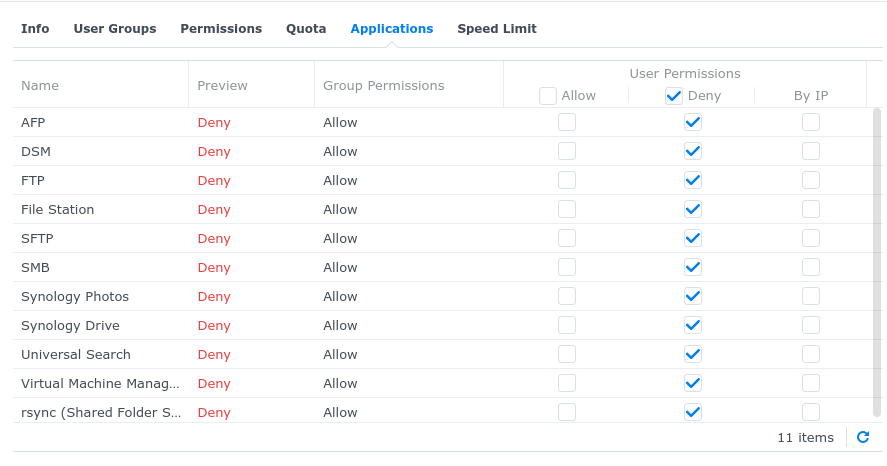


Hey @sovereignstack maybe what is missing in the docs is a comprehensive explanation on how to best create a user for this synology csi. What is not clear from current documentation is the right settings for the user to be able to creat iscsi luns which clearly requires admin rights. Also what is needed to mitigate security risk while creating this user as the secret will be exposed in plain sight with the user synology user credentials? Lastly even by applying the settings you recommeded above, is this still safe to go on production environment ? Best would be to figure out a way for a non admin user to be allowed to create iscsi luns.

Same issue here. Also wouldn't be so bad if you could restrict it to a single Shared Folder instead of littering the volume with directories.
