

 SynoCommunity
SimpleExtJSApp : Attempt to have an ExtJS demo app
Motivation: This package is an attempt to have a simple ExtJS app demo for DSM
This is an initial version tested OK on DSM 7 (inspired from Debian-Chroot.js) :
- Application is added on the DSM desktop
- App & window creation
- Handling button event to call the test.cgi example from the Synology developper guide
- Retrieve the result and display it in an alert message
The todo list :
- Have the help documentation integrated in DSM (sample files added but current integration not working fine)
- Put additional ExtJS components in this demo application (reverse engineering from synology *.js files)
- Add additional test cases for calls from DSM client part to DSM server part : PHP calls, NodeJS calls, etc
This package is to be considered as a fundation to share Synology's ExtJS API which is currently not documented as far as I know. Not tested on DSM 6 : it might require some fixes.
Checklist
- [x] Build rule
all-supportedcompleted successfully - [ ] Package upgrade completed successfully
- [ ] New installation of package completed successfully

finally ✔️ 👍 We have some packages here, that do not work anymore due to an ExtJs Configuration Dialog (and using pyextdirect python2 lib by @Diaoul, that was never ported to python3)
- debian-chroot
- gentoo-chroot
- haproxy
- subliminal

Ok I have identified the base UI components which can be added to DSM. Below is a first try with a few of them (derived from ExtJS) :
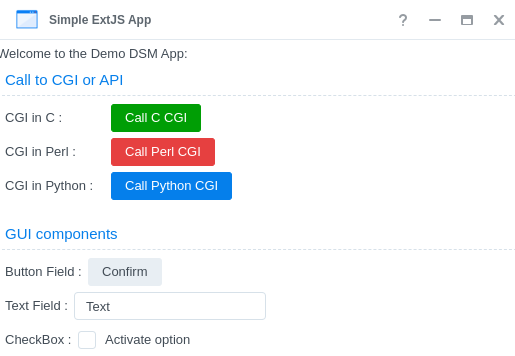
Having something quite interesting to start from :
- js-beautify to reverse the "compressed" Synology's JS files from the NAS
- extjs3.4 sources doc available (with comments)
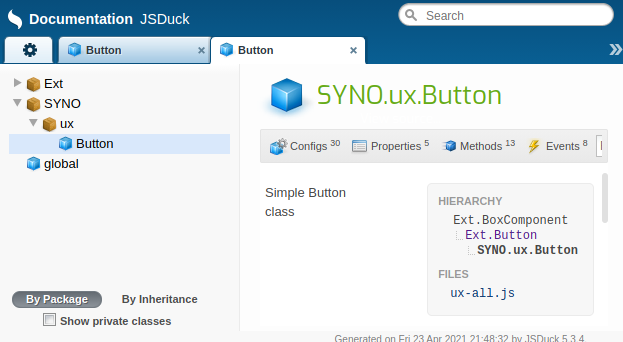
- jsduck to generate documentation from the extjs3.4 comments above + the additional comments added in the newly Synology JS files documented
Not committed yet, but I have been able to propose 2 links on DSM :
- one is relative to running the ExtJS demo app
- the other is to provide a link to the doc generated
Below are the screenshot to illustrate this :
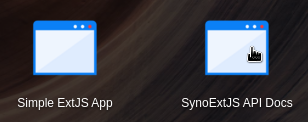
I was wondering if the framework could propose to have more that one icon for a package ? In this case it could be useful (1 icon for the app, 1 icon for the link to the docs).
The "config" file is as per below :
{ ".url": { "com.synocommunity.packages.simpleextjsapp": { "title": "SynoExtJS API Docs", "desc": "SynoExtJS API Docs", "icon": "images/icon1-{0}.png", "type": "url", "protocol": "http", "port": "80", "url": "/simpleextjsapp", "allUsers": false, "grantPrivilege": "local" } }, "simpleextjsapp.js": { "SYNOCOMMUNITY.SimpleExtJSApp.AppInstance": { "type": "app", "title": "app:app_name", "version": "0.1", "icon": "images/icon2-{0}.png", "texts": "texts", "allowMultiInstance": false, "allUsers": false, "appWindow": "SYNOCOMMUNITY.SimpleExtJSApp.AppWindow", "depend": ["SYNOCOMMUNITY.SimpleExtJSApp.AppWindow"] }, "SYNOCOMMUNITY.SimpleExtJSApp.AppWindow": { "type": "lib", "title": "app:app_name", "icon": "images/simpleextjsapp-{0}.png", "texts": "texts" } } }
The other point is that : are some people interested to document the Synology ExtJS library or to use Synology ExtJS library ?
Thank you for the suggestions. Indeed the digests was incorrect and it's now ok : )
For the various improvements :
-
cgi sample as shell script : I've tried several times, but for an unknown reason the call to a shell script is generating an error at NGINX level ("upstream prematurely closed connection while reading response header from upstream / request: "GET /webman/3rdparty/simpleextjsapp/test.cgi... upstream: "scgi://unix:/run/synoscgi.sock) => one possibility is to provide a python wrapper which is calling the shell cgi : it's working fine but this solution is not very clean, so to investigate how to fix this
-
support for DSM6 : I think it's possible, the cross part is very light. For the testing part, I don't have anymore access to DSM6, so maybe a few hints on that topic might help
I was thinking on other use cases :
- call to a new API : this point is not documented in the developper's guide, however in the "resource" part there are some references to apis/webapi-desc, so maybe an interesting point to review
@DigitalBox98 I got the bash cgi working. Not sure whether it depends on that I have nginx and apache 2.4 active in webstation.
Ok it's working fine with your version :+1: The -e option with echo was missing in mine :)
I've put various improvements and the API doc with jsduck is becoming interesting : )
The possible improvements :
- As suggested DSM6 version
- Remaining widgets (lots of)
- Remaining doc for SDS part (SYNO.API.JsonStore, etc)
I have discovered the "apis/webapi-desc" keyword is now restricted to Synology packages. So writing "own" API is only possible via CGI (python, bash, etc) : )
For DebianChroot package, in theory it should be possible to use the standard SYNO.Core.TaskScheduler API in order to execute a specific task as root + use SQLite for the DB storage part. This way it would avoid to use pyextdirect which is indeed no more available. Possible workaround would be a 3 step process :
- webapi : SYNO.Core.TaskScheduler / create
- webapi : SYNO.Core.TaskScheduler / run
- webapi : SYNO.Core.TaskScheduler / delete Once a task is defined, it's also possible to run it through the command line : synoschedtask --run id=<task_id> check_time=0 check_status=0
oops I was not clear enough.
If the file to download is v0.7.tar.gz you need to define PKG_DIST_NAME = v$(PKG_VERS).$(PKG_EXT)
But you need an additional definition of PKG_DIST_FILE = $(PKG_NAME)-$(PKG_VERS).$(PKG_EXT)
and for the sake of the order it finally would be
PKG_EXT = tar.gz
PKG_DIST_NAME = v$(PKG_VERS).$(PKG_EXT)
PKG_DIST_SITE = https://github.com/DigitalBox98/SimpleExtJSApp/archive
PKG_DIST_FILE = $(PKG_NAME)-$(PKG_VERS).$(PKG_EXT)
This means "download file PKG_DIST_NAME from url PKG_DIST_SITE and rename the downloaded file to PKG_DIST_FILE".
You only need to define PKG_DIST_FILE if PKG_DIST_NAME does not contain neither the name nor the version of the package (and therefore PKG_DIST_FILE is different to PKG_DIST_NAME).
Ok indeed the latest filename contains the package name. I have remove the unnecessary PKG_DIST_FILE