

 SwiftKickMobile
Message under Navigation Bar
I'm displaying a message on the top of the screen with a presentationContext of view, where the view has been set to the top view of the view controller. However the massage appears to be displayed in partially under the navigation bar. Is there a workaround for this? The message is displayed correctly if I set the presentationContext to viewController or automatic however this causes the message to persist (I'm using a duration of forever) even when navigating to another screen.
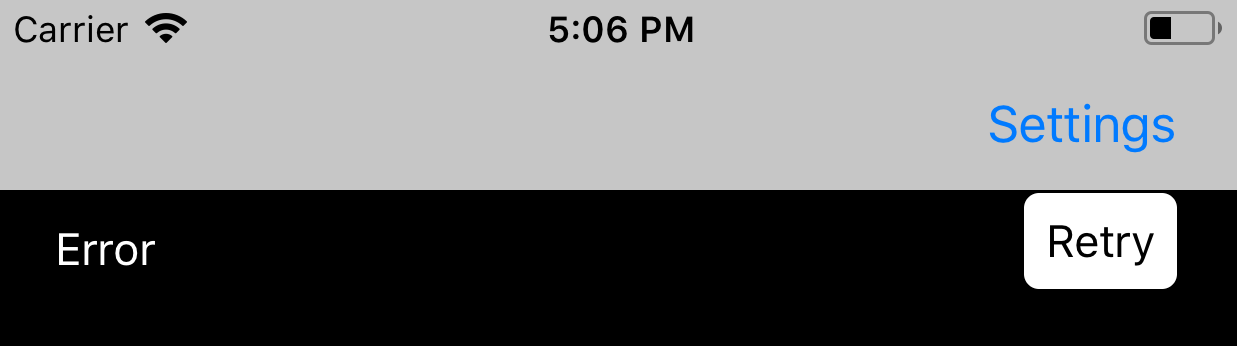

This is a bug. SwiftMessages makes some margin adjustments in order to look good on iPhone X when being displayed under the notch or the home indicator. These adjustments are incorrectly being applied here. I'll take a closer look soon, but it seems I need to update the function Presenter.safeZoneConflicts() to address the TODO comments on line 228.

I haven't been able to address this yet. Can you possibly set your view controller to not be under top bars? I think that would be a workaround for you.
Yes, that does help with the issue although I prefer not to do that. However I'm not urgently in need of this at the moment. When I do, I will also take a moment to look at the source for a workaround to assist. Thanks!
I'm facing the similar issue - one of the view-controller which is part of the navigation-controller, I am presenting this navigation-controller and it causing this issue for me. It is displaying the SwiftMessages underneath the navigation-bar. To prevent this, I changed the navigationCtrl.modalPresentationStyle = .overCurrentContext and it helps but then there are other consequences with the app functions which are within this view-controller so I've to remove this. Any fixes you would suggest?

@hemangshah can you use config.presentationContext = .window(windowLevel: .normal)?