

 SuperPWA
Update plugins or theme assets previously cached
Hello! Thanks for this plugin and the effort you are putting into the development.
I got a question:
several plugins, and of course themes, enqueue assets (stylesheets or scripts).
As developers, we don't have control of their version: most of them appends a ?ver= or ?v= to disable previously cached versions.
How does this situation is managed by the SuperPWA service worker?
I did a test:
- I have a WordPress using TwentySeventeen 1.4
- I install and configure SuperPWA plugin
- I visit the website, the sw caches style.css
- I update TwentySeventeen to version 1.5
- I visit the website and I got the previously cached version 1.4.
I noticed that in the Cache Storage I got 2 style.css files, both versions, but the SW loads the version 1.4.

Is it a common issue? Thank you!

Hello @leopuleo
Here is the test I did based on yours - https://youtu.be/Kx6CA4-TbqE
SuperPWA is network first. So if network is available, it serves the live website and saves the most current copy to the cache. As long as the HTML is updated (and other factors such as browser cache is not playing in between), you should see the latest version of the page.
So if the HTML is updated with version 1.5 from 1.4, then you should see version 1.5.
But based on your message, that is not the case I suppose.
- Was there browser caching / server side caching by any chance?
- Was the old page visited again once the update was made?
Having both the versions in the cache is fine, its what is referenced in the HTML that will be picked up. The query strings are present in the header as you can see here:
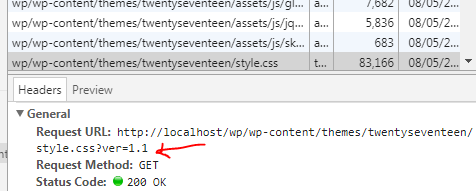
Please let me know what I missed if I did. Looking forward to your feedback.

Hi @arunbasillal, thanks for such quick response.
I just saw the video, all clear.
Answering your questions: no browser or server cache at all and yes, I visited the old page.
I noticed that in my test the ?ver query string didn't change after the update: I still have the WordPress version (4.9.4).
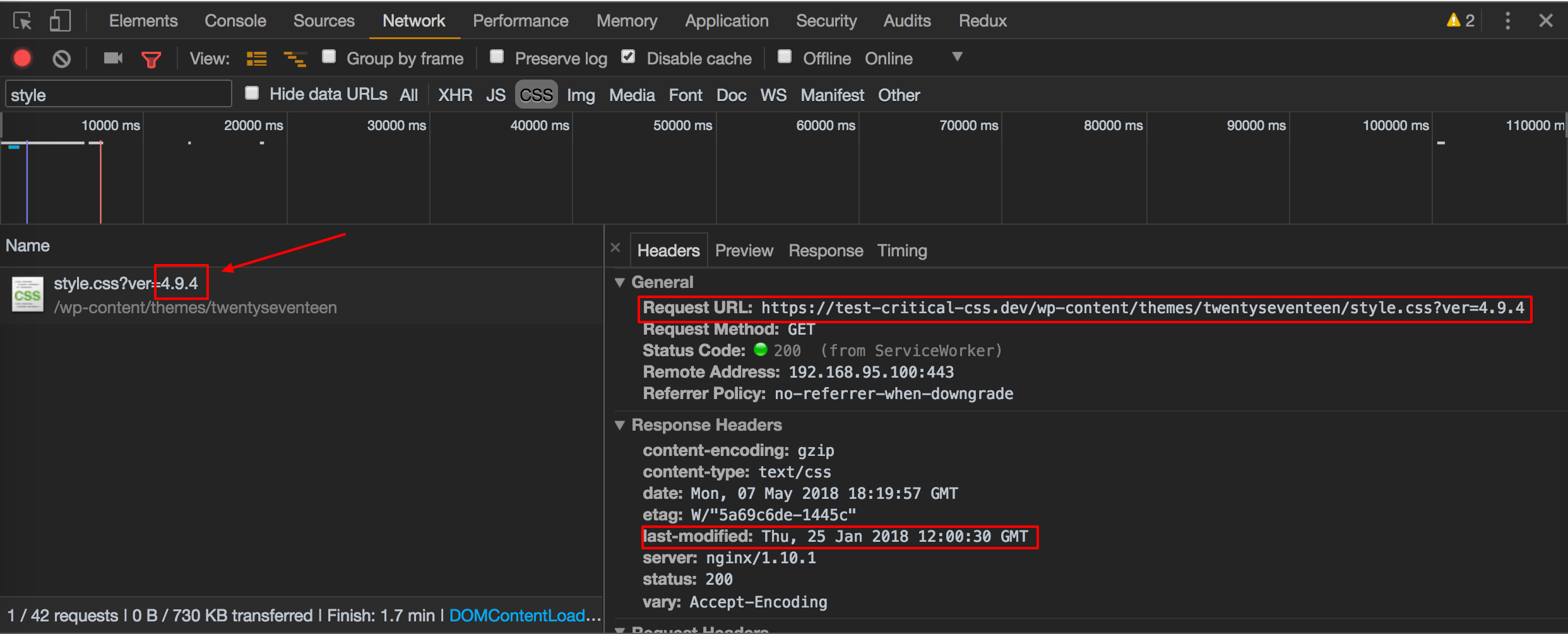
After I updated WordPress core, the query string changed and the browser loaded the right file (see screenshot):
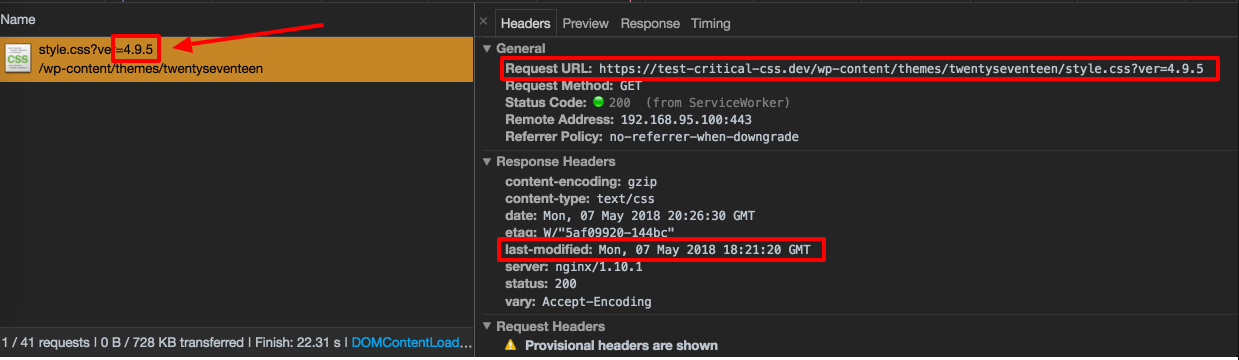
In your experience, is there a way to force the cache update even if the query string does not change? Append to assets the version of the plugin/theme is quite common, but we can't rely on that.
Thank you!
If the query string doesn't change, then the old file and new file are pretty much same. The service worker still will cache the latest copy.
If you disable SuperPWA, do you see the whole thing work differently? i.e. does the page update even when the query string doesn't change?
Right now yes, I don't have any cache level between. In case I set up some static cache rules, I won't update immediately, this will depend on the expiration rules.
I'm not complaining about this plugin, I'm just trying to understand how this works 😄
Of course, I didn't take it as a complaint, I was just using it as a learning experience because I was curious to see how this works as well.
Right now, SuperPWA does not handle any of these files (there is no cache management either). We cache the files and make sure they are available offline. And let the HTML document do its thing.
It might be solved by generating a random cache key each time a plugin/theme/core has been activated or updated.
This would invalidate all the previously cached files, also the still valid ones. What do you think?
While having an option to force a cache clear using a cache key ( I am thinking time() ) is in the road-map, I am not sure why this is happening in the first place.
The cache is refreshed on each visit and as you can see in my video, pages are updated when you change something.
See this: https://github.com/SuperPWA/Super-Progressive-Web-Apps/blob/10cd1b7dcf675a8f63a169a6bcb5d29a8c82a31a/public/sw.php#L164-L175
As long as the browser is online, the latest is fetched from the server and sent to the browser. A copy ( response.clone() ) is saved to the cache.
The cache is only fetched if this condition fails as you can see here: https://github.com/SuperPWA/Super-Progressive-Web-Apps/blob/10cd1b7dcf675a8f63a169a6bcb5d29a8c82a31a/public/sw.php#L177-#L188
I have a custom PHP application nested in the WordPress directory. The cached resource will "shift" my index of elements until the service worker cache syncs.
What would be the best way to fix this? Request a cache update, or somehow exclude a subdirectory from being cached? And where could I provide that custom instruction to the PWA service worker?
