
hUGETracker
 hUGETracker copied to clipboard
 SuperDisk
Confusing Behavior: Order Editor
The order editor is one of the most confusing parts of hUGETracker. I've found it to be challenging and frustrating to use. Here are the reasons:
Lack of Feedback
- When right clicking on a row to make changes, the previously selected row stays highlighted. Which row is the right click going to affect? The answer to this question is unclear. The solution to the problem is when the user right clicks on a row, that row is highlighted and the menu choice will apply to that row.
- When I right click and select Insert/Duplicate/Replicate, where does the new row go? How can I easily tell which one is the new row? The new row should automatically be selected and shown to remove any question
Lack of Flexibility
- As far as I know, there's no way to move rows up or down. This has caused me to spend lots of time rearranging things manually. I expect to be able to order these things with drag and drop
- It doesn't seem possible to change the width of the order editor. This was annoying when I wanted to put two hUGETracker windows next to each other. It's also frustrating because the Order Editor is wider than it has to be to display all the information. There's a pretty large amount of empty horizontal space for no reason. It would be nice to be able to change the size and even hide it in a View menu
Reliance on Right Click
- Right click is a great shortcut but sometimes it's not ideal. I prefer to have buttons for the options in the right click menu at the bottom of the Order Editor field. They can be simple icons to keep the buttons at a small toolbar at the bottom

These are all good suggestions, though
As far as I know, there's no way to move rows up or down. This has caused me to spend lots of time rearranging things manually. I expect to be able to order these things with drag and drop
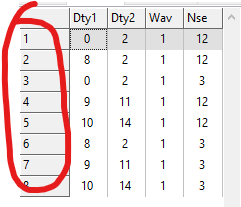
You can drag these numbers up and down to re-order the orders:

These are all good suggestions, though
As far as I know, there's no way to move rows up or down. This has caused me to spend lots of time rearranging things manually. I expect to be able to order these things with drag and drop
You can drag these numbers up and down to re-order the orders:
That’s good to know
I've implemented these in 3b8c28b67fdce21f84279895d4daece3928b1c0d:
- [...] when the user right clicks on a row, that row is highlighted and the menu choice will apply to that row.
- The new row should automatically be selected and shown to remove any question
- It doesn't seem possible to change the width of the order editor. [...]
The only thing I didn't do is add buttons for the order editor, which I might do later but possibly not. Let me know if this mostly addresses your issue (I'll put out a new release soon).