

 StreisandEffect
fresh install on ubuntu 16.04 (64bit) fails
fresh install on ubuntu 16.04 (64bit) fails. I've tried many many times on a fresh vps. I use option 7 (install on localhost).
I even tried apt update and apt upgrade before running streisand. I also used Mosh to make sure I do not lose connection to server.
running ./util/venv-dependencies.sh ./venv gave these errors but said all dependencies are installed
Using cached https://files.pythonhosted.org/packages/00/8d/9d56bfe43997f1864fe0891be69bc239ded98e69c9f56eb9eaa5b1789660/rfc3986-1.3.2-py2.py3-none-any.whl
ERROR: os-service-types 1.7.0 has requirement pbr!=2.1.0,>=2.0.0, but you'll have pbr 1.10.0 which is incompatible.
ERROR: python-keystoneclient 3.19.0 has requirement pbr!=2.1.0,>=2.0.0, but you'll have pbr 1.10.0 which is incompatible.
ERROR: oslo-i18n 3.23.1 has requirement pbr!=2.1.0,>=2.0.0, but you'll have pbr 1.10.0 which is incompatible.
ERROR: oslo-utils 3.41.0 has requirement pbr!=2.1.0,>=2.0.0, but you'll have pbr 1.10.0 which is incompatible.
ERROR: stevedore 1.30.1 has requirement pbr!=2.1.0,>=2.0.0, but you'll have pbr 1.10.0 which is incompatible.
ERROR: oslo-serialization 2.29.1 has requirement pbr!=2.1.0,>=2.0.0, but you'll have pbr 1.10.0 which is incompatible.
ERROR: debtcollector 1.21.0 has requirement pbr!=2.1.0,>=2.0.0, but you'll have pbr 1.10.0 which is incompatible.
ERROR: keystoneauth1 3.14.0 has requirement pbr!=2.1.0,>=2.0.0, but you'll have pbr 1.10.0 which is incompatible.
Installing collected packages: pyasn1, six, pycparser, cffi, bcrypt, enum34, asn1crypto, ipaddress, cryptography, pynacl, paramiko, MarkupSafe, jinja2, PyYAML, azure-nspkg, azure-mgmt-nspkg, azure-common, certifi, isodate, urllib3, chardet, idna, pyOpenSSL, requests, oauthlib, requests-oauthlib, msrest, SecretStorage, configparser, entrypoints, keyring, PyJWT, python-dateutil, adal, msrestazure, azure-mgmt-network, pyparsing, packaging, azure-mgmt-containerregistry, azure-mgmt-sql, azure-mgmt-web, azure-mgmt-compute, azure-mgmt-rdbms, azure-storage, azure-cli-nspkg, azure-mgmt-keyvault, azure-mgmt-storage, azure-mgmt-dns, azure-mgmt-containerservice, azure-mgmt-batch, azure-mgmt-containerinstance, azure-mgmt-resource, colorama, wheel, monotonic, humanfriendly, applicationinsights, tabulate, pygments, argcomplete, jmespath, knack, azure-cli-core, ansible, boto, futures, docutils, botocore, s3transfer, boto3, dopy, apache-libcloud, pycryptodome, pycurl, linode-python, funcsigs, mock, simplejson, iso8601, pytz, Babel, pbr, oslo.i18n, wrapt, debtcollector, netifaces, netaddr, oslo.utils, PrettyTable, msgpack, oslo.serialization, stevedore, os-service-types, keystoneauth1, rfc3986, oslo.config, python-keystoneclient, python-novaclient, os-virtual-interfacesv2-python-novaclient-ext, os-networksv2-python-novaclient-ext, rax-scheduled-images-python-novaclient-ext, rax-default-network-flags-python-novaclient-ext, ip-associations-python-novaclient-ext, rackspace-auth-openstack, os-diskconfig-python-novaclient-ext, rackspace-novaclient, pyrax
  Found existing installation: wheel 0.33.4
    Uninstalling wheel-0.33.4:
      Successfully uninstalled wheel-0.33.4
Successfully installed Babel-2.6.0 MarkupSafe-1.1.1 PrettyTable-0.7.2 PyJWT-1.7.1 PyYAML-5.1 SecretStorage-2.3.1 adal-1.2.1 ansible-2.6.5 apache-libcloud-2.4.0 applicationinsights-0.11.9 argcomplete-1.10.0 asn1crypto-0.24.0 azure-cli-core-2.0.35 azure-cli-nspkg-3.0.2 azure-common-1.1.11 azure-mgmt-batch-4.1.0 azure-mgmt-compute-2.1.0 azure-mgmt-containerinstance-0.4.0 azure-mgmt-containerregistry-2.0.0 azure-mgmt-containerservice-3.0.1 azure-mgmt-dns-1.2.0 azure-mgmt-keyvault-0.40.0 azure-mgmt-network-1.7.1 azure-mgmt-nspkg-2.0.0 azure-mgmt-rdbms-1.2.0 azure-mgmt-resource-1.2.2 azure-mgmt-sql-0.7.1 azure-mgmt-storage-1.5.0 azure-mgmt-web-0.32.0 azure-nspkg-2.0.0 azure-storage-0.35.1 bcrypt-3.1.6 boto-2.49.0 boto3-1.9.156 botocore-1.12.156 certifi-2019.3.9 cffi-1.12.3 chardet-3.0.4 colorama-0.4.1 configparser-3.7.4 cryptography-2.6.1 debtcollector-1.21.0 docutils-0.14 dopy-0.3.5 entrypoints-0.3 enum34-1.1.6 funcsigs-1.0.2 futures-3.2.0 humanfriendly-4.18 idna-2.8 ip-associations-python-novaclient-ext-0.2 ipaddress-1.0.22 iso8601-0.1.12 isodate-0.6.0 jinja2-2.10.1 jmespath-0.9.4 keyring-18.0.1 keystoneauth1-3.14.0 knack-0.3.3 linode-python-1.1.1 mock-3.0.5 monotonic-1.5 msgpack-0.6.1 msrest-0.4.29 msrestazure-0.4.31 netaddr-0.7.19 netifaces-0.10.9 oauthlib-3.0.1 os-diskconfig-python-novaclient-ext-0.1.3 os-networksv2-python-novaclient-ext-0.26 os-service-types-1.7.0 os-virtual-interfacesv2-python-novaclient-ext-0.20 oslo.config-6.9.0 oslo.i18n-3.23.1 oslo.serialization-2.29.1 oslo.utils-3.41.0 packaging-19.0 paramiko-2.4.2 pbr-1.10.0 pyOpenSSL-19.0.0 pyasn1-0.4.5 pycparser-2.19 pycryptodome-3.8.1 pycurl-7.43.0.1 pygments-2.4.1 pynacl-1.3.0 pyparsing-2.4.0 pyrax-1.9.8 python-dateutil-2.8.0 python-keystoneclient-3.19.0 python-novaclient-2.27.0 pytz-2019.1 rackspace-auth-openstack-1.3 rackspace-novaclient-2.1 rax-default-network-flags-python-novaclient-ext-0.4.0 rax-scheduled-images-python-novaclient-ext-0.3.1 requests-2.22.0 requests-oauthlib-1.2.0 rfc3986-1.3.2 s3transfer-0.2.0 simplejson-3.16.0 six-1.12.0 stevedore-1.30.1 tabulate-0.8.2 urllib3-1.25.3 wheel-0.30.0 wrapt-1.11.1

*************

All dependencies installed into ./venv. To use this environment, run this
in your shell:

    source "./venv/bin/activate"

You need to do this once in every terminal window you plan to run the
command './streisand' in.

After you've run that, you're ready to run ./streisand.
streisand-diagnostics.md
### Ansible Information

* Ansible version: 2.6.5
* Ansible system: Linux
* Host OS: Ubuntu
* Host OS version:  16.04
* Python interpreter: /usr/bin/python
* Python version: 2.7.12

### Streisand Information

* Streisand Git revision: c91292a71e6dc143141187eb79420aa14f8de2b0
* Streisand Git clone has untracked changes: no
* Genesis role: localhost
* Custom SSH key: False

### Enabled Roles

* Shadowsocks enabled:  True
* Wireguard enabled: False
* OpenVPN enabled: False
* stunnel enabled: False
* Tor enabled: False
* Openconnect enabled: True
* TinyProxy enabled: False
* SSH forward user enabled: False
* Configured number of VPN clients: 18
It gets failed at here
TASK [ip-forwarding : Enable IPv4 traffic forwarding] ****************************************************************************************************************************
fatal: [localhost]: FAILED! => {"changed": false, "msg": "Failed to reload sysctl: net.ipv4.neigh.default.base_reachable_time_ms = 600000\nnet.ipv4.neigh.default.mcast_solicit = 20\nnet.ipv4.neigh.default.retrans_time_ms = 250\nnet.ipv4.conf.all.rp_filter = 0\nnet.ipv4.conf.eth0.rp_filter = 0\nkernel.sysrq = 0\nkernel.core_uses_pid = 1\nnet.ipv4.tcp_syncookies = 1\nkernel.msgmnb = 65536\nkernel.msgmax = 65536\nkernel.shmmax = 68719476736\nkernel.shmall = 4294967296\nnet.ipv4.conf.all.accept_source_route = 0\nnet.ipv4.conf.default.accept_source_route = 0\nnet.ipv4.conf.all.log_martians = 1\nnet.ipv4.conf.default.log_martians = 1\nnet.ipv4.conf.all.accept_redirects = 0\nnet.ipv4.conf.default.accept_redirects = 0\nnet.ipv4.conf.all.send_redirects = 0\nnet.ipv4.conf.default.send_redirects = 0\nnet.ipv4.conf.default.rp_filter = 0\nnet.ipv4.icmp_echo_ignore_broadcasts = 1\nnet.ipv4.icmp_ignore_bogus_error_responses = 1\nnet.ipv4.conf.all.secure_redirects = 0\nnet.ipv4.conf.default.secure_redirects = 0\nkernel.randomize_va_space = 1\nnet.core.wmem_max = 12582912\nnet.core.rmem_max = 12582912\nfs.suid_dumpable = 0\nfs.protected_hardlinks = 1\nfs.protected_symlinks = 1\nnet.ipv4.ip_forward = 1\nsysctl: cannot stat /proc/sys/net/ipv4/conf/eth1/rp_filter: No such file or directory\n"}

RUNNING HANDLER [ssh : Restart SSH] **********************************************************************************************************************************************
RUNNING HANDLER [dnsmasq : Restart dnsmasq] **************************************************************************************************************************************        to retry, use: --limit @/root/streisand/playbooks/localhost.retry

PLAY RECAP ***********************************************************************************************************************************************************************
localhost                  : ok=67   changed=44   unreachable=0    failed=1
btw: how can I just resume the installation and avoid doing this all over again?


@hadifarnoud Which provider are you using? Some don't give you sufficient privileges to manage networking; those VPS providers will never run Streisand.


That would be very useful. I'm currently on a trip, so I'm not going to look at it until Friday or so. I make no promises. Some providers virtualize at too high a layer for Streisand to work properly.
My email address is [email protected] (PGP accepted); see also Keybase. SSH public keys at https://github.com/nopdotcom.keys . I figure the simplest thing for you to do is add my SSH pub keys to the machine, and then have you email me the IP address. (By emailing me, you'll be telling me your email address.)
Has any progress been made on this? It's still occurring for me: https://i.imgur.com/dhJSaTb.png
It'd be nice to know if any progress has been made.

I continue to attempt making this work.
So thanks to this link, I found how to upgrade PBR by itself. So I performed the command:
~$ sudo pip install --upgrade pbr
And the output looks like this:
Collecting pbr Downloading https://files.pythonhosted.org/packages/46/a4/d5c83831a3452713e4b4f126149bc4fbda170f7cb16a86a00ce57ce0e9ad/pbr-5.4.3-py2.py3-none-any.whl (110kB) 100% |████████████████████████████████| 112kB 277kB/s python-novaclient 2.27.0 has requirement pbr<2.0,>=1.6, but you'll have pbr 5.4.3 which is incompatible. Installing collected packages: pbr Found existing installation: pbr 1.10.0 Uninstalling pbr-1.10.0: Successfully uninstalled pbr-1.10.0 Successfully installed pbr-5.4.3
Okay, so far so good, seeing as how #2 in your instructions show "Ignore the python-novaclient" message. So I follow the instructions up to the git command, and I see what looks to be a contradiction according to the steps I've just taken (link: https://i.imgur.com/hcTJJbr.png):
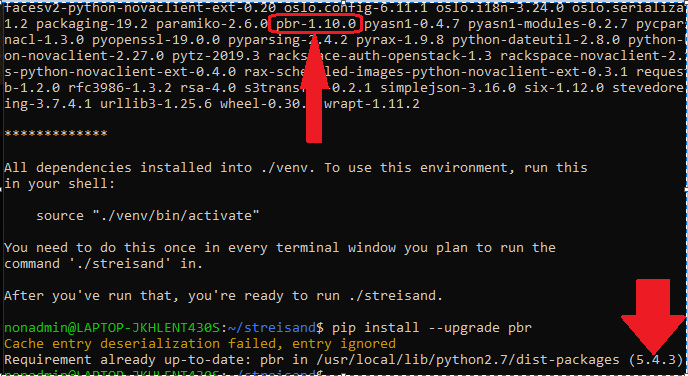
I attempt to re-upgrade (thinking the git caused the old version to be downloaded again), but the output shows this:
~/streisand$ pip install --upgrade pbr Cache entry deserialization failed, entry ignored Requirement already up-to-date: pbr in /usr/local/lib/python2.7/dist-packages (5.4.3)
So now I'm utterly confused. Help, please?
And now I see it's one of the dependencies (screenshot: https://i.imgur.com/Rad1Szh.png).
https://files.pythonhosted.org/packages/b2/f4/871eb251ea31e5923961a51f730def9553f7d63a74d6e10827c7a346501a/python_keystoneclient-3.22.0-py2.py3-none-any.whl (397kB)
     |████████████████████████████████| 399kB 4.1MB/s

Collecting pbr<2.0,>=1.6
  Downloading https://files.pythonhosted.org/packages/b8/a1/7abb01fd93d66fc71e24e5df9ca6d7d9acfb4b715937d2a38fd739f266e6/pbr-1.10.0-py2.py3-none-any.whl (96kB)
     |████████████████████████████████| 102kB 1.6MB/s

Collecting oslo.utils>=2.0.0
So now I'm gonna' have to take a look through the files (I'm still looking for which ones reference a the Python-Pip command to DL the components)...
Hey, @nopdotcom ... where exactly do I find streisand-diagnostics.md so I can include it? I've gone digging around the directories but I haven't found it yet...
someone figure out a solution for this? fresh ubuntu 16.04 and same error, making streisand effectively not working.
Is anyone from the dev team working on this? or is this another dead project?

All of the pbr requirements seem to stem from various dependencies of pyrax, which is a deprecated library for interacting with Rackspace. I think if you're not using Rackspace, it should probably work regardless of these errors.
Anyway, pyrax==1.9.8 (the latest release) requires python-novaclient==2.27.0 which in turn requires pbr>=1.6,<2.0 which resolves to 1.10.0.
So it seems that the solution to this problem isn't that easy, the Streisand developers would have to replace the use of pyrax with openstacksdk and rackspacesdk.

