

 StrataSource
Material exclusion list in Hammer's settings doesn't work
Describe the bug
The Materials tab in the settings includes a list of material folders to exclude from appearing in the texture browser. In my case I chose to exclude the bee2/antigel/gen folder, as this contains textures which are dynamically generated by BEE2 on export and not always present to use in Hammer maps.
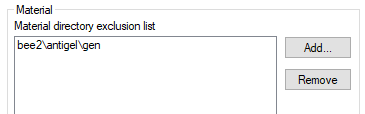 However, this appears to have no effect, even after restarting Hammer.
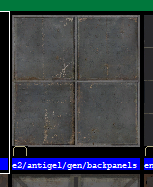 Material exclusion lists can also be specified in FGDs. I haven't checked if those are also broken.
To Reproduce
- Go to the materials tab in Hammer's settings
- Add a directory containing some materials
- Restart Hammer or don't, it doesn't matter, either way the materials will still appear in the texture browser.
Issue Map
N/A
Expected Behavior
The materials should not appear in the texture browser
Operating System
Tested on Windows 10

It does work, but the excluded folder names have to start with forward slash and the exclusion list has to use forward slashes only. And only works after restarting hammer, since this filtering is done while scanning for materials.

The file path thing should probably be fixed, that's not exactly clear... Also add something which tells you you need to restart hammer for it to take effect (I thought to try that anyway, but some people might not)
The slash at the start and it requiring to restart hammer will most likely get fixed anyway.