

 StrangeLoopGames
USER ISSUE: Recurring crash and FPS drop with RTX 4090
User Id: (Not logged user)
Version: 0.9.7.3 beta release-391
Steps to Reproduce: Have an RTX 4090, 55GB of RAM, an i9-10900X with 15 FPS gaming, then play like everyone else.
Expected behaviour: A game that works, that does not crash and with 300 FPS.
Actual behavior: 15 FPS, even at minimum graphics (no difference). Crash with a "Unity crash" popup every 5-90 minutes. Sometimes the game crashes with a "Unity crash" popup when clicking on the "Play" button on steam. I am then forced to reinstall the game and pray.
Do you have mods installed? Does the issue happen when no mods are installed?: Yes, only one. I only play on the Esperance server.
**Please provide log files. Instruction is here https://github.com/StrangeLoopGames/EcoIssues/wiki/Getting-the-Eco-game-log-file

I have a very similar setup with same card, 128 GB RAM and a 7950X without any issues. (160+ fps on 4K) Your logs are full of error spam, though. It'd be best if we could get profilings, so if you can, please play on White Tiger server on playtest branch which starts today evening. And if you still get this problem, follow the instructions for profilings on our discord / here: https://wiki.play.eco/en/Client_Profiling

I have a very similar setup with same card, 128 GB RAM and a 7950X without any issues. (160+ fps on 4K) Your logs are full of error spam, though. It'd be best if we could get profilings, so if you can, please play on White Tiger server on playtest branch which starts today evening. And if you still get this problem, follow the instructions for profilings on our discord / here: https://wiki.play.eco/en/Client_Profiling
Here is the crash report. It does not came from the mod:
d3d11: failed to create staging 2D texture w=128 h=2 d3dfmt=10 [887a0005] Crash!!! SymInit: Symbol-SearchPath: '.;F:\SteamLibrary\steamapps\common\Eco;F:\SteamLibrary\steamapps\common\Eco;C:\Windows;C:\Windows\system32;SRVC:\websymbolshttp://msdl.microsoft.com/download/symbols;', symOptions: 534, UserName: 'drago' OS-Version: 10.0.0
After some searchs (as a unity developper) The problem seems to came from Unity: https://forum.unity.com/threads/d3d11-failed-to-create-2d-texture.392286/ There is some solutions there for your developpers. It came from your sprite texture draw with some issues in calculation
D3nnis3n I found a temporary solution : Making graphic % graphic render to 75% instead of 100% seems work. It confirm that your code got an arithmetic issue
D3nnis3n
If that can helps you, I found this specific configuration settings that now makes me not crashing again.
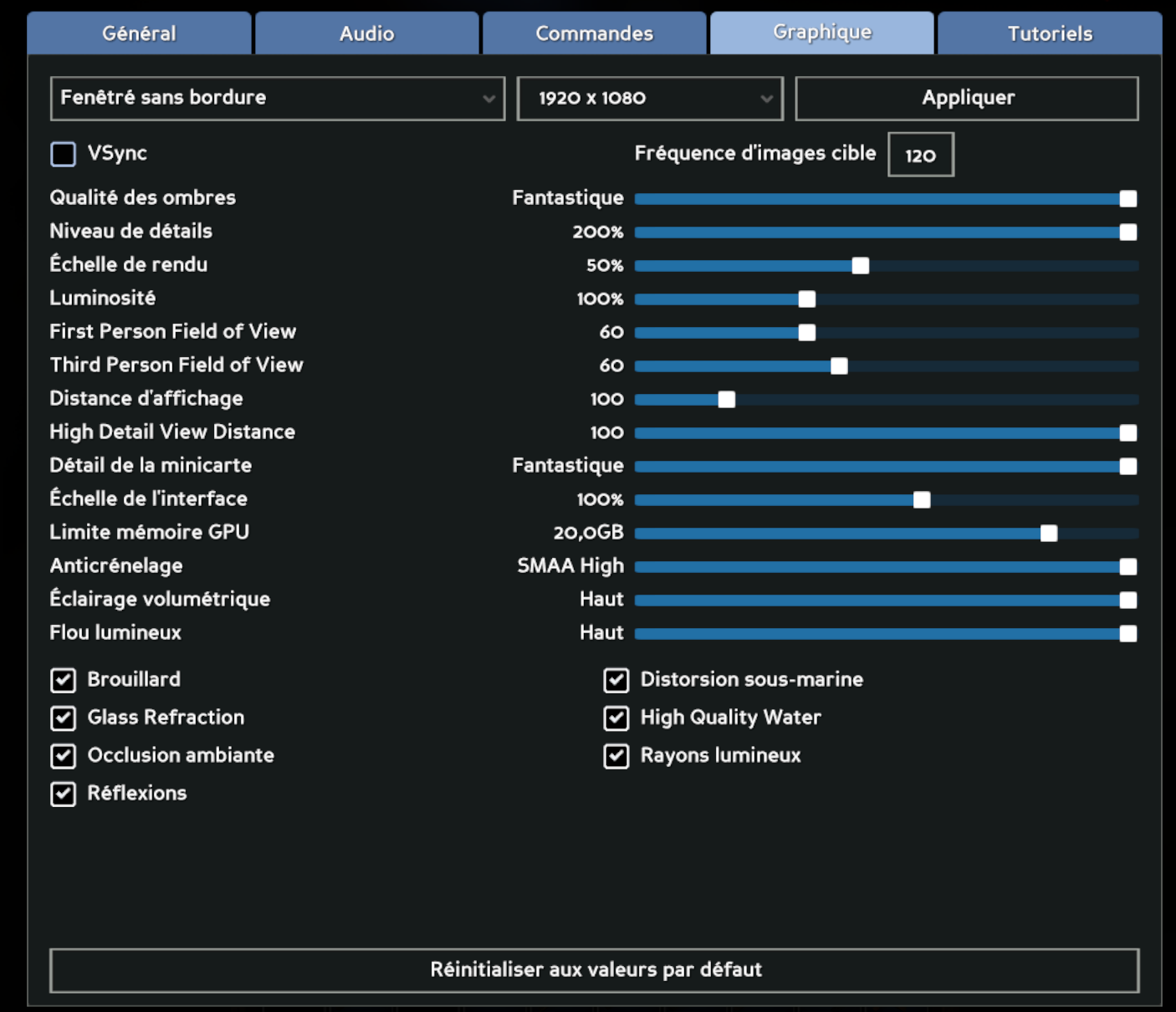 As you can see, I am playing with 50% render settings.
It makes my visual disgusting a lot but at least my game isn't crashing.
This bug of crash is definitely linked with that parameter.
As you can see, I am playing with 50% render settings.
It makes my visual disgusting a lot but at least my game isn't crashing.
This bug of crash is definitely linked with that parameter.