

 SteamDeckHomebrew
plugin: add wifi-locker plugin
WiFi Locker
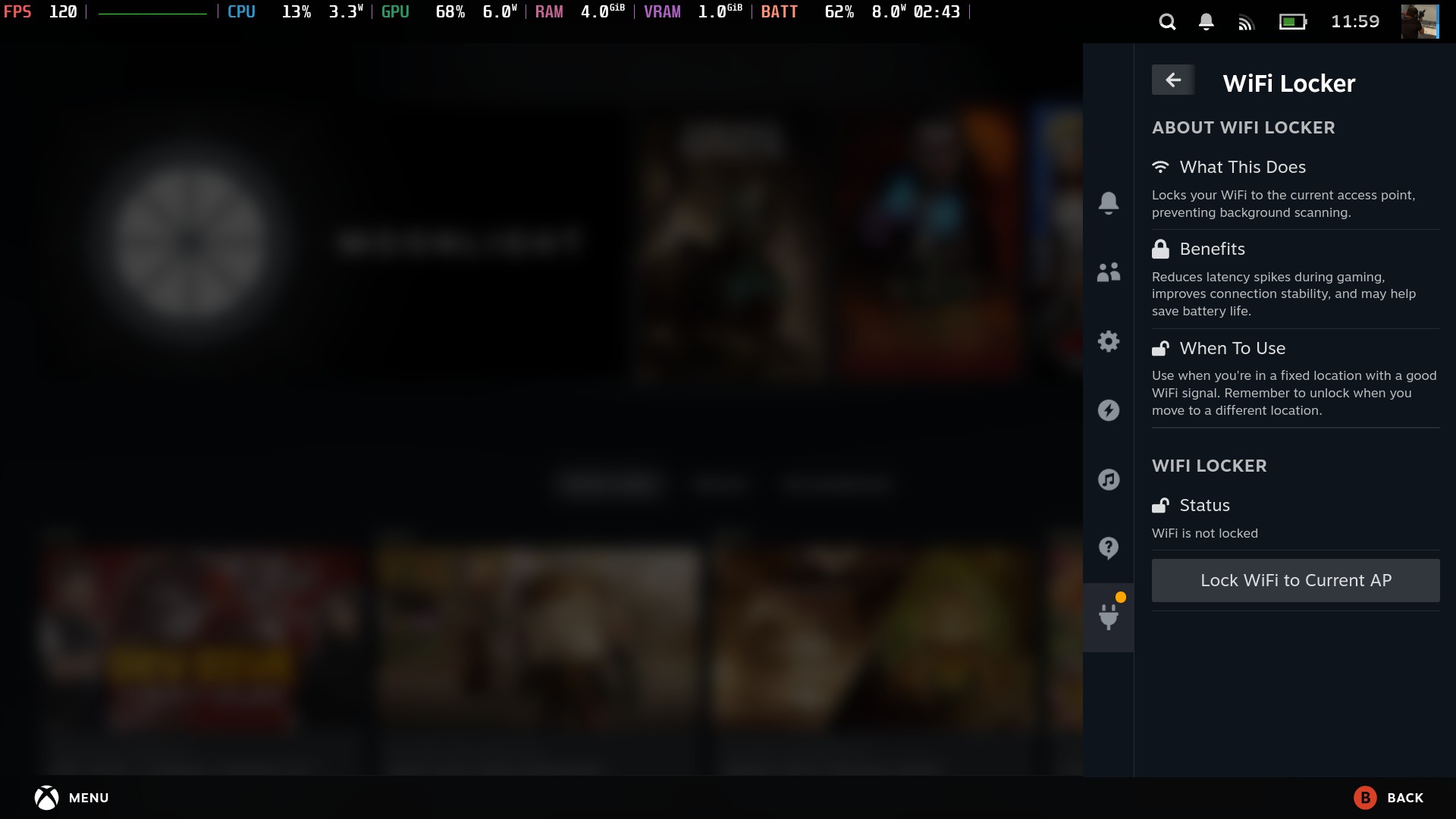
WiFi Locker is a utility plugin that allows Steam Deck users to lock their WiFi connection to the current access point by binding to its specific BSSID. This prevents the WiFi adapter from performing background scanning, which can cause latency spikes and connection instability during gaming sessions.
Key features:
- Lock WiFi to current access point with a single click
- Unlock when needed to restore normal WiFi operation
- Clear status display showing lock state and connected network
- Informative UI explaining benefits and optimal usage scenarios
Benefits for gamers:
- Reduces random latency spikes during online gaming / streaming applications
- Improves connection stability for a more consistent experience
- May help conserve battery by reducing unnecessary scanning
The plugin is designed with a clean, intuitive interface that fits seamlessly with the Steam Deck UI. It's particularly useful for users who experience network stuttering or lag spikes while streaming on WiFi.
Task Checklist
Developer
- [x] I am the original author or an authorized maintainer of this plugin.
- [x] I have abided by the licenses of the libraries I am utilizing, including attaching license notices where appropriate.
Plugin
- [x] I have verified that my plugin works properly on the Stable and Beta update channels of SteamOS.
- [x] I have verified my plugin is unique or provides more/alternative functionality to a plugin already on the store.
Backend
- No: I am using a custom backend other than Python.
- No: I am not using a tool or software from a 3rd party FOSS project that does not have its dependencies statically linked.
- No: I am not using a custom binary that has all of its dependencies statically linked.
Community
- [ ] I have tested and left feedback on two other pull requests for new or updating plugins.
- [ ] I have commented links to my testing report in this PR.
Testing
- [x] Tested by a third party on SteamOS Stable or Beta update channel.

This pull request is stale as no updates or testing reports have been posted within the last 7 days. Please ensure you are actively recruiting testers or resolving the issues discussed. If you do not remove the stale label or comment, this will be closed in 7 days. Please close this pull request if you need more time to resolve issues so we can keep our repo healthy.
![github-actions[bot] avatar](https://avatars.githubusercontent.com/in/15368?v=4 "Published by a pub.dev verified publisher")
Does not work on Steam Deck OLED. When pressing the button Lock WiFi to Current AP, I got an error:
Steamos: 3.6.24 Decky: 3.1.5
Plugin installed: MagicPods 2.0.0 MagicBlack 1.0.2 Memory Deck 0.18 Decky Recorder 0.4.1

@TrainDoctor I disagree with the quality of the code.
Plugin contains demo code from Decky Plugin Template and should be removed. https://github.com/felipejfc/decky-wifi-locker/blob/9fe9b366616bec2a8c308e3ac5b3b5d4f4c2895f/backend/src/main.c
Backend/
- src/
- Dockerfile
- Makefile
This pull request is stale as no updates or testing reports have been posted within the last 7 days. Please ensure you are actively recruiting testers or resolving the issues discussed. If you do not remove the stale label or comment, this will be closed in 7 days. Please close this pull request if you need more time to resolve issues so we can keep our repo healthy.
I'm coming back from vacations tomorrow then I will take a look at the pendencies
Plugin Testing Report
Installed Plugins
- TabMaster - 2.90
- CSS Loader - 2.1.2
- SteamGridDB - 1.5.1
- Web Browser - 1.4.0
- HLTB - 2.0.4
- Game Theme Music - 1.7.0
- Storage Cleaner - 1.3.1
- Decky Recorder - 0.4.1
- PlayTime - 2.0.9
- DeckSP - 1.1.0
Specifications
- SteamOS 3.6.24 (beta)
- Steam 1745623383 (beta)
- Decky 3.1.5 (Pre-Release)
Issues
Has the following major blocking issue(s): "Exception: [Errno 2] No such file or directory..." toast when clicking button
Has the following minor non-blocking issue(s):
Summary
I get the same error as mentioned above. Running on original (non oled) steam deck.

@felipejfc Please fix your plugin directory structure so it will build properly.
  Could not create plugin: Backend directory found, but no Dockerfile or entrypoint.sh. If you're using a custom backend, refer to the documentation for information on how to build it. If not, remove the `backend` directory.
  note: run with `RUST_BACKTRACE=1` environment variable to display a backtrace

@felipejfc Is there a reason you're using the backend folder if you aren't building a custom backend? You should be using another folder if just storing scripts. See Decky Framegen for an example where scripts are stored in defaults/assets.
@felipejfc Is there a reason you're using the backend folder if you aren't building a custom backend? You should be using another folder if just storing scripts. See Decky Framegen for an example where scripts are stored in defaults/assets.
thx for the tip! adjusted the plugin accordingly to this reference
Plugin Testing Report
Installed Plugins
- TabMaster - 2.90
- CSS Loader - 2.1.2
- SteamGridDB - 1.5.1
- Web Browser - 1.4.0
- HLTB - 2.0.4
- Game Theme Music - 1.7.0
- Storage Cleaner - 1.3.1
- Decky Recorder - 0.4.1
- PlayTime - 2.0.9
- DeckSP - 1.1.0
Specifications
- SteamOS 3.6.24 (beta)
- Steam 1745623383 (beta)
- Decky 3.1.5 (Pre-Release)
Issues
Has the following major blocking issue(s): "Exception: [Errno 2] No such file or directory..." toast when clicking button
Has the following minor non-blocking issue(s):
Summary
I get the same error as mentioned above. Running on original (non oled) steam deck.
care to retest? problem should be fixed now
Plugin Testing Report
Installed Plugins
- TabMaster - 2.90
- CSS Loader - 2.1.2
- SteamGridDB - 1.5.1
- Web Browser - 1.4.0
- HLTB - 2.0.4
- Game Theme Music - 1.7.0
- Storage Cleaner - 1.3.1
- Decky Recorder - 0.4.1
- PlayTime - 2.0.9
- DeckSP - 1.1.0
Specifications
- SteamOS 3.6.24 (beta)
- Steam 1745623383 (beta)
- Decky 3.1.5 (Pre-Release)
Issues
Has the following major blocking issue(s): see summary
Has the following minor non-blocking issue(s):
Summary
There are a few issues I encountered in my testing. After going out of range of a connected network while it is locked, it fails to unlock. You should be able able to unlock if you are no longer connected. Also for some reason when trying to lock with my phone hotspot it fails with "Failed to parse script output: Expecting value...". Lastly, I experienced a couple times where it would cause saved network passwords to be forgotten. I'm not exactly sure how to reproduce this, but it seemed to happen when I would manually connect to a different network while it was locked.
Plugin Testing Report
Installed Plugins
- SteamGridDB - 1.5.1-loaderv2
- PlayCount - 1.6
- XR Gaming - 1.1.0
- WiFi Locker - 1.0.2-933849d
- NonSteamLaunchers - 1.0.34
- ProtonDB Badges - 1.1.0
Specifications
- SteamOS 3.6.24 (Beta)
- Steam 1746211562
- Decky v3.1.5 (Prerelease)
Issues
Has the following major blocking issue(s): No blocking issues noted
Has the following minor non-blocking issue(s): Doesn't detect manual lock state on load (e.g. lock the wifi via terminal then load the plugin, it doesn't know it's already locked)
Summary
I locked my Wifi and played a game with online components. No issues noted.
A few non-blocking suggestions:
- Check for already-locked status (locked outside the plugin) on-load
- Show a lock icon next to the wifi symbol in the top bar

After going out of range of a connected network while it is locked, it fails to unlock.
Agreed that this is a blocking issue, please let us know when this is resolved
thx for all the feedback so far.
fixed the blocking issue @EMERALD0874 @jessebofill
adopted your first suggestion @wheaney. for the second one it would for sure be neat, however I'm afraid it would couple plugin to steam ui which would make it harder to maintain, like needing to react to changes in css etc.
I am unable to run the script on Jovian NixOS:
[2025-05-05 07:04:24,399][ERROR]: Exception while locking WiFi: [Errno 2] No such file or directory: '/var/lib/decky-loader/plugins/decky-wifi-locker/assets/lock_wifi.sh'
The issue is not that that file doesn't exist - it does - however the shebang is "wrong": #!/bin/bash.
This should be #!/usr/bin/env bash to ensure that it works no matter where bash is actually located.

@felipejfc Please fix the previously mentioned issue and we can redeploy to testing store
I don't think we should try to support all possible linux distros that people will want to run in the steam deck or other handhelds. Some of them might not even include network manager which provides the core plugin functionality. Despite that, @theCapypara suggestion is simple enough and seems to be a good practice overall so I incorporated it!
This pull request is stale as no updates or testing reports have been posted within the last 7 days. Please ensure you are actively recruiting testers or resolving the issues discussed. If you do not remove the stale label or comment, this will be closed in 7 days. Please close this pull request if you need more time to resolve issues so we can keep our repo healthy.
@jessebofill Any chance you can test to see if your major blocking issue has been fixed?
@jessebofill Any chance you can test to see if your major blocking issue has been fixed?
Yeah. I’ll try to test it tomorrow.
Plugin Testing Report
Installed Plugins
- TabMaster - 2.90
- CSS Loader - 2.1.2
- SteamGridDB - 1.5.1
- Web Browser - 1.4.0
- HLTB - 2.0.4
- Game Theme Music - 1.7.0
- Storage Cleaner - 1.3.1
- Decky Recorder - 0.4.1
- PlayTime - 2.0.9
- DeckSP - 1.1.0
Specifications
- SteamOS 3.6.24 (beta)
- Steam 1745623383 (beta)
- Decky 3.1.5 (Pre-Release)
Issues
Has the following major blocking issue(s): None
Has the following minor non-blocking issue(s): None
Summary
Unlocking after going out of range of locked network now works.