
react-native-google-fit
 react-native-google-fit copied to clipboard
 StasDoskalenko
GoogleFit.Authorize is hanging
I've installed & linked react-native-google-fit in order to allow my app to read Google Fit data. Specifically, I need to read the user's heart rate data (it's possible that I will need more than this at some stage).
I've created an OAuth 2.0 Client ID (although I just created it in the console and then downloaded a file - I haven't actually put that file anywhere as none of the instructions I followed told me what to do with it).
In my app I have:
import React, { useEffect } from 'react'
import GoogleFit, { Scopes } from 'react-native-google-fit'

const Navigator = props => {

  useEffect(() => {
    GoogleFit.checkIsAuthorized().then(() => {

        if(!GoogleFit.isAuthorized) {
          const options = {
            scopes: [
              Scopes.FITNESS_ACTIVITY_READ,
              Scopes.FITNESS_BODY_READ
            ],
          }

          console.log("Attempting to authorize");

          GoogleFit.authorize(options)
            .then(authResult => {
              if (authResult.success) {
                console.log('Success')
                dispatch("AUTH_SUCCESS");
              } else {
                console.log('Denied')
                dispatch("AUTH_DENIED", authResult.message);
              }
            })
            .catch(() => {
              dispatch("AUTH_ERROR");
            })

        }else {
          console.log("Already authorized")
        }
      })
  },[])
When I run this, I get a screen which asks which Google account I wish to use to continue to my app; I select my account and then I just get a white box with the Google spinner in it. In the console I can see "Attempting to authorize", but then nothing else happens.
Am I doing something wrong? I believe I have followed all steps in the instructions, but I must be missing something.

First, you don't need to link if your RN version is above 0.6.
You need to follow the instruction https://developers.google.com/fit/android/get-api-key#find_your_apps_certificate_information then request your OAuth 2.0 Client ID .
the development keystore is located in android\app. You need to get your SHA-1 from the keystore file and use it during the instructon. You also need to get your app name from android/app/src/main/AndroidManifest.xml. Both are mentioned during the process. You just need to carefully follow the instruction then you should be fine,
In you google console, there is a library section under Dashboard, make sure to add fitness api there.
You will find once you create your OAuth 2.0 Client, there are only 3 things you need to have, client name for the api, which could be whatever your want. the app name and the SHA-1 are from the above.
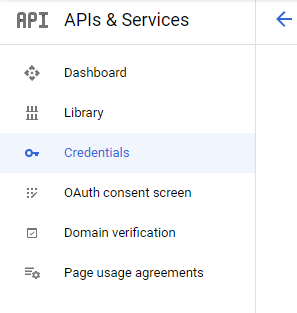

Thanks for your reply. I went through all of that to check, and it's all in, but still not working. I wonder whether it's to do with how I've configured the API. I'm on a debug version of my app for starters, and running on a local device (connected via USB). Does it need to be a production version?
I had it set to "External testing" but changed that to "Internal Testing" - once I did that, I opened my app again, and tried to authorise Google Fit (with my own gmail address - the app is set up under the company account). This time I was denied access.
Does it have to be set up in a particular way?
Hmm, it's really hard to tell. I will try to create a fresh new RN app recently and go through the entire auth process. And then rewrite the auth instruction doc.
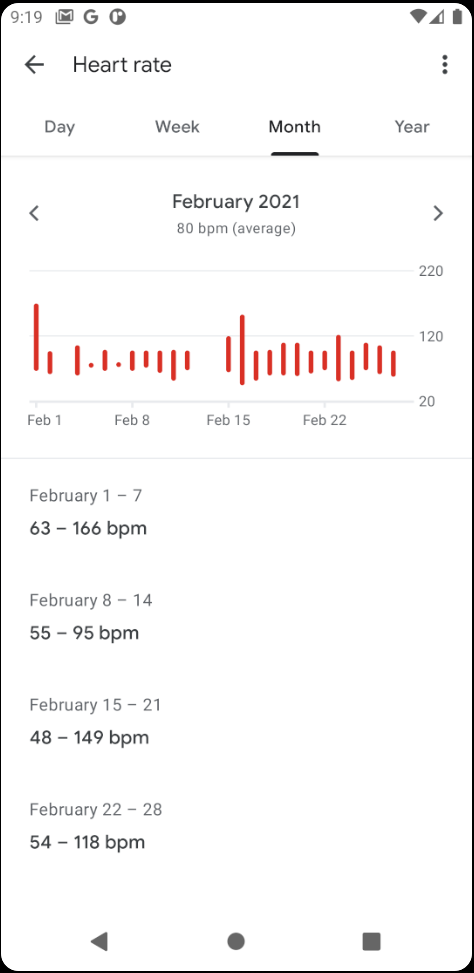
Hi there! i got some issue maybe related to Authorizing Or Somethingeles that i cant figure out! That i can get stepCountSample for sure but heartRate and blood pressure samples is always return empty array, though my google fit app already have heart rate data.
Here is my google fit app data.

@NguyenHoangMinhkkkk you are missing the scope, also read the doc carefully. It's on the doc but ppl keep missing those lines.
Scopes.FITNESS_HEART_RATE_READ,
I hadn't managed a proper way to return error when scope is missing.
======= Edit =======
My bad, the heartrate scope is missing from the doc instruction since it's not existed before the last google fit api update,
@NguyenHoangMinhkkkk you are missing the scope, also read the doc carefully. It's on the doc but ppl keep missing those lines.
Scopes.FITNESS_HEART_RATE_READ,I hadn't managed a proper way to return error when scope is missing.
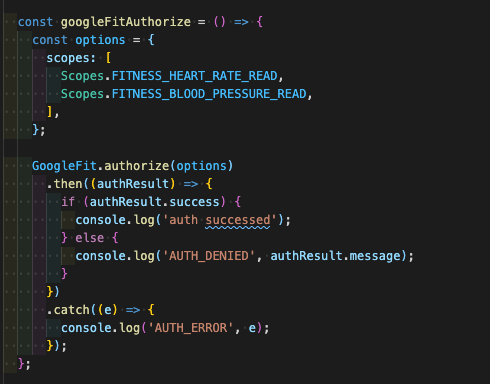
Thanks for your replying! but i already add it at the authorize function!
@NguyenHoangMinhkkkk you are missing the scope, also read the doc carefully. It's on the doc but ppl keep missing those lines.
Scopes.FITNESS_HEART_RATE_READ,I hadn't managed a proper way to return error when scope is missing.
Thanks for your replying! but i already add it at the authorize function!
Also include Scopes.FITNESS_ACTIVITY_READ to see if it works, it can be the problem that your old fitness data is from the old scopes, and new heartrate data will be in new scope. Depending on how developer implements it, it's confusing but Google seems like going to enforce the change in the future.
@NguyenHoangMinhkkkk you are missing the scope, also read the doc carefully. It's on the doc but ppl keep missing those lines.
Scopes.FITNESS_HEART_RATE_READ,I hadn't managed a proper way to return error when scope is missing.
Thanks for your replying! but i already add it at the authorize function!
Also include
Scopes.FITNESS_ACTIVITY_READto see if it works, it can be the problem that your old fitness data is from the old scopes, and new heartrate data will be in new scope. Depending on how developer implements it, it's confusing but Google seems like going to enforce the change in the future.
It also not work, may google did some change which i dont know. i need more time to reseach other solutions. Thanks
@NguyenHoangMinhkkkk Maybe you should try to inspect the background process in Android studio to check if the data exist but failed to pass to the RN. I just try the sample code and was able to receive data which I added from rest api. When I didn't include the heart rate scope, I did receive empty data.

Try this code. It may work for you.
const [Steps, setSteps] = useState(null);
  const [Weighttt, setWeighttt] = useState(null);
  const [Heighttt, setHeightt] = useState(null);
  const [BP, setBP] = useState(null);
  const [HeartRate, setHeartRate] = useState(null);
  const [Activities, setActivities] = useState(null);
  const [Calories, setCalories] = useState(null);

  //   GoogleFit.checkIsAuthorized().then(() => {
  //     console.log(GoogleFit.isAuthorized) // Then you can simply refer to `GoogleFit.isAuthorized` boolean.
  // })

  const options = {
    scopes: [
      Scopes.FITNESS_ACTIVITY_READ,
      Scopes.FITNESS_ACTIVITY_WRITE,
      Scopes.FITNESS_BODY_READ,
      Scopes.FITNESS_BODY_WRITE,
    ],
  };
  GoogleFit.authorize(options)
    .then((authResult) => {
      if (authResult.success) {
        console.log('AUTH_SUCCESS');
      } else {
        console.log('AUTH_DENIED', authResult.message);
      }
    })
    .catch(() => {
      console.log('AUTH_ERROR');
    });

  const opt = {
    startDate: new Date(2021, 1, 1).toISOString(), // required ISO8601Timestamp
    endDate: new Date().toISOString(), // required ISO8601Timestamp
    bucketUnit: 'DAY', // optional - default "DAY". Valid values: "NANOSECOND" | "MICROSECOND" | "MILLISECOND" | "SECOND" | "MINUTE" | "HOUR" | "DAY"
    bucketInterval: 1, // optional - default 1.
  };

  const optWeight = {
    unit: 'kg', // required; default 'kg'
    startDate: new Date(2021, 1, 1).toISOString(), // required
    endDate: new Date().toISOString(), // required
    bucketUnit: 'DAY', // optional - default "DAY". Valid values: "NANOSECOND" | "MICROSECOND" | "MILLISECOND" | "SECOND" | "MINUTE" | "HOUR" | "DAY"
    bucketInterval: 1, // optional - default 1.
    ascending: false, // optional; default false
  };

  const optHeight = {
    startDate: '2017-01-01T00:00:17.971Z', // required
    endDate: new Date().toISOString(), // required
  };

  const optionsHB = {
    startDate: new Date(2021, 1, 1).toISOString(), // required
    endDate: new Date().toISOString(), // required
    bucketUnit: 'DAY', // optional - default "DAY". Valid values: "NANOSECOND" | "MICROSECOND" | "MILLISECOND" | "SECOND" | "MINUTE" | "HOUR" | "DAY"
    bucketInterval: 1, // optional - default 1.
  };

  let optActivities = {
    startDate: new Date(2020, 1, 1).toISOString(), // required
    endDate: new Date().toISOString(), // required
    bucketUnit: 'DAY', // optional - default "DAY". Valid values: "NANOSECOND" | "MICROSECOND" | "MILLISECOND" | "SECOND" | "MINUTE" | "HOUR" | "DAY"
    bucketInterval: 1, // optional - default 1.
  };

  const optCalories = {
    startDate: '2017-01-01T00:00:17.971Z', // required
    endDate: new Date().toISOString(), // required
    // basalCalculation: true, // optional, to calculate or not basalAVG over the week
    // bucketUnit: 'DAY', // optional - default "DAY". Valid values: "NANOSECOND" | "MICROSECOND" | "MILLISECOND" | "SECOND" | "MINUTE" | "HOUR" | "DAY"
    // bucketInterval: 1, // optional - default 1.
  };

  const optDistance = {
    startDate: new Date(2021, 1, 1).toISOString(), // required
    endDate: new Date().toISOString(), // required
    bucketUnit: 'DAY', // optional - default "DAY". Valid values: "NANOSECOND" | "MICROSECOND" | "MILLISECOND" | "SECOND" | "MINUTE" | "HOUR" | "DAY"
    bucketInterval: 1, // optional - default 1.
  };

  const optSleep = {
    startDate: new Date(2021, 1, 1).toISOString(), // required, timestamp or ISO8601 string
    endDate: new Date().toISOString(), // required, timestamp or ISO8601 string
  };

  GoogleFit.onAuthorize(async function fetchData() {
    const res = await GoogleFit.getDailyStepCountSamples(opt);
    console.log('steps', res);
    setSteps(res[1].steps);

    const Weight = await GoogleFit.getWeightSamples(optWeight);
    setWeighttt(Weight[0].value);
    console.log('Weight', Weight[0].value, Weighttt);

    const Height = await GoogleFit.getHeightSamples(optHeight);
    setHeightt(Height[0].value);
    console.log('Height', Height[0].value, Heighttt);
  });

  GoogleFit.onAuthorize(async function fetchMoreData() {
    // const heartrate = await GoogleFit.getHeartRateSamples(optionsHB);
    // setHeartRate(heartrate[0].value);
    // console.log('heartrate', heartrate);
    const bloodpressure = await GoogleFit.getBloodPressureSamples(optionsHB);
    setBP(bloodpressure[0]);
    console.log('bloodpressure', bloodpressure);

    const Activities = await GoogleFit.getActivitySamples(optActivities);
    setActivities(Activities);
    console.log('Activities', Activities);

    const Calories = await GoogleFit.getActivitySamples(optCalories);
    setCalories(Calories);
    console.log('Calories', Calories.length > 0 ? Calories : 'Nahi hai');

    const Distance = await GoogleFit.getDailyDistanceSamples(optDistance);
    console.log('Distance', Distance);

    // const Sleep = await GoogleFit.getSleepSamples(optSleep);
    // console.log('Sleep', Sleep);

    console.log('yoyoy');
  });

Hi All,
For me, the issue was in the google console while setting the project I had made the project OAuth consent screen External so, I had to add a test user account (google account id) to access the API.
After adding that I got a screen similar to
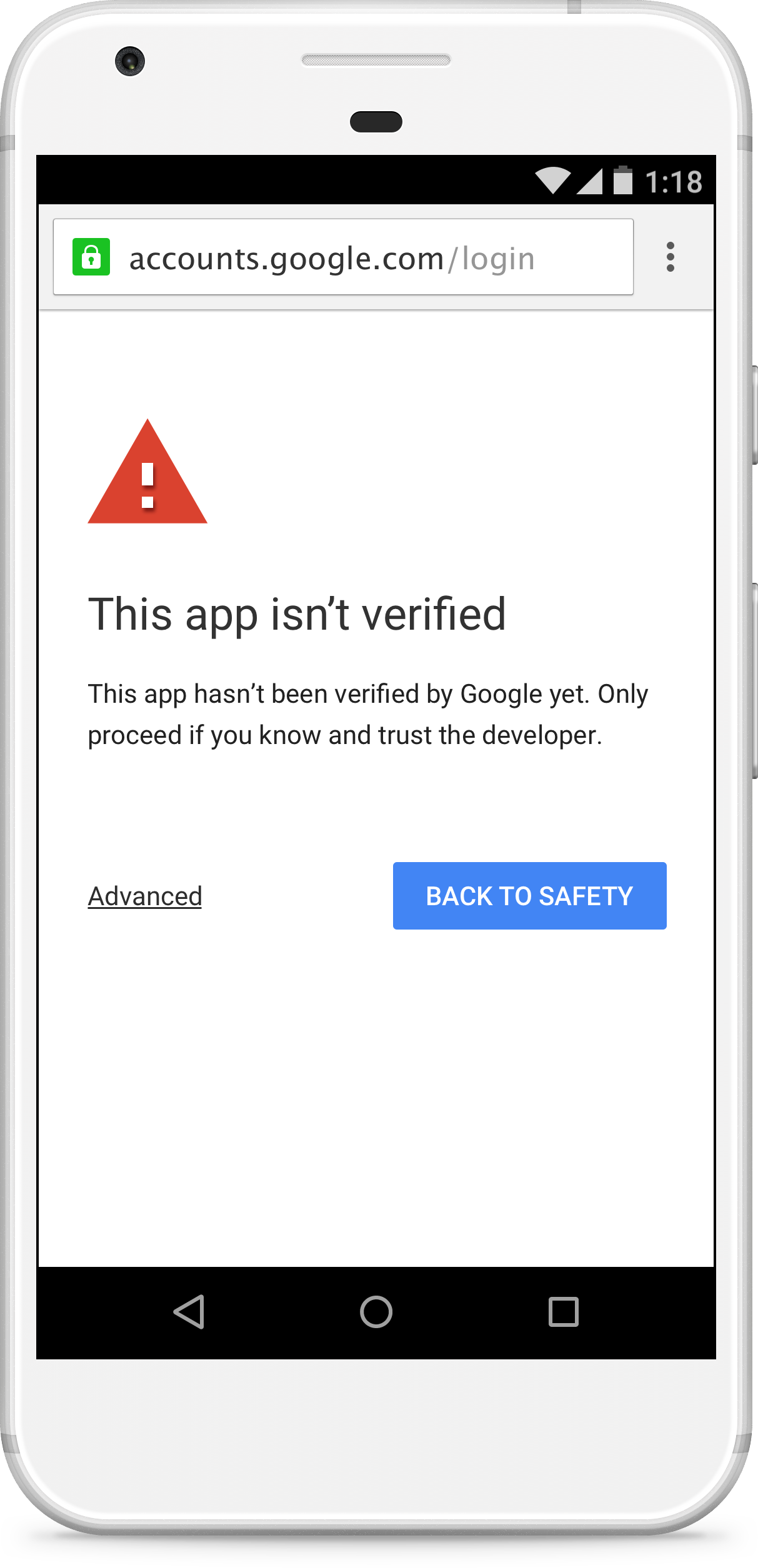 and after clicking continue I was able to use the google fit APIs.

Hi All, For me, the issue was in the google console while setting the project I had made the project OAuth consent screen External so, I had to add a test user account (google account id) to access the API. After adding that I got a screen similar to
Did you manage to find a workaround for this? This screen suddenly appeared in our apps. It is causing alarm among our users.

@mabc21 I believe these are the test users who are testing your application, If not then your app deployment on the play store is not done correctly. In the debug environment it is fine see this screen.
@minkeshj I think we need our app to be verified by google since they changed the scopes of Google Fit to be a sensitive scope, they just changed it this year. Your apps are verified?
No, Actually I was testing certain features on the debug build only that's when I encountered this issue. Have not published app on production yet so can not comment on it.
On Tue, Jun 15, 2021 at 12:35 PM Angela Cabonce @.***> wrote:
@minkeshj https://urldefense.proofpoint.com/v2/url?u=https-3A__github.com_minkeshj&d=DwMCaQ&c=kscRujJyAkQsYKgOOQVwjhZ5JZcK7vY7fLntrz10DKg&r=ZNRD4o2TfflFgv9V9Qedy_o4l-8CtfI1KuSoQUhDZHk&m=vibJgtw_yT8R3Fta1f96Vpa2N4ORKutsg2OWEnq7gkw&s=3Xr_SXPTurr5xy3ML5CCJaz-_4qLZ5BzVmUCZOkxXAE&e= I think we need our app to be verified by google since they changed the scopes of Google Fit to be a sensitive scope, they just changed it this year. Your apps are verified?
— You are receiving this because you were mentioned. Reply to this email directly, view it on GitHub https://urldefense.proofpoint.com/v2/url?u=https-3A__github.com_StasDoskalenko_react-2Dnative-2Dgoogle-2Dfit_issues_217-23issuecomment-2D861237733&d=DwMCaQ&c=kscRujJyAkQsYKgOOQVwjhZ5JZcK7vY7fLntrz10DKg&r=ZNRD4o2TfflFgv9V9Qedy_o4l-8CtfI1KuSoQUhDZHk&m=vibJgtw_yT8R3Fta1f96Vpa2N4ORKutsg2OWEnq7gkw&s=tllkIV-FsgoDIXFwEF8W-_I1anfo_vpw4LKviBWbXxE&e=, or unsubscribe https://urldefense.proofpoint.com/v2/url?u=https-3A__github.com_notifications_unsubscribe-2Dauth_AOQYON36WXSYMWTTKZJS3QDTS33S7ANCNFSM4YCZXP2Q&d=DwMCaQ&c=kscRujJyAkQsYKgOOQVwjhZ5JZcK7vY7fLntrz10DKg&r=ZNRD4o2TfflFgv9V9Qedy_o4l-8CtfI1KuSoQUhDZHk&m=vibJgtw_yT8R3Fta1f96Vpa2N4ORKutsg2OWEnq7gkw&s=9LfWwSKliWlAcoPXdKNp21DODewXribu1NUuGXwyvUc&e= .
-- This message and its attachments are confidential (or legally privileged) information and are meant solely for the addressee of such message. Any unauthorized use of the message / its attachments is strictly prohibited.
I tried by adding my login email id to test users. If you are not an organizational user you can not make your oAuth consent screen to internal and so for external you either need to add a test user or publish the app and send it for review. Though I do not know the steps of sending the app to review in google console. Internal Testing link Verify app link

