
vscode-comment-anchors
 vscode-comment-anchors copied to clipboard
 StarlaneStudios
Bug: custom tag shows double ahcnor icon in gutter
steps
- in config: ensure gutter icons are shown
- in config: add a custom tag, e.g. "TEST"
- in code: add a comment anchor, e.g.
//TEST test this new stuff
results
- anchor is shown on a line (OK)
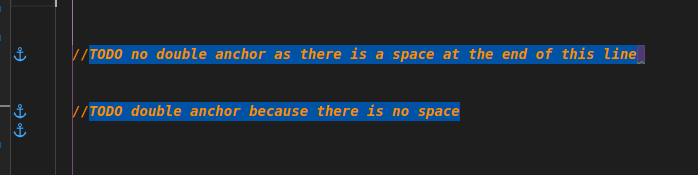
- same anchor also shown on the line below it (BUG)
Note that the bug occurs only when there is no space at the end of the comment, so:
- ok:
"//TEST test this new stuff "<--- note the trailing space - bug:
"//TEST test this new stuff"

Hi there!
I'm unable to reproduce this issue. Could you please include a screenshot/snippet of this bug in action?
Thanks!

Hi Ionix1, Its not related to this issue but how did you add a custom tag. Which settings file did you edit for that? or can you paste the code for your custom tag. I tried but couldnt add one.

@ahmednrana The answer is here. Just add the custom tags to your workspace settings. Open the json file (not the UI) and you'll see examples of how to add new tags.
Please open another issue for that if you get stuck.
@macjuul Did you manage to repro the issue? Maybe my idea that it has something to do with trailing spaces is incorrect, but the issue it still there. Not sure what it could be.
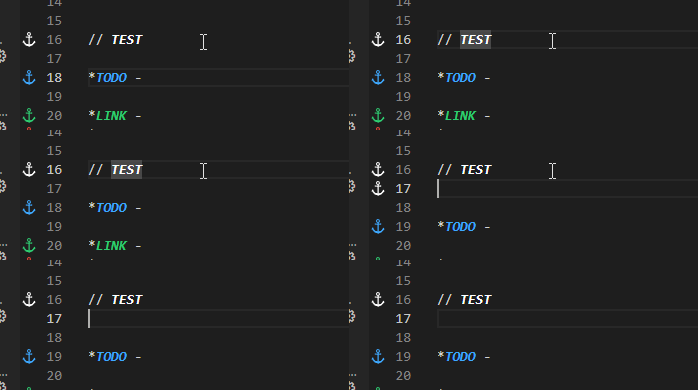
I made a custom tag to try and reproduce this issue and while it does appear to create a phantom anchor after going to a new line, this seems to only be the case for a very short period of time before it corrects itself.
Given that this issue has been unable to be reproduced, I will close this. If you or anyone else is able to reproduce it, feel free to re-open.
Thank you for using Comment Anchors!
