

 StackStorm
Rules/triggers not getting updated while using register-rules or register-all
Whenever we are updating any rules or triggers and loading changes via st2ctl reload --register-all or st2ctl reload --register-rules/triggers it is not getting updated. Have to manually delete the rule and again have to create it and then changes are taking place. This is not particular to rules only,it is happening while loading triggers/actions also.
Stackstorm version: st2 3.5.0, on Python 3.6.8

What deployment type? Is this docker, K8 or standalone install?
When you do the st2ctl reload then when it states the number of rules/triggers loaded, does the number look correct? Is there any errors reported when you do the reload in the stdout/stderr of the st2ctl reload, or in the ST2 log files? (Sometimes there can be some errors at the start of the output on a reload - that can be missed.

Hi Thanks for replying.
It is a standalone install. The number of rules/triggers loaded seems to be correct and no errors could be seen while loading them.

Again today we faced the same issue. I made a change in rules file and reloaded the configuration by running 'st2ctl reload --register-configs' but it did not update the rules. Then i even restarted the services of st2 to see if it helps but no luck.
Then i deleted the rule and again created it and then to my surprise it started working fine after that.
If you just ran reload --register-configs then it wouldn't reload a rule, as that just reloads configuration and only reloads files in /opt/stackstorm/configs.
Restarting ST2 does not cause it to reload, restarting ST2 will just use what has already been loaded into the database.
When you are altering the rule, are you altering it in the deployed location e.g. /opt/stackstorm/packs/sudo st2ctl reload --register-rules then it should get loaded.
yes @amanda11 i followed everything and that was mentioned to just tell that i followed whatever steps i could.
Initially i followed 'sudo st2ctl reload --register-rules' this only. But it does not work.
I've just verified this functionality on a 3.7dev machine and can see it is working as expected.
Please can you provide the following:
- Location of the rule file you are altering - and show the permissions on that file
- Change you are making to the rule file - e.g. are you changing it's name, parameters etc
- Output from running st2ctl reload --register-rules
- Check in the st2api.log at the time of the reload, check that it has an entry for the rule you have changed and that no errors appear
- Can you double-check that in the /opt/stackstorm/packs/packname/rules area that the rule doesn't appear twice? e.g. two rule files whereby the "name:" parameter in the yaml file is the same? This can cause odd behaviour if you have fileA and fileB both refering to rule with name: C for example.
-
Location of the rule file you are altering - and show the permissions on that file Answer
-rwxr-xr-x. 1 root st2packs 1.2K May 16 09:57 rule_smavd_mem_crit.yaml -
Change you are making to the rule file - e.g. are you changing it's name, parameters etc Answer Changed pattern to warning from critical:
trigger.state: pattern: WARNING -
Output from running st2ctl reload --register-rules Answer `[root@sjc4-stackstorm1 zsi]# st2ctl reload --register-rules Registering content...[flags = --config-file /etc/st2/st2.conf --register-rules] 2022-05-16 15:08:00,887 INFO [-] Connecting to database "st2" @ "127.0.0.1:27017" as user "None". 2022-05-16 15:08:00,893 INFO [-] Successfully connected to database "st2" @ "127.0.0.1:27017" as user "None". 2022-05-16 15:08:01,256 INFO [-] ========================================================= 2022-05-16 15:08:01,256 INFO [-] ############## Registering rules ######################## 2022-05-16 15:08:01,256 INFO [-] ========================================================= 2022-05-16 15:08:01,397 INFO [-] Registered 3 rules.
st2 components status
st2actionrunner PID: 4155 st2actionrunner PID: 4157 st2actionrunner PID: 4159 st2actionrunner PID: 4161 st2actionrunner PID: 4163 st2actionrunner PID: 4165 st2actionrunner PID: 4167 st2actionrunner PID: 4169 st2actionrunner PID: 4171 st2actionrunner PID: 4173 st2api PID: 4180 st2api PID: 4280 st2stream PID: 4188 st2stream PID: 4287 st2auth PID: 4195 st2auth PID: 4261 st2garbagecollector PID: 4204 st2notifier PID: 4215 st2rulesengine PID: 4245 st2sensorcontainer PID: 4255 st2chatops is not running. st2timersengine PID: 4274 st2workflowengine PID: 4289 st2scheduler PID: 4297 `
-
Check in the st2api.log at the time of the reload, check that it has an entry for the rule you have changed and that no errors appear. Answer: Could not see anything.
-
Can you double-check that in the /opt/stackstorm/packs/packname/rules area that the rule doesn't appear twice? e.g. two rule files whereby the "name:" parameter in the yaml file is the same? This can cause odd behaviour if you have fileA and fileB both refering to rule with name: C for example. Answer: Only 2 rule files are present for different workflows
What is the full path to the rules file that you are editing?
In the st2api.log did you see a GET entry for the rule that you had altered?
Can you try with verbose mode, e.g. st2ctl reload --register-rules --verbose
In the output of the verbose can you check for your rule at the location of the file that it says it is loading, is the same as the one you are editing. And that it reports that it has done an update on the rule that you are expecting to change.
st2api.log has a get entry for the rule that i altered.
`[root@sjc4-stackstorm1 st2]# grep -i zsnagios.smavd st2api.log 2022-05-16 08:59:01,088 140476116999664 INFO logging [-] e2a2cf1b-945a-4af4-8bb7-9ba948f5d3b0 - GET /v1/actions/zsnagios.smavd_mem with query={} (method='GET',path='/v1/actions/zsnagios.smavd_mem',remote_addr='127.0.0.1',query={},request_id='e2a2cf1b-945a-4af4-8bb7-9ba948f5d3b0') 2022-05-16 08:59:01,096 140476116999664 INFO logging [-] e2a2cf1b-945a-4af4-8bb7-9ba948f5d3b0 - 200 1026 7.211ms (method='GET',path='/v1/actions/zsnagios.smavd_mem',remote_addr='127.0.0.1',status=200,runtime=7.211,content_length=1026,request_id='e2a2cf1b-945a-4af4-8bb7-9ba948f5d3b0')
Can you try with verbose mode, e.g.
st2ctl reload --register-rules --verbose
Answer I ran this command , what i could see that it shows the location and loading of all the default rules but not the custom ones.
2022-05-16 16:21:54,210 AUDIT [-] Rule updated. Rule RuleDB(action=ActionExecutionSpecDB@139674274093240(ref="core.sendmail", parameters="{'body': 'We received an email', 'to': '[email protected]', 'from': '[email protected]', 'subject': 'Email Received'}"), context={}, criteria={'trigger.from': {'pattern': '[email protected]', 'type': 'contains'}}, description="Rule which sends an email when an email from [email protected] is received", enabled=False, id=623e37b2c81c9cb4463011c9, metadata_file="rules/sample.emailsample.yaml", name="Sample", pack="email", ref="email.Sample", tags=[], trigger="email.imap.message", type=RuleTypeSpecDB@139674213923720(ref="standard", parameters="{}"), uid="rule:email:Sample") from /opt/stackstorm/packs/email/rules/sample.emailsample.yaml. 2022-05-16 16:21:54,212 DEBUG [-] ref_count decrement for TriggerDB(description=None, id=623e37b2c81c9cb4463011c3, metadata_file=None, name="imap.message", pack="email", parameters={}, ref="email.imap.message", ref_count=0, type="email.imap.message", uid="trigger:email:imap.message:99914b932bd37a50b983c5e7c90ae93b") not required. 2022-05-16 16:21:54,213 DEBUG [-] Pack slack does not contain rules.
2022-05-16 16:21:54,197 AUDIT [-] Rule updated. Rule RuleDB(action=ActionExecutionSpecDB@139674274093240(ref="chatops.post_result", parameters="{'channel': '{{trigger.data.source_channel}}', 'user': '{{trigger.data.user}}', 'execution_id': '{{trigger.execution_id}}', 'context': '{{trigger.data.source_context}}'}"), context={}, criteria={'trigger.route': {'pattern': 'hubot', 'type': 'equals'}}, description="Notification rule to send results of action executions to stream for chatops", enabled=True, id=617adb3e4959f8e7287c9f4a, metadata_file="rules/notify_hubot.yaml", name="notify", pack="chatops", ref="chatops.notify", tags=[], trigger="core.st2.generic.notifytrigger", type=RuleTypeSpecDB@139674213923720(ref="standard", parameters="{}"), uid="rule:chatops:notify") from /opt/stackstorm/packs/chatops/rules/notify_hubot.yaml.
I again tried to change the rules file and after changing and reloading it , even the st2 rule get <rule_name> is not reflecting the chnages.
Dont know what is wrong.
The change i made: `[root@sjc4-stackstorm1 zsi]# cat rule_smavd_mem_crit.yaml | grep SMAVD description: Rule checks for SMAVD MEMORY alert # optional #pattern: "SMAVDMEMORY_USAGE" pattern: "SMAVD MEMORY USAGE"
Reload performed.
But still below: st2 rule get zsnagios.rule_smavd_mem
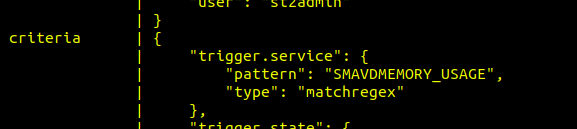
I am not sure you are editing the file in the correct location. When you do a reload it will reload the rules from /opt/stackstorm/packs/packname/rules/*.yaml.
Where is your rule_smavd_mem_crit.yaml? Given the information above it seems to be in a directory called zsi, so that's not in the packname directory - if your pack is zsnagios.
When you do a reload it only reloads from the directory where the packs get deployed to, i.e. /opt/stackstorm/packs not from any local location that you might have installed the pack from in the first place.
Thanks for pointing it out @amanda11 . Indeed this was the reason that why rules were not getting updated but then this is strange that it does pick it from other directory though and the only concerning thing is that they dont get updated when we make any change . Should not it have the provision that if under rules directory there are subdirectories it should work fine?
In an environment where we have lots of servers to target and many alerts, one will want segregation and might create rules according to that . This is what we did. We created 2 directories under rules directory just for segregation because some of our alerts directly impact the environment and others do not have any impact as such.