

 StackExchange
bug(md-editor) Pasting in code within a fenced code block, creates 2nd inner code block
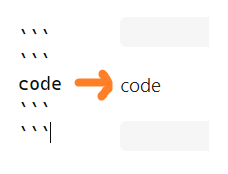
Describe the bug In the markdown editor, when pasting code into a pre-existing fenced code block, a second code block is created inside.
To Reproduce Steps to reproduce the behavior:
-
Open md editor
-
Create fenced code block
``` -
Paste anything detected as code into block - ex: copy the text below:
var x = 1
Expected behavior Only the single (existing) fenced region is used
Screenshots

This will also render incorrectly if saved without manually fixing:
Desktop
- OS: Windows
- Browser: Chrome
- Version: v104

Currently, this is working "by design". Unlike rich-text mode, we don't have any easy way to detect what type of "node" you're modifying. Because of this, you're going to see issue like the one you describe. Although I do agree that the current behavior is not ideal, this would take quite a bit of effort to resolve due to a number of factors. Because of this, I'm placing it in the backlog to revisit at a later date.
Notes to self
How would we handle the following edge cases?
indented code blocks (pretend the dots are spaces)
····paste here
unterminated code blocks (yes, this is legal: https://spec.commonmark.org/0.30/#example-126)
```
paste here


