

 Squirrel
Execution stub in AppData\Local folder is not working
Squirrel version(s) 2.0.0 (and also tried with 2.1.0, same behaviour)
Description We've created a Labelprinter which is a Windows Application in .Net 4.6.1 and made it SquirrelAware and made it create shortcuts.
When I install the Setup.exe which I created with Squirrel --releasify Labelprinter.1.0.0.nupkg,
it's creating all the files in my AppData\Local\Labelprinter folder as shown below:
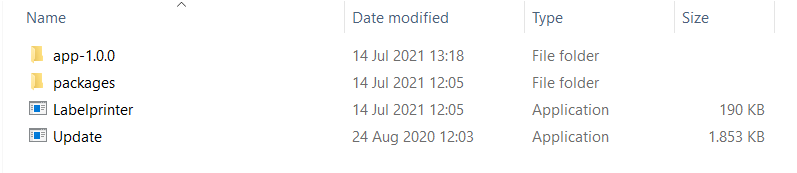
But the shortcuts which are pointing to the execution stub at AppData\Local\Labelprinter\Labelprinter.exe are not working.
[14 07 21 12:05:37] info: LogHost: Rigging execution stub for Labelprinter_ExecutionStub.exe to
The Labelprinter.exe inside the AppData\Local\Labelprinter\app-1.0.0\Labelprinter.exe is working.
Expected behavior Working AppData\Local\Labelprinter\Labelprinter.exe and shortcuts pointing to this .exe
Actual behavior AppData\Local\Labelprinter\Labelprinter.exe is not working (and also all the shortcuts pointing to this .exe are not working).
Additional information When I created the MyApp example project from the Getting Started guide the .exe is working in the AppData\Local\MyApp. Am I doing something wrong in the Labelprinter application?

The execution stub rarely fails, this usually means that your actual app is crashing on startup. Try running your app from the command line with the local directory set to what the execution stub would set it to
cd %LocalAppData%\LabelPrinter
.\app-1.0.0\LabelPrinter.exe

I ran the app from the AppData\Local\Labelprinter directory from the command line with the following command:
app-1.0.0\Labelprinter.exe
the app starts and the labelprinter application is working, so it seems that the app is not crashing on startup.
Is it possible that something goes wrong while using Squirrel --releasify Labelprinter.1.0.0.nupkg ?
I would debug through the stub I guess - build https://github.com/Squirrel/Squirrel.Windows/tree/develop/src/StubExecutable then copy it into %LocalAppData%\LabelPrinter and rename the EXE and PDB to LabelPrinter.exe
The stub from the develop/src/StubExecutable with the name LabelPrinter is working. I still don't know why the stub from the releasify is not working. Any ideas on how to test this?
You could try this:
- Drop the stub you just compiled (and you say worked) into the same directory as Squirrel.exe and do a
--releasify. Squirrel will use the one you just compiled when creating your release. - Install your app, does it work or break?
- if it works, there may have been a problem with the binary shipped in the version of Squirrel you are using.
- If it still breaks, now you can drop the symbols from your build into the same directory and launch the stub with your debugger to see what's causing the issue.
See here for how to launch an exe at an arbitrary location with your debugger attached: https://stackoverflow.com/questions/8167610/how-do-i-attach-visual-studio-to-a-process-that-is-not-started-yet
The reason why you should try it in this order, is that stub is modified during --releasify, so it might not be a problem with the stub, it could be a problem with the modification process when your exe metadata is copied into the stub.

I got this exactly problem too, I'm using NET5 ( my app upgraded from net 4.7.2)
If I try to coppy MyApp.exe from MyApp/MyApp-1.0.0 to MyApp/, it still not launch,
The process in both cases is started and I can see it in Task Manager (with 0% CPU and couples MBs of RAM)


If anyone can upload a sample project which reproduces this issue, I might be able to help
Thank you @caesay, I figure out what was the problem. Issue occurred because of MyApp.lnk (Application Shortcut). I found shortcut target argument was missing so I edit Target: C:\Users\kbailey\AppData\Local\MyApp\Update.exe --processStart MyApp.exe. It worked but problem is still continue. I am using GithubUpdateManager so after updating, shortcut resetting the target again

I am having the same issue. The setup files created by "squirrel --releasify" add a shortcut to the Desktop to my app (...\AppData\Local\MyApp\MyApp.exe) but trying to open that link does not work. The docs at (https://github.com/Squirrel/Squirrel.Windows/blob/master/docs/using/install-process.md) state this shortcut link (...\AppData\Local\MyApp\Update.exe --processStart MyApp.exe) will be created on the Desktop but this does not happen. If I manually update the shortcut link's Target value to be (...\AppData\Local\MyApp\Update.exe --processStart MyApp.exe) then it works and opens my application.

There have been fixes to the stub's and shortcut creation code in my fork. I'm confident this has been fixed there but if you do run into any issues I can help.
@caesay I tried your fork and the shortcut created on the Desktop does the exact same thing as I mentioned above. It does not create the shortcut as mentioned in (https://github.com/Squirrel/Squirrel.Windows/blob/master/docs/using/install-process.md) and trying to open the shortcut does not open my application. I'm using Windows 11.
@teamboyd It is likely that your app is crashing on startup when being run via the stub. Try adding some debugging / logging to your app or attach a debugger that can watch multiple processes (VS can maybe do this? WinDbg can via .childdbg 1)
@anaisbetts when I run the application from the .\app-1.0.0\MyApp.exe it works or if I create a link with
Target = ...\Update.exe --processStart MyApp.exe
it works that way. Any idea why?
@teamboyd Usually some app is expecting the current directory to be some value that it isn't, this is a really common problem with Squirrel installs. You can build your app in debug mode, copy all the binaries into your installed app-XYZ directory, then attach a debugger. Make your app show a message box as the first line so you can catch it
@anaisbetts Okay, I determined the issue and it has to do with our code not allowing more than one instance of MyApp.exe to run on the same computer. Therefore, my question is...how do I make the process create the MyApp.lnk as it states it does in this document https://github.com/Squirrel/Squirrel.Windows/blob/master/docs/using/install-process.md? If it created the link like this then our desktop shortcut would work properly.
@caesay do you know of any options around this? Is there a way to have the releasify process rename the execution stub, say, for example, instead of naming it 'MyApp.exe' what about 'Start-MyApp.exe'?
The solution is to fix your app, not to try and rig Squirrel! This document is describing the Old Way that Squirrel used to make shortcuts, it doesn't do that any more
You are correct but at the same time the documentation should reflect what happens.
@anaisbetts Okay, I determined the issue and it has to do with our code not allowing more than one instance of MyApp.exe to run on the same computer. Therefore, my question is...how do I make the process create the MyApp.lnk as it states it does in this document https://github.com/Squirrel/Squirrel.Windows/blob/master/docs/using/install-process.md? If it created the link like this then our desktop shortcut would work properly.
@caesay do you know of any options around this? Is there a way to have the releasify process rename the execution stub, say, for example, instead of naming it 'MyApp.exe' what about 'Start-MyApp.exe'?
How did you determine it was your app that didn't allow more than one instance. I'm having this issue and haven't figured out the cause. I added logging to my 'main.js' and have determined that it never gets called, when starting using the app.exe in the main directory.

@incy-tron Start with the advice at https://github.com/Squirrel/Squirrel.Windows/issues/1728#issuecomment-879912367, if you run your app from the command line you should get some debug info
Well, I didn't get any debug info when running from command line. I took a wild guess that Squirell didn't like me using version 0.0.0. Changing that to 0.0.1, fixed the problem of launching from the shortcut.