
spotifyd
 spotifyd copied to clipboard
 Spotifyd
Better Mrpis Support, for like cover art and stuff
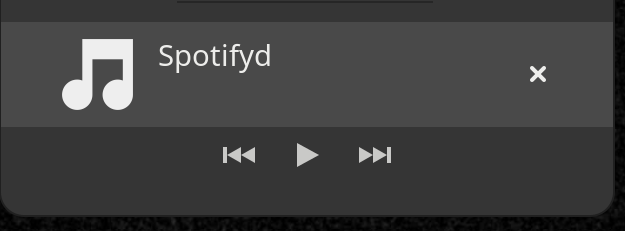
Is your feature request related to a problem? Please describe. I want to be able to control spotifyd from my Mpris gnome shell extension, but the support is poor.
Describe the solution you'd like Add cover art, loop controls, song name, and shuffle controls.
Describe alternatives you've considered Maybe just cover art would be nice.
Additional context
Spotify players like ncspot have good mpris support, maybe something like theirs would be a good implementation

For some of your points (cover art, song name), it is actually already implemented:
# qdbus org.mpris.MediaPlayer2.spotifyd /org/mpris/MediaPlayer2 org.mpris.MediaPlayer2.Player.Metadata
mpris:artUrl: https://i.scdn.co/image/...
mpris:length: ...
mpris:trackid: spotify:track:...
xesam:album: ...
xesam:albumArtist: ...
xesam:artist: ...
xesam:autoRating: ...
xesam:discNumber: ...
xesam:title: ...
xesam:trackNumber: ...
xesam:url: https://open.spotify.com/track/...
The reason, why that info does not appear in the MPRIS controls might be the missing support for the PropertiesChanged signal that most implementations rely on to update the data (see e.g. mpris-indicator-button). This is tracked in #910 as well as #457.
The other things you mention are indeed not implemented as read / write properties but rather only read (see e.g. LoopStatus, which only has a .get() registered, not a .set()). This was requested in #559, but this issue has been closed as stale.
All this probably won't help you much, just a little bit of context.

For some of your points (cover art, song name), it is actually already implemented:
# qdbus org.mpris.MediaPlayer2.spotifyd /org/mpris/MediaPlayer2 org.mpris.MediaPlayer2.Player.Metadata
mpris:artUrl: https://i.scdn.co/image/...
mpris:length: ...
mpris:trackid: spotify:track:...
xesam:album: ...
xesam:albumArtist: ...
xesam:artist: ...
xesam:autoRating: ...
xesam:discNumber: ...
xesam:title: ...
xesam:trackNumber: ...
xesam:url: https://open.spotify.com/track/...
The reason, why that info does not appear in the MPRIS controls might be the missing support for the
PropertiesChangedsignal that most implementations rely on to update the data (see e.g. mpris-indicator-button). This is tracked in #910 as well as #457.The other things you mention are indeed not implemented as read / write properties but rather only read (see e.g. LoopStatus, which only has a
.get()registered, not a.set()). This was requested in #559, but this issue has been closed as stale.All this probably won't help you much, just a little bit of context.
Thanks!
So mrpis is looking a lot better on master! However one area that is still not showing up at least for me is cover art. However this is so much better already then having no info shown. I was just wondering if its expected to not see cover art or not?

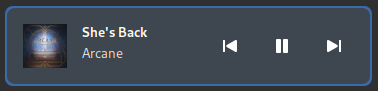
This is what is shown for me on latest master (993336f74ec89cb6cad23dd009251e70548761b6) and with GNOME Shell 42.4. If that is not working for you, what MPRIS indicator are you using and what does the following print for you?
dbus-send --print-reply=literal --dest=org.mpris.MediaPlayer2.spotifyd /org/mpris/MediaPlayer2 org.freedesktop.DBus.Properties.Get string:org.mpris.MediaPlayer2.Player string:Metadata
This is what is shown for me on latest
master(993336f) and with GNOME Shell42.4. If that is not working for you, what MPRIS indicator are you using and what does the following print for you?dbus-send --print-reply=literal --dest=org.mpris.MediaPlayer2.spotifyd /org/mpris/MediaPlayer2 org.freedesktop.DBus.Properties.Get string:org.mpris.MediaPlayer2.Player string:Metadata
Sorry for the delayed response. I am on 42.4 gnome I will rebuild spotifyd to be sure I am using a PKGBUILD so maybe one of the options isn't right? It's just one that I threw together to compile git version of spotifyd. PKGBUILD.txt(if you want to look at the compile options.)
As for what that prints for me it prints:
dbus-send --print-reply=literal --dest=org.mpris.MediaPlayer2.spotifyd /org/mpris/MediaPlayer2 org.freedesktop.DBus.Properties.Get string:org.mpris.MediaPlayer2.Player string:Metadata
   variant       array [
         dict entry(
            mpris:length            variant                int64 181279000
         )
         dict entry(
            mpris:artUrl            variant                https://i.scdn.co/image/ab67616d0000b2730f7ad6d8d829906c17cae210         )
         dict entry(
            xesam:album            variant                hopeless fountain kingdom (Deluxe)         )
         dict entry(
            xesam:title            variant                Bad At Love         )
         dict entry(
            mpris:trackid            variant                spotify:track:7y9iMe8SOB6z3NoHE2OfXl         )
         dict entry(
            xesam:url            variant                https://open.spotify.com/track/7y9iMe8SOB6z3NoHE2OfXl         )
         dict entry(
            xesam:albumArtist            variant                array [
                  Halsey               ]
         )
         dict entry(
            xesam:trackNumber            variant                uint32 11
         )
         dict entry(
            xesam:autoRating            variant                double 0.73
         )
         dict entry(
            xesam:discNumber            variant                int32 1
         )
         dict entry(
            xesam:artist            variant                array [
                  Halsey               ]
         )
      ]
Just to show what I am seeing:

(Just finished rebuilding can confirm I still don't get any image preview)
Ok so part of the issue was I had mrpis incorrectly in my config however still no image preview but slightly different:

Well, that is strange. As you can see in the output you posted above, spotifyd correctly sets all the metadata, so the problem is on GNOME Shell side. Most likely this one, with a workaround described here (which I might have applied, which is why it would be working for me but not for you).
mpris:artUrl variant https://i.scdn.co/image/ab67616d0000b2730f7ad6d8d829906c17cae210
Hmm so I looked at that link and it appears that newer versions of gnome don't actually setcap so there is no capability to remove.
Another thing to say is that it only seems to be spotifyd. mpd shows cover art correctly.
You may be right, I currently just cannot imagine, why it would be doing this. Some things you can try:
- If you have
playerctlinstalled, compare the results ofplayerctl -F metadata mpris:artUrlbetweenmpdandspotifyd(and maybe the official Spotify Client?), when you switch between tracks. - Look around, if something suspicious is shown in the logs of
gnome-shell:journalctl --user -ft gnome-shell
Maybe this helps us get closer to your issue.
You may be right, I currently just cannot imagine, why it would be doing this. Some things you can try:
1. If you have `playerctl` installed, compare the results of `playerctl -F metadata mpris:artUrl` between `mpd` and `spotifyd` (and maybe the official Spotify Client?), when you switch between tracks.

2. Look around, if something suspicious is shown in the logs of `gnome-shell`: `journalctl --user -ft gnome-shell`
Maybe this helps us get closer to your issue.
Thanks for the reply. So looking at playerctl the difference is that mpd uses a local file and spotifyd is using a remote file via https:. As for gnome shell I have the following but I think it is unrelated:
Sep 01 15:30:09 vinox gnome-shell[1850]: == Stack trace for context 0x558f1c01c640 ==
Sep 01 15:30:09 vinox gnome-shell[1850]: #0   558f1c646fc8 i   resource:///org/gnome/gjs/modules/core/overrides/Gio.js:169 (bb995acd560 @ 16)
Sep 01 15:30:09 vinox gnome-shell[1850]: == Stack trace for context 0x558f1c01c640 ==
Sep 01 15:30:09 vinox gnome-shell[1850]: #0   558f1c646fc8 i   resource:///org/gnome/gjs/modules/core/overrides/Gio.js:172 (bb995acd560 @ 77)
Sep 01 15:30:09 vinox gnome-shell[1850]: == Stack trace for context 0x558f1c01c640 ==
Sep 01 15:30:09 vinox gnome-shell[1850]: #0   558f1c646fc8 i   resource:///org/gnome/gjs/modules/core/overrides/Gio.js:169 (bb995acd560 @ 16)
Sep 01 15:30:09 vinox gnome-shell[1850]: == Stack trace for context 0x558f1c01c640 ==
Sep 01 15:30:09 vinox gnome-shell[1850]: #0   558f1c646fc8 i   resource:///org/gnome/gjs/modules/core/overrides/Gio.js:172 (bb995acd560 @ 77)
Sep 01 15:42:24 vinox gnome-shell[1850]: Window manager warning: Buggy client sent a _NET_ACTIVE_WINDOW message with a timestamp of 0 for 0x1a00007
Sep 01 15:47:08 vinox gnome-shell[1850]: libinput error: client bug: timer event10 debounce short: scheduled expiry is in the past (-24ms), your system is too slow
Looking at both of these issues: https://gitlab.gnome.org/GNOME/gnome-shell/-/issues/2284 https://gitlab.gnome.org/GNOME/gnome-shell/-/issues/4624
it sounds like there was a problem with remote urls but it should be fixed? I'm not really sure how to debug this further.
This appears to be the relevant part in the gjs source code to the error that is being thrown still not sure whether it is related: https://gitlab.gnome.org/GNOME/gjs/-/blob/master/modules/core/overrides/Gio.js#L160
I appear to have the same issue with ncspot too. So I am pretty sure this is due to gnome not liking remote urls. I'm curious if their would be a way for a script to cache the cover art locally as a work around till I can figure this out. I don't know too much about dbus or mpris though.
Thanks for investigating!
I'm not sure, either. Indeed, it seems like it should have been fixed some versions ago already. Have you tried the setcap -r /usr/bin/gnome-shell workaround already? If none of this is working, maybe open a bug for gnome-shell in your distribution's bug tracker?
I appear to have the same issue with ncspot too. So I am pretty sure this is due to gnome not liking remote urls. I'm curious if their would be a way for a script to cache the cover art locally as a work around till I can figure this out. I don't know too much about dbus or mpris though.
This wouldn't be too easy, probably, since you'd have to write an application that 1. consumes and 2. re-exports the MPRIS interface that is exposed by spotifyd.
Anyway, good to have ruled out that it's a spotifyd issue. :sweat_smile:
I figured it most likely wouldn't be easy script wise. As for gnome-shell I checked and there is no capabilites set so doing set cap doesn't do anything. And arch does have latest stable release so I'm not really sure. My only guess is maybe I'm missing a dependency for it to work properly but i find that improbable. To test I'm going to download the whole gnome group instead of just gnome-shell to see if having the whole gnome suite helps.
Ahhh I feel dumb now installing the whole gnome group did indeed fix it sorry for wasting your time.
No problem, a missing dependency would have been the last thing I suspected as well! Glad to hear that it works now.