

 SpecFlowOSS
Scenario Tag - @Ignore or @ignore is not working
SpecFlow Version:
- [x ] 3.1
- [x] 3.0
- [ ] 2.4
- [ ] 2.3
- [ ] 2.2
- [ ] 2.1
- [ ] 2.0
- [ ] 1.9
Used Test Runner
- [ ] SpecFlow+Runner
- [ ] MSTest
- [ x] NUnit
- [ ] Xunit
Version number: 3.11
Project Format of the SpecFlow project
- [ ] Classic project format using
packages.config - [ ] Classic project format using
<PackageReference>tags - [ ] Sdk-style project format
.feature.cs files are generated using
- [ x]
SpecFlow.Tools.MsBuild.GenerationNuGet package - [ ]
SpecFlowSingleFileGeneratorcustom tool
Visual Studio Version
- [ x] VS 2019
- [ ] VS 2017
- [ ] VS 2015
Enable SpecFlowSingleFileGenerator Custom Tool option in Visual Studio extension settings
- [ ] Enabled
- [x] Disabled
Are the latest Visual Studio updates installed?
- [x ] Yes
- [ ] No, I use Visual Studio version
<Major>.<Minor>.<Patch>
.NET Framework:
- [ ] >= .NET 4.5
- [ ] before .NET 4.5
- [ ] .NET Core 2.0
- [ ] .NET Core 2.1
- [ ] .NET Core 2.2
- [x ] .NET Core 3.0
- [x] .NET Core 3.1
Test Execution Method:
- [ x] Visual Studio Test Explorer
- [ ] TFS/VSTS/Azure DevOps – Task – PLEASE SPECIFY THE NAME OF THE TASK
- [ ] Command line – PLEASE SPECIFY THE FULL COMMAND LINE
<SpecFlow> Section in app.config or content of specflow.json
{
  "pluginparameters": {
    "variantkey": "Browser"
  }
}
Repro Project
Issue Description
I am trying to skip scenarios while execution based on tags. My scenarios have tags @Ignore and @ignore.

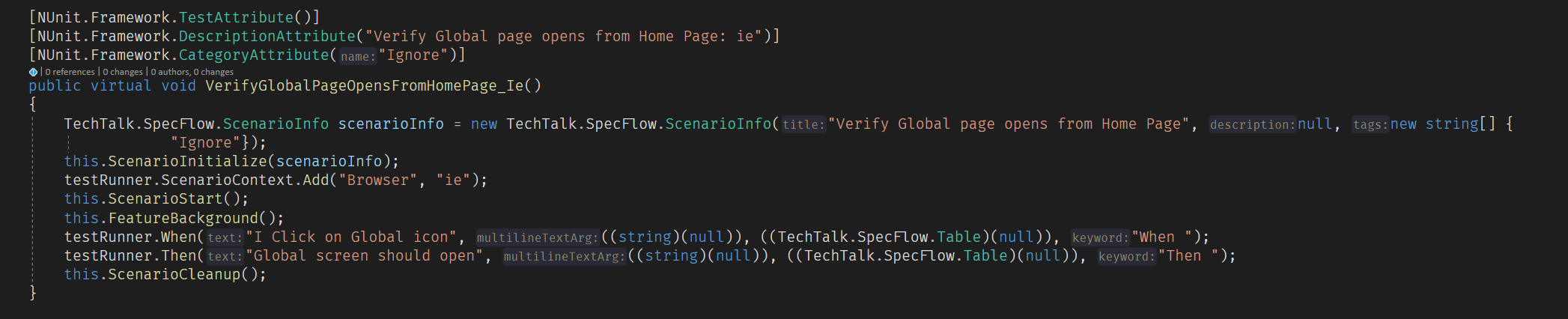
Feature.cs file has:
Steps to Reproduce
- Add the tag @Ignore or @ignore to the scenario
- run tests

@shrikantkaramkar What is not working? And please fix the code. I have no idea what this is? Should be this a hook? A step definition?

Hm, interesting. @shrikantkaramkar what version of the packages do you use? Is this the result of a build or can it be that the old SpecFlowSingleFileGenerator is turned on?
I have an NUnit project at hand using v3.1.97 and if I copy your scenario text into the feature file I get this .cs content generated during build:
        [NUnit.Framework.TestAttribute()]
        [NUnit.Framework.DescriptionAttribute("Verify Global page opens from Home Page")]
        [NUnit.Framework.CategoryAttribute("Ignore")]
        public virtual void VerifyGlobalPageOpensFromHomePage()
        {
            string[] tagsOfScenario = new string[] {
                    "Ignore"};
            TechTalk.SpecFlow.ScenarioInfo scenarioInfo = new TechTalk.SpecFlow.ScenarioInfo("Verify Global page opens from Home Page", null, new string[] {
                        "Ignore"});
#line 11
this.ScenarioInitialize(scenarioInfo);
#line hidden
            bool isScenarioIgnored = default(bool);
            bool isFeatureIgnored = default(bool);
            if ((tagsOfScenario != null))
            {
                isScenarioIgnored = tagsOfScenario.Where(__entry => __entry != null).Where(__entry => String.Equals(__entry, "ignore", StringComparison.CurrentCultureIgnoreCase)).Any();
            }
            if ((this._featureTags != null))
            {
                isFeatureIgnored = this._featureTags.Where(__entry => __entry != null).Where(__entry => String.Equals(__entry, "ignore", StringComparison.CurrentCultureIgnoreCase)).Any();
            }
            if ((isScenarioIgnored || isFeatureIgnored))
            {
                testRunner.SkipScenario();
            }
            else
            {
                this.ScenarioStart();
#line 12
 testRunner.When("I Click on Global icon", ((string)(null)), ((TechTalk.SpecFlow.Table)(null)), "When ");
#line hidden
#line 13
 testRunner.Then("Global screen should open", ((string)(null)), ((TechTalk.SpecFlow.Table)(null)), "Then ");
#line hidden
            }
            this.ScenarioCleanup();
        }
Note the generated line number pragmas and the code for handling the ignore tag. I wonder why these are all missing in your case...

SpecFlowSingleFileGenerator is Turned on.
Attached feature.cs file
// ------------------------------------------------------------------------------
//  <auto-generated>
//      This code was generated by SpecFlow (http://www.specflow.org/).
//      SpecFlow Version:3.1.0.0
//      SpecFlow Generator Version:3.1.0.0
//
//      Changes to this file may cause incorrect behavior and will be lost if
//      the code is regenerated.
//  </auto-generated>
// ------------------------------------------------------------------------------
#region Designer generated code
#pragma warning disable
// Generation customised by SpecFlow.Contrib.Variants
namespace ARK.UITests.FeatureFiles
{
    using TechTalk.SpecFlow;


    [System.CodeDom.Compiler.GeneratedCodeAttribute("TechTalk.SpecFlow", "3.1.0.0")]
    [System.Runtime.CompilerServices.CompilerGeneratedAttribute()]
    [NUnit.Framework.TestFixtureAttribute()]
    [NUnit.Framework.DescriptionAttribute("HomePage")]
    [NUnit.Framework.CategoryAttribute("Browser:ie")]
    public partial class HomePageFeature
    {

        private TechTalk.SpecFlow.ITestRunner testRunner;

#line 1 "HomePage.feature"
#line hidden

        [NUnit.Framework.OneTimeSetUpAttribute()]
        public virtual void FeatureSetup()
        {
            testRunner = TechTalk.SpecFlow.TestRunnerManager.GetTestRunner();
            TechTalk.SpecFlow.FeatureInfo featureInfo = new TechTalk.SpecFlow.FeatureInfo(new System.Globalization.CultureInfo("en-US"), "HomePage", "\tIn order to test app\r\n\tI want to open web site and test ", ProgrammingLanguage.CSharp, new string[] {
                        "Browser:ie"});
            testRunner.OnFeatureStart(featureInfo);
        }

        [NUnit.Framework.OneTimeTearDownAttribute()]
        public virtual void FeatureTearDown()
        {
            testRunner.OnFeatureEnd();
            testRunner = null;
        }

        [NUnit.Framework.SetUpAttribute()]
        public virtual void TestInitialize()
        {
        }

        [NUnit.Framework.TearDownAttribute()]
        public virtual void ScenarioTearDown()
        {
            testRunner.OnScenarioEnd();
        }

        public virtual void ScenarioInitialize(TechTalk.SpecFlow.ScenarioInfo scenarioInfo)
        {
            testRunner.OnScenarioInitialize(scenarioInfo);
            testRunner.ScenarioContext.ScenarioContainer.RegisterInstanceAs<NUnit.Framework.TestContext>(NUnit.Framework.TestContext.CurrentContext);
        }

        public virtual void ScenarioStart()
        {
            testRunner.OnScenarioStart();
        }

        public virtual void ScenarioCleanup()
        {
            testRunner.CollectScenarioErrors();
        }

        public virtual void FeatureBackground()
        {
            testRunner.Given("I have navigated to ark site", ((string)(null)), ((TechTalk.SpecFlow.Table)(null)), "Given ");
        }

        [NUnit.Framework.TestAttribute()]
        [NUnit.Framework.DescriptionAttribute("Verify Global page opens from Home Page: ie")]
        [NUnit.Framework.CategoryAttribute("Ignore")]
        public virtual void VerifyGlobalPageOpensFromHomePage_Ie()
        {
            TechTalk.SpecFlow.ScenarioInfo scenarioInfo = new TechTalk.SpecFlow.ScenarioInfo("Verify Global page opens from Home Page", null, new string[] {
                        "Ignore"});
            this.ScenarioInitialize(scenarioInfo);
            testRunner.ScenarioContext.Add("Browser", "ie");
            this.ScenarioStart();
            this.FeatureBackground();
            testRunner.When("I Click on Global icon", ((string)(null)), ((TechTalk.SpecFlow.Table)(null)), "When ");
            testRunner.Then("Global screen should open", ((string)(null)), ((TechTalk.SpecFlow.Table)(null)), "Then ");
            this.ScenarioCleanup();
        }
    }
}
#pragma warning restore
#endregion
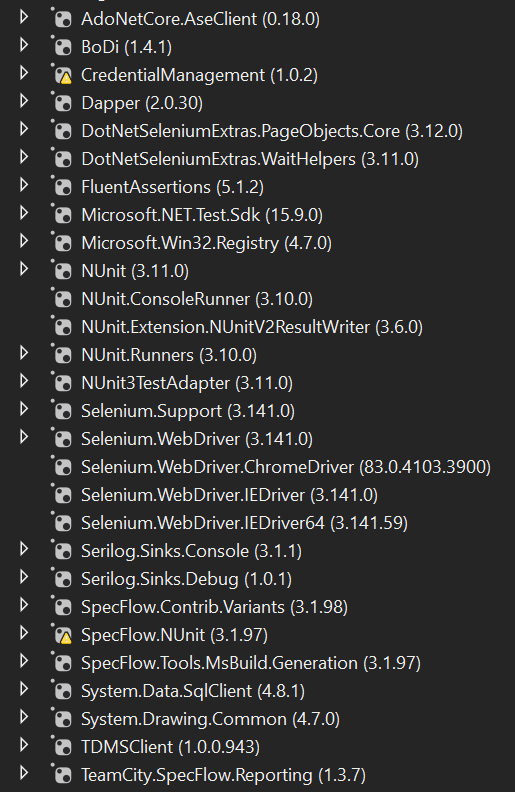
I have below packages:
Please turn off the single file generator as described in the "Configuration" section here: https://specflow.org/documentation/Generate-Tests-from-MsBuild/
Does it solve the issue?
I checked at path: Tools > Options > Specflow: It is set to false

Still, it is not working.

@kbhargava505 With SpecFlow 3.1 we changed the generation of the code-behind file. Please make sure that your code-behind files are generated with the SpecFlow.Tools.MSBuild.Generation and they are generating at build.
I am working with a client that uses MS Test. This is not NUnit-specific. They are using SpecFlow.MSTest 3.4.31, and SpecFlow 3.4.31

Real world scenario: my client was refactoring. The client put @ignore on the test cases known to fail during refactoring; those failure reports show up at their executive level. Severity: low is not true for my client. I am a dev, I get it. @ignore is used in this case for test cases currently broken that "we" intend to keep; if the test case were not worth keeping, everyone has a DEL key. I suggest that @ignore properly used is a higher priority than "low".
@mprochaska-landorphan Could you provide a sample project where we can reproduce this? I see the severity to low because simply only two users until now had this issue. And in that case, I think it is a problem that the code-behind file generation is not properly set up in their projects.
I also can't reproduce it.
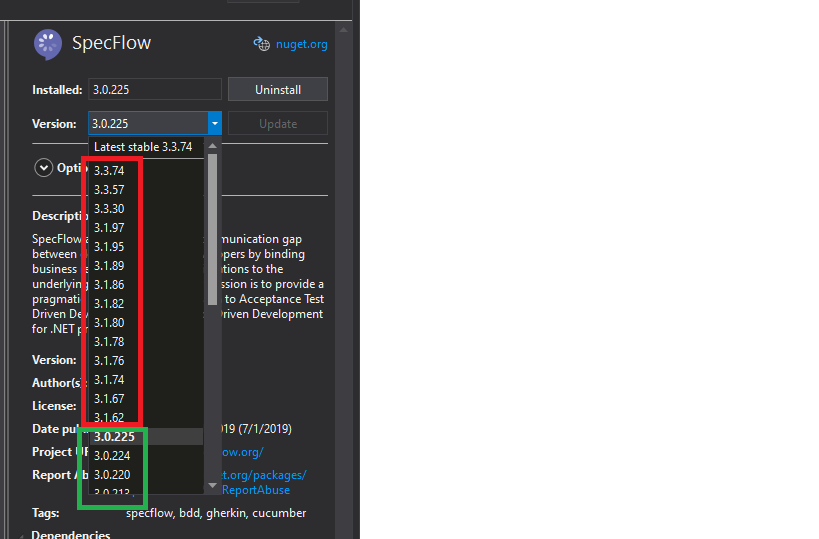
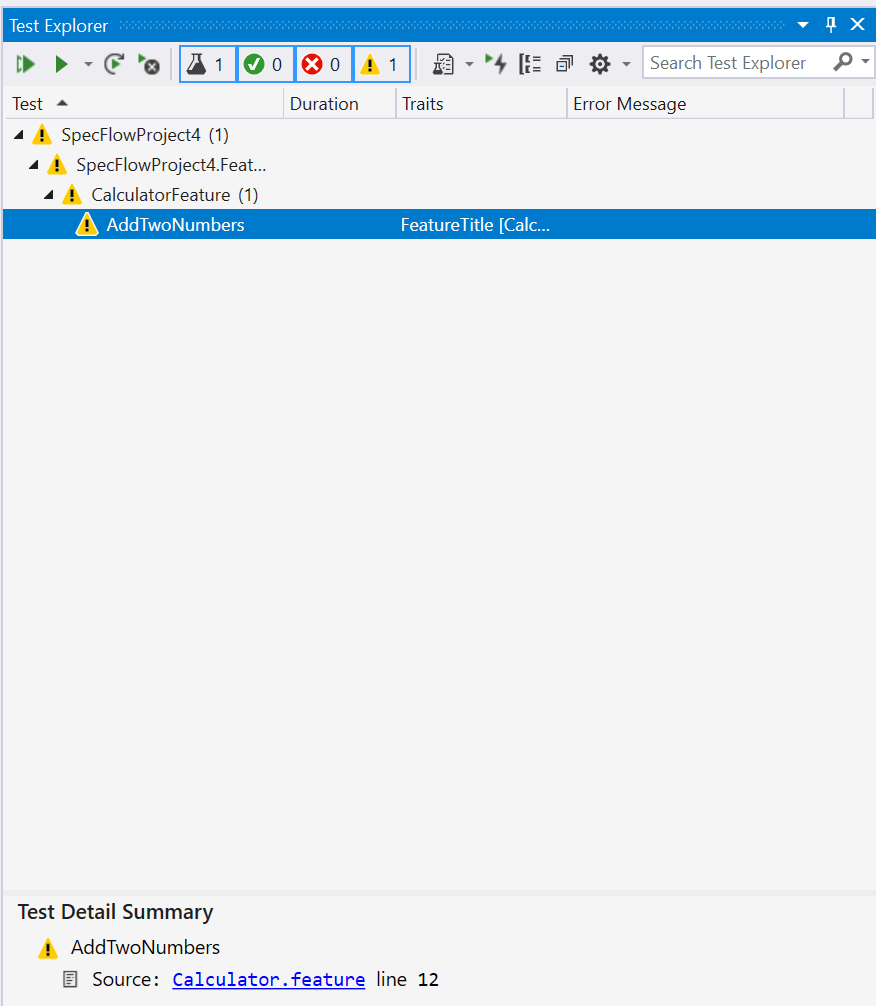
This is what I get in MSTest with 3.0.225:
And this is what I get with the latest version:
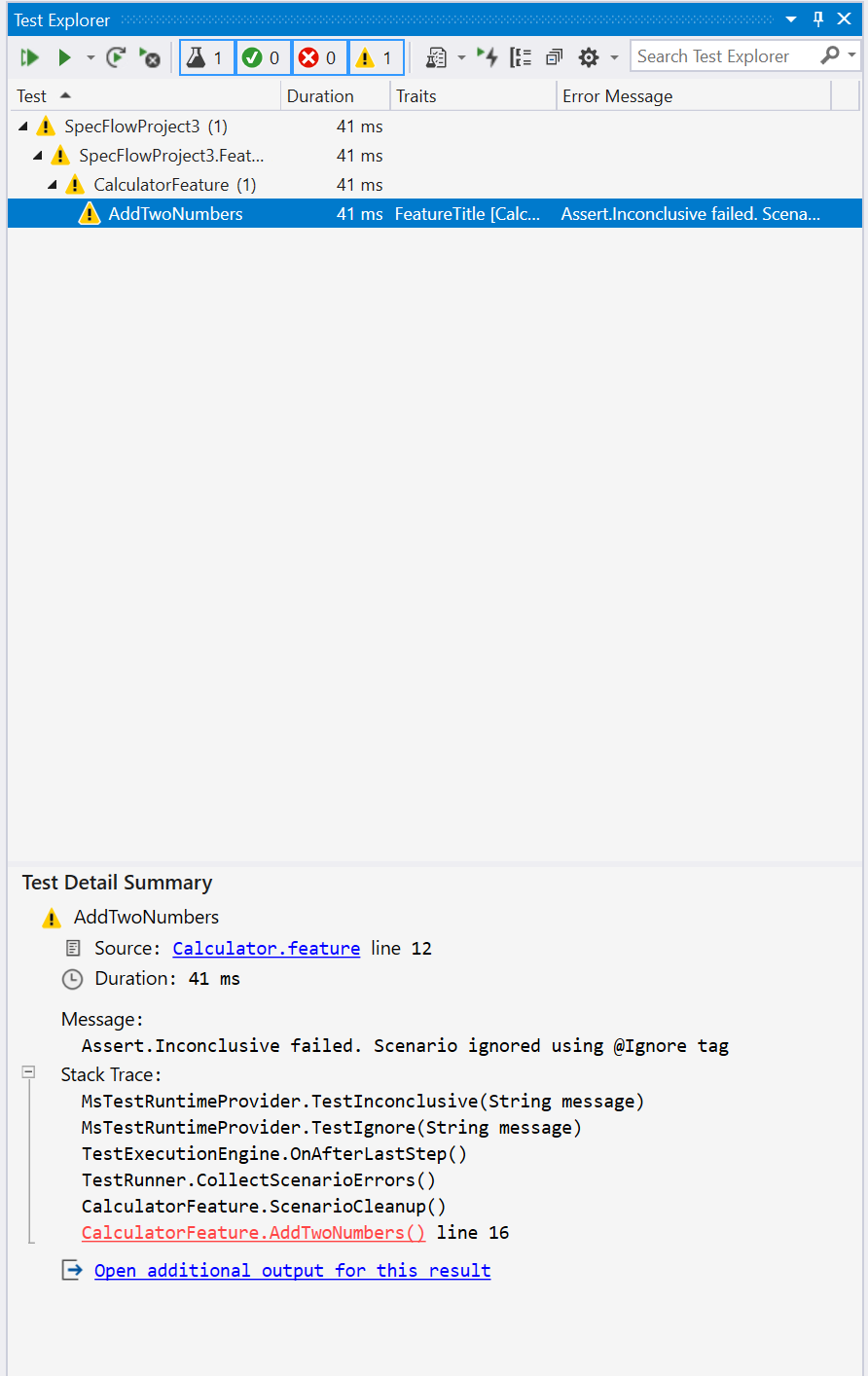
Both times the test is yellow.
What would you expect else? What is for you "properly" ignore a scenario?
@ SabotageAndi I will be happy to produce such an example project stripped to the bare necessities. I too maintain software. Give me about 48 hours based on my current meeting schedule.
I can instruct the team to comment out all ignored tests; I am hoping to find root cause and get either user error resolved, or a fix in the backlog.
I do not expect a fix now! nor Tomorrow! Just in the backlog (I too maintain software :))
"What would you expect else? What is for you "properly" ignore a scenario?" Answer: When I run ignored tests in AzureDevOps, they should not execute nor report FAILED. (This is a relatively new team, on a relatively new pipeline, we do not have logic that says IgnoreTestAttribute => failure). (We are exclusively MSTest behind, we have external bindings, we are dotnetcore3.1).
(I have never seen this behavior before from SpecFlow -- I need time to dig in to get you the details you need (and I need to understand more); I wouldn't call myself a master, but I am no newb).
I will build a simple solution that represents what my team is seeing, run it locally, and run it in the Azure Pipeline, and copy the results here (whether or not it matches what we were originally seeing). It is my responsibility to deliver the same. Fair?
I do appreciate the response; I have seen 1000s upon 1000s of no repro. I get it.
Thank you for your time
~Michael
@mprochaska-landorphan If we have a repro project until Monday, that would be awesome. Then I can plan it for the next iteration (which starts on Tuesday).
The ignored scenarios will be executed, but no bindings for it should be called and we should return the same result as before. So no idea currently, why you get these scenarios as failed. The change to execute also ignored scenarios was needed to support cucumber-messages and how test execution is working in .NET.
@SabotageAndi My current team is in crisis mode because of unrelated issues (it happens). I intend to give you a repro example solution; here is an educated guess based on years working with SpecFlow and conversations with seasoned SpecFlow users looking at their code. In past, SpecFlow used to generate a IgnoreAttribute in MSTest, now it generates a TestCategory("ignore"). If @ignore is just a category, that's fine, we add it to the category filter.
I need to build a sterilized solution using vstest to confirm the above; it absolutely explains the Azure DevOps pipeline failures, that are not seen locally in the UI/VS. I have yet to use dotnet Peek or observe this with my own eyes. I should have no problem creating a repro solution during the weekend (no meetings).
If so, we just put a TestCategory != "ignore" (I am guessing at syntax) for SpecFlow 3.x on Azure DevOps using vstest. The SpecFlow team can decide whether or not formally inserting an IgnoreAttribute is the intended result for MSTest implementations.
(All of the above is speculation; I really need to build and inspect code).
(Local VS/UI test runs are for troubleshooting only; the single source of truth at this customer is how it shows up in the pipeline).
I will build a sterilized minimal solution and report what I see and submit the same. I am also set up for NUnit 3.x so I will do that too.
@mprochaska-landorphan Yes, this things happens. No problem.
I created now a pipeline for one of our MSTest examples (https://github.com/SpecFlowOSS/SpecFlow-Examples/tree/master/NETCore%20Examples/BowlingKata-SpecFlowJson-MsTest) where I added an ignored scenario.
This is the scenario:
@ignore
Szenario: Nur Spares
    Gegeben sei eine neue Bowling-Partie
    Wenn ich 10 mal 1 und 9 werfe
    Und ich 1 werfe
    Dann soll meine Punktzahl 110 sein
And this is the generated code:
        [Microsoft.VisualStudio.TestTools.UnitTesting.TestMethodAttribute()]
        [Microsoft.VisualStudio.TestTools.UnitTesting.DescriptionAttribute("Keine Punkte")]
        [Microsoft.VisualStudio.TestTools.UnitTesting.TestPropertyAttribute("FeatureTitle", "Punkteberechnung")]
        public virtual void KeinePunkte()
        {
            string[] tagsOfScenario = ((string[])(null));
            System.Collections.Specialized.OrderedDictionary argumentsOfScenario = new System.Collections.Specialized.OrderedDictionary();
            TechTalk.SpecFlow.ScenarioInfo scenarioInfo = new TechTalk.SpecFlow.ScenarioInfo("Keine Punkte", null, tagsOfScenario, argumentsOfScenario);
#line 8
this.ScenarioInitialize(scenarioInfo);
#line hidden
            bool isScenarioIgnored = default(bool);
            bool isFeatureIgnored = default(bool);
            if ((tagsOfScenario != null))
            {
                isScenarioIgnored = tagsOfScenario.Where(__entry => __entry != null).Where(__entry => String.Equals(__entry, "ignore", StringComparison.CurrentCultureIgnoreCase)).Any();
            }
            if ((this._featureTags != null))
            {
                isFeatureIgnored = this._featureTags.Where(__entry => __entry != null).Where(__entry => String.Equals(__entry, "ignore", StringComparison.CurrentCultureIgnoreCase)).Any();
            }
            if ((isScenarioIgnored || isFeatureIgnored))
            {
                testRunner.SkipScenario();
            }
            else
            {
                this.ScenarioStart();
#line 9
    testRunner.Given("eine neue Bowling-Partie", ((string)(null)), ((TechTalk.SpecFlow.Table)(null)), "Gegeben sei ");
#line hidden
#line 10
    testRunner.When("alle meine Kugeln in der Seitenrinne landen", ((string)(null)), ((TechTalk.SpecFlow.Table)(null)), "Wenn ");
#line hidden
#line 11
    testRunner.Then("soll meine Punktzahl 0 sein", ((string)(null)), ((TechTalk.SpecFlow.Table)(null)), "Dann ");
#line hidden
            }
            this.ScenarioCleanup();
        }
So no [IgnoreAttribute] is created, but if you look at the code, you see that when a "ignore" tag is there, the steps are not executed.
The pipeline result for this example looks now like this:
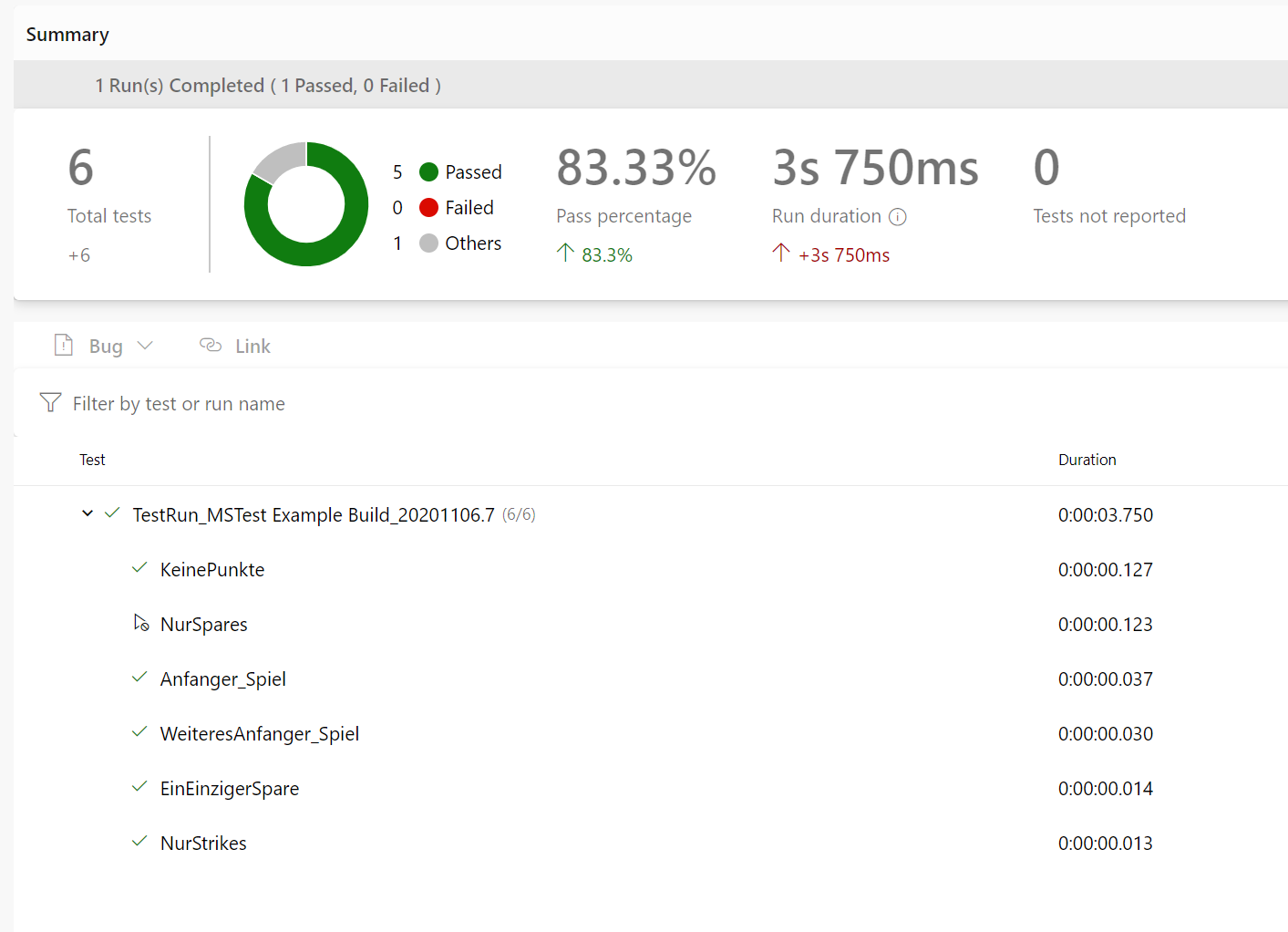
Link: https://dev.azure.com/specflow/SpecFlow/_build/results?buildId=5450&view=ms.vss-test-web.build-test-results-tab
The ignored scenario has the result state "Others".
So in this example, it is not needed to filter out the ignore tags/categories manually.
Could you check if you have a similar generated code? How do you configure your VSTest test task?
There was a time I thought in German, now, I only understand Jede for Sich, und Gott gegan alles (good movie) :)
I think I understand. I took a report from my devops engineeers. I am an architect am cutting out all of the middle men. It is just me and the code.
I am building both a MStest and NUnit3.x projects to see how it lands. My issue is with MSTest as reported by my devops engineers; I see issues on the original thread from NUnit, why not do both? It is relatively easy for me to build a solution with 2 projects, one of each flavor.
I no longer understand German, I do speak MSTest and NUnit.3x :) Aber Ich spreche nur ein bischen Deutch. (in pigeon German; I am certain I totally screwed that up, I have not spoken German in many decades but I try when spoken to in German; I studied German language for many years; just not much use in Redmond, WA)
Give me a couple of hours,
Tchuiss! :)
~Michael
I give up. I was trying to post a workaround to @gasparnagy. GitHub is now deleting code for developers trying to help the broader community of developer.
I love SpecFlow; I have been using it for more than 10 years; I am so mad at GitHub right now I think it best I say nothing. See: https://github.com/specsolutions/deveroom-visualstudio/issues/60
If I cannot post a workaround in MSBUILD to github; I will just handle this privately with my client. I sent mail to github.
On this issue; either your are emitting a MSTest IgnoreAtrribute, or you are not. At the very least, you are issuing an "ignore" test category; I can work with that.
@gasparnagy. I cannot post proof of source versus deployed for the same reasons. Discovery needs to read from deployed, not source. I am xcopying external bindings to the root of consumers in a after build target to get the tools to work in local builds. I would post the MSBuild for the same but GitHub deletes it.
I truly give up. I am no longer a submitter, just a reader. I absolutely love your SpecFlow! The policing by github is horrible. I cannot even show you my workaround because they automatically delete MSBUILD code; and you you do not understand my English; because this is hard to describe. I am done done.
Heaven forbid I share working code on a domain dedicated to developers :) If you want the MSBuild code that solves external bindings, you must contact me privately apparently.
I am sorry I wasted both @SabotageAndi and @gasparnagy time. I will never post a bug on this site again. The site deletes a developer's sharing code with other devlopers in comments (without the courtesy of even saying "deleted"). It is just a repo for me from now on.
I do appreciate your time; @SabotageAndi and @gasparnagy, that github blocks me from posting a workaround that shows the issue; stymies me. I truly give up. Consider me a reader (and I am 10 years into specflow and muted).
I have another huge week in terms of hours; I set aside time this weekend to talk to @SabotageAndi and @gasparnagy on the issues I see with my client; and all code is deleted by github. I have nothing but praise for @SabotageAndi and @gasparnagy, github, please create a site where developers cannot share code; that will work well :P
I am facing the same issue too, in Specflow v3.5.14, couldnt find ignore attribute in feature.cs. Any workaround?

Hey @lyndealim, please open a new issue, where you can fill all the required data for an issue.

Hello, i'm using the last version of ExtentReport "5.0.2" for .NET and the version 3.9.74 of SpecFlow and i think that i'm facing an issue with this tag. So when i add the tag @ignore in my feature, i can see in my generated report only the passed and failed scenarios but not the same for the skipped scenarios. Can someone help me please to show all the status of scenario (Pass, Fail, Skip and Warn)?
