

 SpecFlowOSS
[DevExE2E][NET8] The numbers are uncolorful in Calculator.feature.cs file, and System.IO.FileNotFoundException throw in Output- SpecFlow.
Used Visual Studio
Visual Studio 2019
Are the latest Visual Studio updates installed?
Yes
SpecFlow Section in app.config or content of specflow.json
No response
Issue Description
Actual Results:
The numbers “50, 70…” are uncolorful in Calculator.feature.cs file, and System.IO.FileNotFoundException throw in Output- SpecFlow.
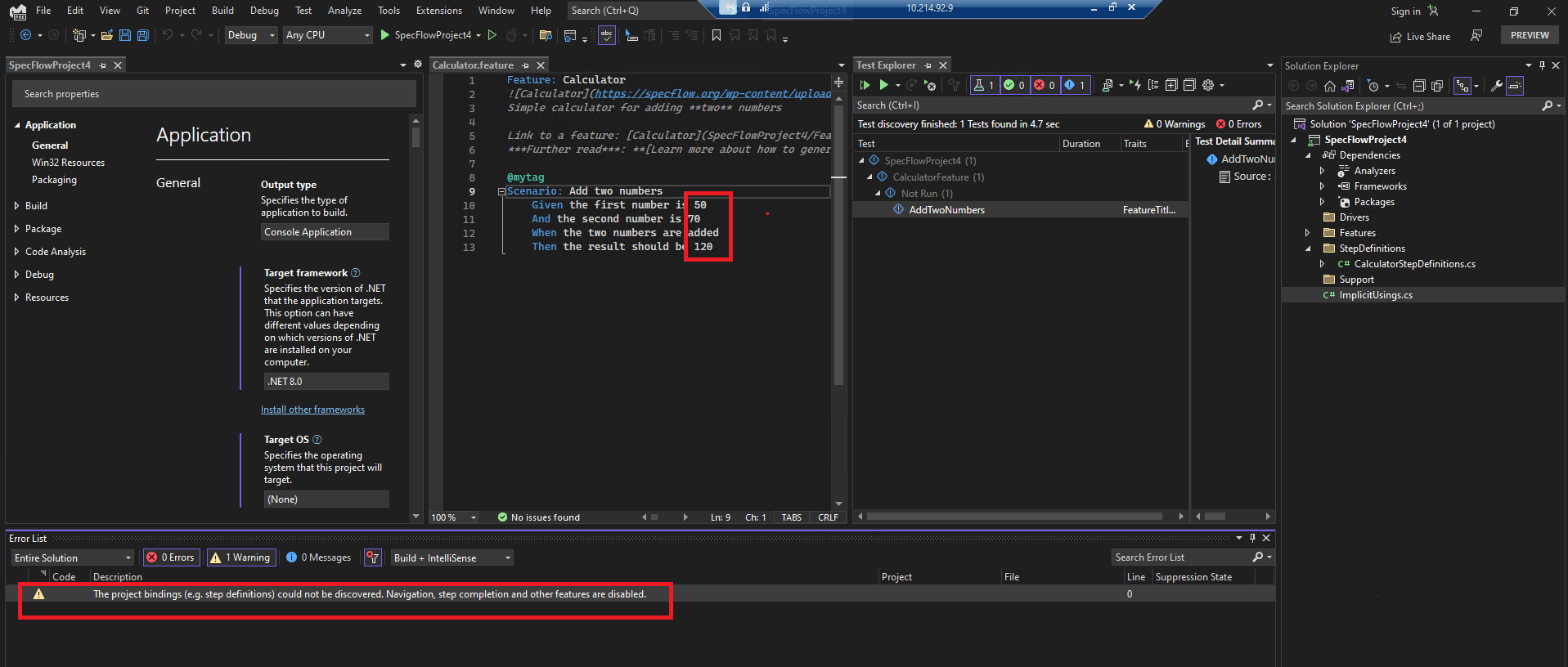
Expected Results:
No error and waring show in Error Lists/Outputs.

Steps to Reproduce
Note: This issue doesn’t repro if we update tfm from .NET6.0 to .NET7.0. We use the latest VS 2022 build. But there's no option in above "Used Visual Studio" dropdown list.
Affected Branch: Rel.d/17.6 Affected Build: Version 17.6.0 Preview 3.0 [33603.287.d17.6] + dotnet-sdk-8.0.100-preview.3.23178.7 Affected Product Language: Affected Build link: Pipelines - Run rel.d17.6-33603.287 (visualstudio.com) + Pipelines - Run 20230329.2-8.0.100-preview.3.23178.7-172219 artifacts (azure.com) +feeds: https://pkgs.dev.azure.com/dnceng/public/_packaging/8.0.100-preview.3.23178.7-shipping/nuget/v3/index.json
Pre-steps:
- Navigate to "Extensions -> Manage Extensions ->Online" and search for "SpecFlow" in the search bar.
- Hit Download. You'll need to restart VS for the installation to completed.
Steps:
- Create a new project -> search and select "SpecFlow Project"
- On Create a new SpecFlow Project page-> Framework: .NET6.0-> Test Framework: "MSTest "-> check "Add FluentAssertions library" -> click "Create"
- Go to project properties page, update tfm from .NET6.0 to .NET8.0.
- Build the project.
- Double click AddTwoNumbers test in TE window -> check Calculator.feature.cs file
--Error List:
| Severity | Code | Description | Project | File | Line | Suppression State |
|---|---|---|---|---|---|---|
| Warning | The project bindings (e.g. step definitions) could not be discovered. Navigation, step completion and other features are disabled. | 0 |
-Logs:
Info: OnActivityStarted: Starting Visual Studio
Extension...
Info: CreateProjectScope: Initializing project: SpecFlowProject4
Info: OnSettingsInitialized: Project settings initialized: .NETCoreApp,Version=v8.0,SpecFlow:3.9.40
Warning: AndDiscoveryProviderSucceed: Error during binding discovery.
Command executed:
C:\Users\v-hozha1\source\repos\SpecFlowProject4\SpecFlowProject4\bin\Debug\net8.0> C:\Program Files\dotnet\dotnet.exe exec C:\Users\v-hozha1\AppData\Local\Microsoft\VisualStudio\17.0_00079088\Extensions\rvnmzffg.q20\Connectors\Generic-net7.0\specflow-vs.dll discovery C:\Users\v-hozha1\source\repos\SpecFlowProject4\SpecFlowProject4\bin\Debug\net8.0\SpecFlowProject4.dll ""
Exit code: 4
Message:
System.IO.FileNotFoundException: Could not load file or assembly 'System.Runtime, Version=8.0.0.0, Culture=neutral, PublicKeyToken=b03f5f7f11d50a3a'. The system cannot find the file specified.
File name: 'System.Runtime, Version=8.0.0.0, Culture=neutral, PublicKeyToken=b03f5f7f11d50a3a'
at System.ModuleHandle.ResolveMethod(QCallModule module, Int32 methodToken, IntPtr* typeInstArgs, Int32 typeInstCount, IntPtr* methodInstArgs, Int32 methodInstCount)
at System.ModuleHandle.ResolveMethodHandleInternal(RuntimeModule module, Int32 methodToken, ReadOnlySpan`1 typeInstantiationContext, ReadOnlySpan`1 methodInstantiationContext)
at System.ModuleHandle.ResolveMethodHandle(Int32 methodToken, RuntimeTypeHandle[] typeInstantiationContext, RuntimeTypeHandle[] methodInstantiationContext)
at System.RuntimeType.GetMethodBase(RuntimeModule scope, Int32 typeMetadataToken)
at System.Reflection.RuntimeCustomAttributeData..ctor(RuntimeModule scope, MetadataToken caCtorToken, ConstArray& blob)
at System.Reflection.RuntimeCustomAttributeData.GetCustomAttributes(RuntimeModule module, Int32 tkTarget)
at SpecFlowConnector.ReflectionExecutor.Execute(DiscoveryOptions options, Func`3 testAssemblyFactory, ILogger _log, IAnalyticsContainer analytics) in D:\a\1\s\Connectors\SpecFlow.VisualStudio.SpecFlowConnector.Generic\ReflectionExecutor.cs:line 15
at SpecFlowConnector.Runner.ExecuteDiscovery(DiscoveryOptions options, Func`3 testAssemblyFactory) in D:\a\1\s\Connectors\SpecFlow.VisualStudio.SpecFlowConnector.Generic\Runner.cs:line 50
at SpecFlowConnector.Runner.<>c__DisplayClass4_0.<Run>b__0(ConnectorOptions options) in D:\a\1\s\Connectors\SpecFlow.VisualStudio.SpecFlowConnector.Generic\Runner.cs:line 30
at FunctionalExtensions.Map[TSource,TResult](TSource this, Func`2 fn) in D:\a\1\s\Connectors\SpecFlow.VisualStudio.SpecFlowConnector.Generic\NetExtensions\FunctionalExtensions.cs:line 5
at SpecFlowConnector.Runner.Run(String[] args, Func`3 testAssemblyFactory) in D:\a\1\s\Connectors\SpecFlow.VisualStudio.SpecFlowConnector.Generic\Runner.cs:line 26
Newtonsoft.Json.JsonReaderException: Unexpected character encountered while parsing value: D. Path '', line 0, position 0.
at Newtonsoft.Json.JsonTextReader.ParseValue()
at Newtonsoft.Json.JsonReader.ReadForType(JsonContract contract, Boolean hasConverter)
at Newtonsoft.Json.Serialization.JsonSerializerInternalReader.Deserialize(JsonReader reader, Type objectType, Boolean checkAdditionalContent)
at Newtonsoft.Json.JsonSerializer.DeserializeInternal(JsonReader reader, Type objectType)
at Newtonsoft.Json.JsonConvert.DeserializeObject(String value, Type type, JsonSerializerSettings settings)
at Newtonsoft.Json.JsonConvert.DeserializeObject[T](String value, JsonSerializerSettings settings)
at SpecFlow.VisualStudio.Connectors.OutProcSpecFlowConnector.Deserialize(RunProcessResult result, Func`2 formatErrorMessage)
Warning: AndDiscoveryProviderSucceed: The project bindings (e.g. step definitions) could not be discovered. Navigation, step completion and other features are disabled.
Please check the error message above and report to https://github.com/SpecFlowOSS/SpecFlow.VS/issues if you cannot fix.
Link to Repository Project
No response

