
SpecFlow.VisualStudio
 SpecFlow.VisualStudio copied to clipboard
 SpecFlowOSS
External Step Assembly is not recognized and all steps turned purple after installed MSBuild Integration
SpecFlow Version:
- [x] 3.0
- [ ] 2.4
- [ ] 2.3
- [ ] 2.2
- [ ] 2.1
- [ ] 2.0
- [ ] 1.9
Used Test Runner
- [ ] SpecFlow+Runner
- [ ] MSTest
- [x] NUnit
- [ ] Xunit
Version number:
Project Format of the SpecFlow project
- [x] Classic project format using
packages.config - [ ] Classic project format using
<PackageReference>tags - [ ] Sdk-style project format
.feature.cs files are generated using
- [x]
SpecFlow.Tools.MsBuild.GenerationNuGet package - [ ]
SpecFlowSingleFileGeneratorcustom tool
Visual Studio Version
- [ ] VS 2019
- [x] VS 2017
- [ ] VS 2015
Enable SpecFlowSingleFileGenerator Custom Tool option in Visual Studio extension settings
- [ ] Enabled
- [x] Disabled
Are the latest Visual Studio updates installed?
- [x] Yes
- [ ] No
.NET Framework:
- [x] >= .NET 4.5
- [ ] before .NET 4.5
- [ ] .NET Core 2.0
- [ ] .NET Core 2.1
- [ ] .NET Core 2.2
- [ ] .NET Core 3.0
Test Execution Method:
- [x] Visual Studio Test Explorer
- [ ] TFS/VSTS/Azure DevOps – Task – PLEASE SPECIFY THE NAME OF THE TASK
- [ ] Command line – PLEASE SPECIFY THE FULL COMMAND LINE
<SpecFlow> Section in app.config or content of specflow.json
Repro Project
Issue Description
Steps to Reproduce

Hi Andi, I have recently installed MSBuild Generation pkg.
The .config contents are same as in my previous ticket https://github.com/techtalk/SpecFlow/issues/1570
I could run the tests via Resharper successfully with the code behind files generated by Specflow version 3.0.0.0. However, I noticed that the feature files still show the steps purple even though the steps are bound. This is strange and if I click on the step it will prompt me to generate. But all the steps are bound as I see in the .cs file. Could you please help. I have attached an image to show how my feature file is now looking. I have also tried the stepmap cache. But does not help. Please advise.
Regards, Vijaya
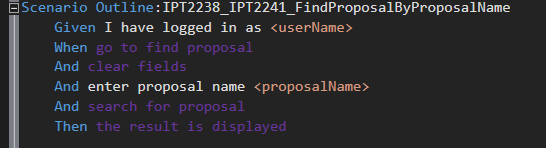
The highlighting has nothing to do with the MSBuild generation. This is the VS Extension alone. And it had always problems with steps from an external assembly. I think the first issue about it is this https://github.com/techtalk/SpecFlow/issues/838

Hi Andi, Could you advise on the resolution for VS Extension issue not identifying the steps. I have upgraded to VS 2019 and the VS Specflow extension 2019.0.31.31805.
I found that in the issue (https://github.com/techtalk/SpecFlow/issues/1499) ,a fix was supplied as part of version: 2019.0.9.46639. But I am on a later version. I wonder that the issue still persists. Could you please help. I am stuck here as I cannot navigate through the steps.
Regards, Vijaya
@VijayaSree2019 Have a log at the Troubleshooting docs: https://specflow.org/documentation/Troubleshooting/
Hi Andi, I have tried all the trouble shooting tricks like deleting the step map and restarting VS, uninstalling Specflow and install agian. But does not seem to help. The step map is generated incorrectly as below: Example: xxxxx.feature.cs","TimeStamp":"2019-05-31T12:00:23.989867+10:00","StepDefinitions":[]}
In the tracing, I could see the below:
[13:40:54.3035767] ProjectFeatureFilesTracker: Analyzing feature file: Workflow\xxxx.feature [13:40:54.3055767] GherkinProcessingScheduler: Applying task 'Analyze all finishing (ProjectFeatureFilesTracker)' on thread: 31 [13:40:54.3065767] VsGeneratorInfoProvider: Discovering generator information... [13:40:54.3125767] VsGeneratorInfoProvider: Runtime found at xxxxxxx\Assemblies\SpecFlow.3.0.213\lib\net45 [13:40:54.3135767] VsGeneratorInfoProvider: Unable to detect generator path [13:40:54.3135767] RemoteGeneratorServices: Creating out of process remote wrapper for the project's generator ( at )
My packages.config has the below <package id="SpecFlow" version="3.0.213" targetFramework="net45" /> <package id="SpecFlow.Tools.MsBuild.Generation" version="3.0.213" targetFramework="net45" />
I could fix this by installing specflow VSIX from marketplace and not by Visual Studio. Now it is stepping through the definitions.
@SabotageAndi I am also seeing this behavior. Are we going to get a fix for the 2019 Visual Studio extension? (bug SpecFlowOSS/SpecFlow#1499 was referenced as a fix for the 2017 Visual Studio extension)

https://github.com/techtalk/SpecFlow.VisualStudio/releases/tag/v2017.1.13 I used this specific vsix to fix my project on VS 2017 latest version.
Hi Andi, This problem seems to persist once I close Visual Studio and reopen it or restart my pc. It is turning all steps to purple. So I am uninstalling Specflow extension in each such instance and then installing using vsix package. Do you reckon there is a good workaround or fix in the near future.

