
SpecFlow.VS

SpecFlow.VS copied to clipboard
 SpecFlowOSS
Ambiguous steps displayed in Visual Studio 2022 when Specflow.Autofac higher than 3.9.58 is referenced
Used Visual Studio
Visual Studio 2022
Are the latest Visual Studio updates installed?
Yes
SpecFlow Section in app.config or content of specflow.json
No response
Issue Description
Visual studio 2022 Specflow Extension shows Ambiguous steps wrongly when Specflow.Autofac 3.9.69 or 3.9.74 is referenced.
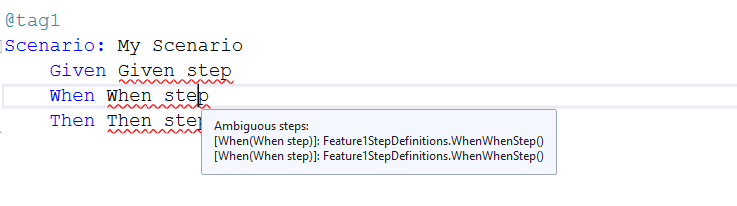
Steps to Reproduce
- Create an empty NUnit project.
- Use Visual Studio 2022 Specflow extension v2022.1.66 PackageReferences:
<PackageReference Include="SpecFlow.Autofac" Version="3.9.74" />
<PackageReference Include="SpecFlow.NUnit" Version="3.9.74" />
- Add feature file and generate step definitions.
Link to Repository Project
https://drive.google.com/file/d/1LRTVHFlPHKGIbwOzJsv_zGFHFocgT5aG/view
