

 SpacingBat3
Can't unmute microphone
Aknowledgements
-
[X] I have checked that there's no other issue describing the same or similar problem that I currently have, regardless if it has been closed or open.
-
[X] I can confirm that this is not an issue with the Discord website, but it is a problem specific to the WebCord itself. I have tested if this bug occurs on Chromium/Chrome or any other Chromium-based browser that uses unpatched/upstream Chromium engine.
-
[ ] I have tried running the build from the
masterbranch and it does not have any fixes implemented according to my issue. -
[ ] My issue describes one of the unstable and/or not fully implemented features.
-
[ ] I have found a workaround to mitigate or temporarily fix this issue in affected releases (please write it in Additional context section below).
Operating System / Platform
🐧️ Linux
Operating system architecture
x64 (64-bit Intel/AMD)
Electron version
19.0.10 / Chromium: 102.0.5005.167 / NodeJS: 16.14.2
Application version
v3.6.0
Bug description
Can't unmute microphone in voice channel/dms. Microphone permission enabled.
Additional context
[AudioActionCreators] unknown getUserMedia error: NotReadableError


Is it granted via the WebCord settings window?
Yes. When it don't granted Discord says no permission.
Also have you read the FAQ?
Yes.
Discord test microphone works but microphone unmute button don't work and test don't show loudness of sound.
Also have you read the FAQ?
Yes.
It sounds like you have to set the default device in the settings (probably pavucontrol). I can't reproduce this issue, at least on the latest builds.
Previously I reproduced it after commit 2d0c2c2, but it has been fixed in 58bd427. The commit 2d0c2c2 didn't make it into the stable, so that's definitely not the same issue.
It sounds like you have to set the default device in the settings (probably pavucontrol).
As a side note, you probably have to restart WebCord in order to apply changes.
If that doesn't work, I'll probably can't help you. I'll check if any bugs were in 3.6.0. You could also check if master branch contains any fixes that works for you.
Same issue here, to help you reproduce the issue this is the audio setup: Pipewire on Fedora 35 with X11 compisitor, never even had pavucontrol on this install since I left arch and don't use pulse so it felt really weird having to download it when the mic is already set to default in both gnome sound settings and EasyEffects.
Followup: Even shows default in pavucontrol, disabled all other mics and removed default, set it again then restarted webcord to no avail.

it felt really weird having to download it when the mic is already set to default in both gnome sound settings
This is why I said system audio settings, which is distro-agnostic. On XFCE it is pavucontrol.
Pipewire on Fedora 35 with X11 compisitor
I'm also on PipeWire/X11 (XFCE) and everything works fine in the master builds. I haven't checked the stable releases yet.
Note: from my understanding, this error implies Chromium (not particular site) has failed to get an access to the specific device. I've found on the internet that on Windows this error may be shown when any site tries to access the camera that is already being used in another application:
[AudioActionCreators] unknown getUserMedia error: NotReadableError
This means this is internal Chromium engine error and I can't do anything about this. And until I won't reproduce it, I won't be able to find any specific cause of it.
Fedora 36/PipeWire/Wayland
Hello everyone. I have a similar problem and I read FAQ, and set default microphone using pactl tool (isn't that right?).
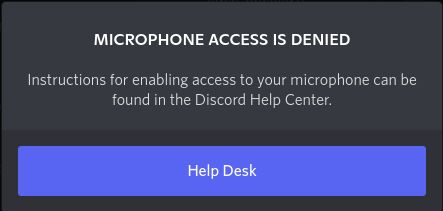 Then I open web version of discord, and I didn't give permission to use the microphone when the browser tried to get permission. Then I saw exactly the same sign as in the screenshot, and after that, the behavior web discord became the same as webcord. Is it related somehow? The same situation with webcam. And webcord don't request permission, is this how it should be? I just don't know how it should work.

Fedora 36/PipeWire/Wayland Hello everyone. I have a similar problem and I read FAQ, and set default microphone using pactl tool (isn't that right?).
Have you granted permissions to it within the app?
Have you granted permissions to it within the app?
Webcord didn't request permissions for microphone and web cam, if that's what you're about. But screen share work, although didn't request permission for it too
Have you granted permissions to it within the app?
Webcord didn't request permissions for microphone and web cam, if that's what you're about. But screen share work, although didn't request permission for it too
Screenshare permission is granted by the default, as it is safe to use it (WebCord will manage the permission anyway by showing the selection screen or passing it to PipeWireCapturer). You have to go into the settings and manually grant them after the installation.
Screenshare permission is granted by the default, as it is safe to use it (WebCord will manage the permission anyway by showing the selection screen or passing it to PipeWireCapturer). You have to go into the settings and manually grant them after the installation.
I just couldn't find the permissions settings, I only saw general settings, so stupid. But now it works! Great app, thank you!!!
I think I'll close this issue, I can't reproduce it and since WebCord has updated and also uses the newer Electron version, it might be fixed if it was a bug in code.
it felt really weird having to download it when the mic is already set to default in both gnome sound settings
This is why I said system audio settings, which is distro-agnostic. On XFCE it is
pavucontrol.Pipewire on Fedora 35 with X11 compisitor
I'm also on PipeWire/X11 (XFCE) and everything works fine in the
masterbuilds. I haven't checked the stable releases yet.Note: from my understanding, this error implies Chromium (not particular site) has failed to get an access to the specific device. I've found on the internet that on Windows this error may be shown when any site tries to access the camera that is already being used in another application:
[AudioActionCreators] unknown getUserMedia error: NotReadableError
This means this is internal Chromium engine error and I can't do anything about this. And until I won't reproduce it, I won't be able to find any specific cause of it.
Just to note, I had also done pavucontrol as you said just forgot to include it, because it didn't work either. Will try a newer version down the line, currently testing discord-screenshare which has right click copy image / video link, screen sharing w/ audio and mic works. Thanks!