

 SpacingBat3
Status changes and the Windows notifications
Because WebCord doesn't track activity outside the program unlike Discord, your profile will be set to Idle if you haven't interacted with the program for a little while. This is a bit annoying, as despite being Online it won't show up that way even if you want it to.
Obviously adding tracking would defeat one of the main purposes of WebCord, but being able to stop automatic status changes would be helpful feature to add, at least for the online status. I'm sure it's not possible to just disable this due to how Discord works, but implementing a setting or something that just periodically sends a sort of keep-alive signal to stay online seems doable.
Another thing that would be a nice change is be the programs name in the Windows notifications. Currently, it shows up as "electron.app.WebCord". This really isn't that big of a deal as it doesn't actually impact anything in terms of usability, but changing it to just show up as "WebCord", possibly with an icon, would look a lot nicer.

Another thing that would be a nice change is be the programs name in the Windows notifications. Currently, it shows up as "electron.app.WebCord".
I don't think there's a way to change this, at least from Electron's code side. Maybe there's a way to configure something in Electron packager through.
I'm sure it's not possible to just disable this due to how Discord works, but implementing a setting or something that just periodically sends a sort of keep-alive signal to stay online seems doable.
If Discord assumes you're actively using it, it will also assume that rendering animations in background is OK (i.e. GIFs, SVG) which is what I would like to prevent to conserve the resources. I believe in older Discord there was a setting to actually disable automatic idle status, but right now I can't find it.

I don't think there's a way to change this, at least from Electron's code side. Maybe there's a way to configure something in Electron packager through.
Gotcha, I may try to at least see if I can change this using the Windows registry. I'll update here if I can figure out a way for anyone who wants to do the same.
If Discord assumes you're actively using it, it will also assume that rendering animations in background is OK (i.e. GIFs, SVG) which is what I would like to prevent to conserve the resources. I believe in older Discord there was a setting to actually disable automatic idle status, but right now I can't find it.
Ah, that makes sense. Discord doesn't seem to keep rendering animations for me unless the window is actually active though, as all animations freeze if I go to something else. It wouldn't need to be a constant thing, just an occasional ping to stop the status from going to idle. I may try and to do this for myself using an Auto Hotkey script. If you can figure out a way to re enable the previous setting instead though, that would be really great.
Hey, it seems like the notification name can be set properly according to this https://stackoverflow.com/questions/64237127/electron-app-notification-states-the-app-sending-notification-is-electron-app-a
Hey, it seems like the notification name can be set properly according to this https://stackoverflow.com/questions/64237127/electron-app-notification-states-the-app-sending-notification-is-electron-app-a
AppUserModelId should be already set in the latest stable release (to SpacingBat3.WebCord). The issue that depended on it was #164.
As a side note, take a look how AppUserModelId was implemented in v3.5.2:
https://github.com/SpacingBat3/WebCord/blob/561e01e8c1b09ca71c4c96ef05058d0f8e3fcadb/sources/code/common/main.ts#L81-L86
https://github.com/SpacingBat3/WebCord/blob/561e01e8c1b09ca71c4c96ef05058d0f8e3fcadb/sources/code/common/modules/client.ts#L11-L24
https://github.com/SpacingBat3/WebCord/blob/561e01e8c1b09ca71c4c96ef05058d0f8e3fcadb/sources/code/common/modules/client.ts#L27-L45
I do not see any bugs there. The current implementation changed a little, since it uses defaultBuildInfoConfig as a fallback value to actually let WebCord know which flag or feature is the default one.
Also, you might think why SpacingBat3.WebCord and not WebCord? This is to actually conform with the spec.
I was actually in the middle of checking it out when you posted this. I'm not really familiar with typescript but I took a look at the code, so apologies if I misunderstand anything, but two things seem to stand out to me.
The first is that AppUserModelId is set in /sources/code/common/main.ts, but not in /sources/main/windows/main.ts so perhaps its being overwritten somehow? The other thing that confused me, is that build info comes from client.ts which mentions buildInfo.json, but I can't seem to find the actual buildInfo.json file anywhere.
These may both mean absolutely nothing, as like I said I don't really understand how this is all put together, but it caught my eye.
It might also be possible that the name Windows is resolving isn't updating, so perhaps the name it associates with WebCord is coming from a version that was previously installed before the change. I'll try to run WebCord in a clean VM and see if it changes at all.
Just tried out WebCord in a clean Windows 10 VM, and the notification name is still showing up as 'electron.app.WebCord', so it seems like the change implemented in v3.5.2 isn't working properly.
The first is that AppUserModelId is set in /sources/code/common/main.ts, but not in /sources/main/windows/main.ts so perhaps its being overwritten somehow?
Nah, the directory structure has been chosen to represent at which process the given module is functional. common is functional at both main and renderer.
The other thing that confused me, is that build info comes from client.ts which mentions buildInfo.json, but I can't seem to find the actual buildInfo.json file anywhere.
That's because it is generated on build time, as the name says by itself.
It might also be possible that the name Windows is resolving isn't updating, so perhaps the name it associates with WebCord is coming from a version that was previously installed before the change.
I doubt that is the case, either it could be unset due to AppUserModelId being a nullish value (which would have to be debugged to confirm that) or app.setAppUserModelId not working. Either way, the implementation had changed and it might work differently in the builds with master branch. I'll check how it works right now in VM.
I was able to fix this. I haven't really messed with Electron before, but I unpacked app.asar and modified main.js, and once repacked the application name is showing up properly. All I did was was replace
{
    const { AppUserModelId } = (0, client_1.getBuildInfo)();
    if (process.platform === "win32" && AppUserModelId)
        main_1.app.setAppUserModelId(AppUserModelId);
}
with
if (process.platform === 'win32')
{
    main_1.app.setAppUserModelId('WebCord')
}
I don't completely understand how this implementation of setting AppUserModelId is different, but it seems like there is an issue with the original somewhere, as I also tried just replacing AppUserModelId with 'WebCord' in the original and it showed up as electron.app.WebCord again.
It seems like this change has also effected the issue with taskbar pinning, as once I made the change a new icon appeared, and once that was pinned seems to be working properly. I did encounter an issue with the icon moving again on my Windows 11 Laptop, so this may hopefully fix that.
I was able to fix this. I haven't really messed with Electron before, but I unpacked
app.asarand modifiedmain.js, and once repacked the application name is showing up properly. All I did was was replace{ const { AppUserModelId } = (0, client_1.getBuildInfo)(); if (process.platform === "win32" && AppUserModelId) main_1.app.setAppUserModelId(AppUserModelId); }with
if (process.platform === 'win32')
{
    main_1.app.setAppUserModelId('WebCord')
}
I don't completely understand how this implementation of setting
AppUserModelIdis different, but it seems like there is an issue with the original somewhere, as I also tried just replacingAppUserModelIdwith 'WebCord' in the original and it showed up as electron.app.WebCord again.It seems like this change has also effected the issue with taskbar pinning, as once I made the change a new icon appeared, and once that was pinned seems to be working properly. I did encounter an issue with the icon moving again on my Windows 11 Laptop, so this may hopefully fix that.
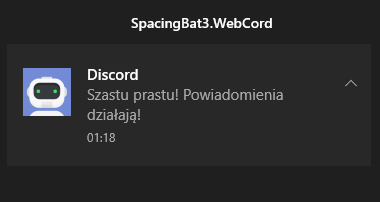
I'm not sure whenever this is fixed in 3.5.2, but definitely is in master releases:
Ah, that might be the issue then. To download the master release, I would need to compile it, right?
Ah, that might be the issue then. To download the
masterrelease, I would need to compile it, right?
It will make it to WebCord 3.6.0, which is now being built by GitHub.
Just confirming that the issue was in fact fixed in 3.6.0, the notification title now shows up as it should.