

 SortableJS
MultiDrag Plugin - Feature for different stacking types
Hi Team,
Great work on this plugin and SortableJS too! Such a fantastic community and library. I've used Vue.Draggable and react.sortablejs and starting to contribute to those.
Currently MultiDrag 'stacks' all list items on top of each other. If it does not exist already, could we have a feature added that holds siblings next to each other instead of stacking on top of each other?

@waynevanson It is possible, but at this point it is a question of whether or not the addition is worth the increase in the output file size. So I'm not sure about this.

Okay thank you. I'd love to see it and think it would be worth. Otherwise, we could wait to see if anyone else requests a similar change.
@waynevanson Ok, here's an idea: a stackedOffset option that you give a percentage of the item's height and width, and the items will stacked using those values relative to the dragged item. For example, passing 100% for the height would cause the offset to be the height of the item, and therefore they would be stacked one on top of each other. Maybe the option could take a function in order to account for moving the items on top or below the dragged item based on whether or not they were initially that way in the DOM.
But do you want them to be stacked like that on the item that is moving in the list, or the image under the mouse cursor while dragging? Or both?
I have similar problem but not with plain text lists.
My configuration:
group: {
  name: 'element',
  pull: 'clone',
  put: false // Do not allow items to be put into this list
},
multiDrag: true
I have selected here both radio and checkbox and I start dragging from radio. Radio moves correctly, but as soon as radio goes over the drop area on the right, the checkbox shows a red (selection color) clone that stays on the right side of left drag area. Either the checkbox should move with radio or it should not appear at all. And I think the red selection color should no disappear from original items when I start dragging.
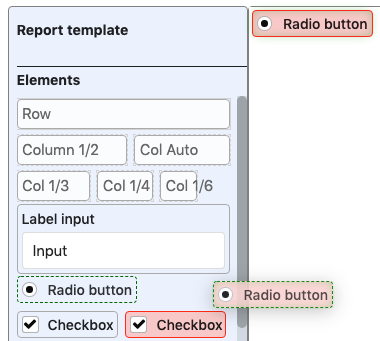

Not easily. But if you decide to change the lib I can test the changes. The point is that the list is not always text and not always horizontal or vertical but fluid. I'm using flexbox here.
Sorry, accidentally closed it.
@owen-m1 stackedOffset sounds like a great idea!
But do you want them to be stacked like that on the item that is moving in the list, or the image under the mouse cursor while dragging? Or both?
There should be both options available, for list and for cursor.
From this JSbin, there should be a way that says
if (group.put === 'clone') {
  // keep list items in place
  // but stack them under the cursor
}
Perhaps it works similarly to how group.put holds a function(to,from) { return ...}
I'd recommend additional options based on this suggestion:
{
  stackedOffset: [HTMLSize], // default at 0px or 0%
  stackedLocation: ['cursor'|'list'] // default to cursor. 'list' property useful when cloning.

}
I feel a little unclear, so feel free to ask any questions related.
@waynevanson What about a stackList and a stackCursor option that are functions? This way the user can specify both the list and cursor stacking.
For example, to make all the items in the list be next to each other in the list like you said:
new Sortable(el, {
	multiDrag: true,
	stackList: function(items) {
		let stacked = [];
		for (var i in items) {
			stacked.push({
				item: items[i],
				offset: ['0', '-100%'] // Relative to next item in list
			});
		}
		return stacked;
	}
})
@waynevanson I realize now that what I described in my last comment could only work on the elements under the cursor. There can't be sorting within the root list if all the multi drag elements are visible - it doesn't make sense. All the elements will already remain visible (not stacked) if sort: false is set on the root list, which means that you cannot sort in that list and therefore the extra items do not need to be hidden. All I can think of now is a showItemsOnPull option that will show all the selected elements only if the user is moving the dragged item to another list.
I think stackCursor does the job, as stackList was just extra functionality as:
it doesn't make sense
And you're right, it doesn't.
All I can think of now is a
showItemsOnPulloption that will show all the selected elements only if the user is moving the dragged item to another list.
This sounds like a good option. Is there anything else you need to know?
@waynevanson I'm not sure what I was thinking when I said I could add a showItemsOnPull option, because you can already achieve this effect by setting pull: 'clone' in the group options.
Try dragging multiple selected items from the left on the left to the list on the right in this JSBin: https://jsbin.com/yinepin/1/edit?html,css,js,output
@waynevanson I realize now that what I described in my last comment could only work on the elements under the cursor. There can't be sorting within the root list if all the multi drag elements are visible - it doesn't make sense. All the elements will already remain visible (not stacked) if
sort: falseis set on the root list, which means that you cannot sort in that list and therefore the extra items do not need to be hidden. All I can think of now is ashowItemsOnPulloption that will show all the selected elements only if the user is moving the dragged item to another list.
that's exactly what I want

Hi @waynevanson, this is related to what @stuta posted.
The case he describes is happening to me, you can see it in this JSBin.
Basically, if you have sort: false, it does not stack the multiselected items on drag, but when you move to another list, only the dragged clone is moved to the new list, and all original selected items are shown again, meaning that the other clones (except the dragged one) are still showing.
Edit: It also seems that the second list not being multidrag is part of the issue.

@owen-m1 Is this feature or something similar implemented? I couldn't find anything to achieve this functionality.
