

 Soothsilver
Importing libraries fails.
Snowride fails to import Libraries. Resource files (.txt) and variables files (.py) are imported successfully.
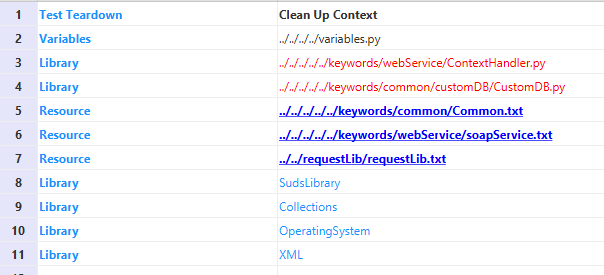
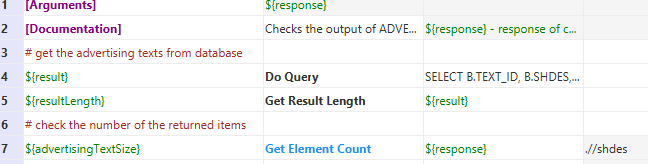

Variable files are ignored by Snowride, which is why they appear neither blue nor red.
However, library files should be importable. Could you please look at the tab "Errors" and post what error message you see there (if any)?

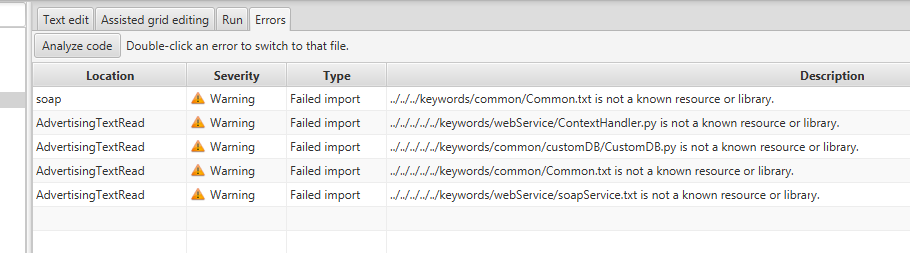
I was afraid of that. So, usually this happens because there is no file at that path. But there could be a bug in Snowride or maybe an error in parsing. Try:
- Check that the number of "../" is correct. I find that RIDE is more lenient than Snowride in counting them.
- Run Snowride from the command line. That way, you will get to see the standard output and standard error which may contain additional error messages, especially if it's a parsing error.
- Create a minimal example that you can send to me and upload it.
Hi all,
I was already about to create a small sample for this issue. Can someone (maybe @esaaben ?) please let me know, if this is still needed?
Kind regards & Cheers, Erik

Hi all,
Yes, this is still needed. That would be great if a small sample could be created. Thanks Erik.
Regards, Saad
From: Erik Fornoff [email protected] Sent: Montag, 16. Dezember 2019 07:27 To: Soothsilver/snowride [email protected] Cc: Saad Benaly [email protected]; Mention [email protected] Subject: Re: [Soothsilver/snowride] Importing libraries fails. (#89)
Hi all,
I was already about to create a small small sample for this issue. Can someone (maybe @esaabenhttps://protect2.fireeye.com/v1/url?k=16f52267-4a26320f-16f562fc-8691b328a8b8-1a8ec50c8008522f&q=1&e=5f6e7a6a-b049-4efa-b654-1b810ceeb2c3&u=https%3A%2F%2Fgithub.com%2Fesaaben ?) please let me know, if this is still needed?
Kind regards & Cheers, Erik
— You are receiving this because you were mentioned. Reply to this email directly, view it on GitHubhttps://protect2.fireeye.com/v1/url?k=fa0d96ef-a6de8687-fa0dd674-8691b328a8b8-565b384f7a98290e&q=1&e=5f6e7a6a-b049-4efa-b654-1b810ceeb2c3&u=https%3A%2F%2Fgithub.com%2FSoothsilver%2Fsnowride%2Fissues%2F89%3Femail_source%3Dnotifications%26email_token%3DAN2NEFK4UWFQKTKSQQQIV73QY4NVBA5CNFSM4JRG4RP2YY3PNVWWK3TUL52HS4DFVREXG43VMVBW63LNMVXHJKTDN5WW2ZLOORPWSZGOEG5U6JY%23issuecomment-565923623, or unsubscribehttps://protect2.fireeye.com/v1/url?k=68215055-34f2403d-682110ce-8691b328a8b8-3819aca9145104db&q=1&e=5f6e7a6a-b049-4efa-b654-1b810ceeb2c3&u=https%3A%2F%2Fgithub.com%2Fnotifications%2Funsubscribe-auth%2FAN2NEFOTDCTQJZILIOB5I73QY4NVBANCNFSM4JRG4RPQ.
At least one part of the issue is, that on import of the resource there are errors like:
The file '../../../../../../../keywords/webService/ContextHandler.py' could not be libdoc'd because libdoc returned a nonzero exit status. Maybe it's not a Robot Framework Python library file or you don't have libdoc
Robot libdoc is present, but the path specified for 'Library' import is relative to each source file, Snowride executes 'python -m robot.libdoc ' with this relative path, but the command is started in current directory of Snowride instead of the directory of the file with the Library import.
It would be better, when a Library object references a relative path with a *.py file to convert it to an absolute path before it is added to importedResources. This has also the side effect that a single *.py library is just one time in importedResources instead of each time it is referenced from a different level in directory structure.
With the absolute path to the python file the libdoc call should be successful.
Cheers, Bert
