

 SketchUp
Curve objects connected by a single vertex result in a bad model
SketchUp 2017 Make Windows 10
I'm creating 2D shapes on the ground plane with welded (curves) edges that connect together at 1 vertex. Under certain conditions, the Validity Check results in a bad model.
The problem initial was discovered by creating shapes via ruby API but most of my test scenarios include shapes created via the toolset (manually). Because the issue initially involved Curve objects, I also tested shapes having the ArcCurve subclass.
All my tests involve 2 shapes that are always connected by a single vertex. Anytime I refer to a Curve shape, I'm talking about a closed-loop shape whose edges are Curve objects. Polyline references are a single edge Curve object. The combination of shapes in my test scenarios are not exhaustive but based on my test results, I've concluded the following:
- Joining two Arc objects results in no issues at all.
- Joining two Polygon objects always results in a bad model.
- Joining two Circle objects always results in a bad model.
- Joining two Curve objects results in a bad model depending on whether or not the first vertex was used to connect the shape. If neither of the shapes are connected by their first vertex then no problems are found.
- Joining two Polyline objects results in no issues.
When testing a combination of shapes (e.g. an Arc with a Circle), I concluded:
- A Polygon connected to any Curve based shape (Arc, Circle, Curve) results in a bad model.
- A Circle connected to any Curve based shape (Arc, Circle, Curve) results in a bad model.
- Anytime a Curve, connected by it's first vertex, to any other Curve based shape will result in a bad model.
The results of Polygon and Circle objects seem identical which makes sense since I believe they are both based on the same ArcCurve class.
I've attached the following files.
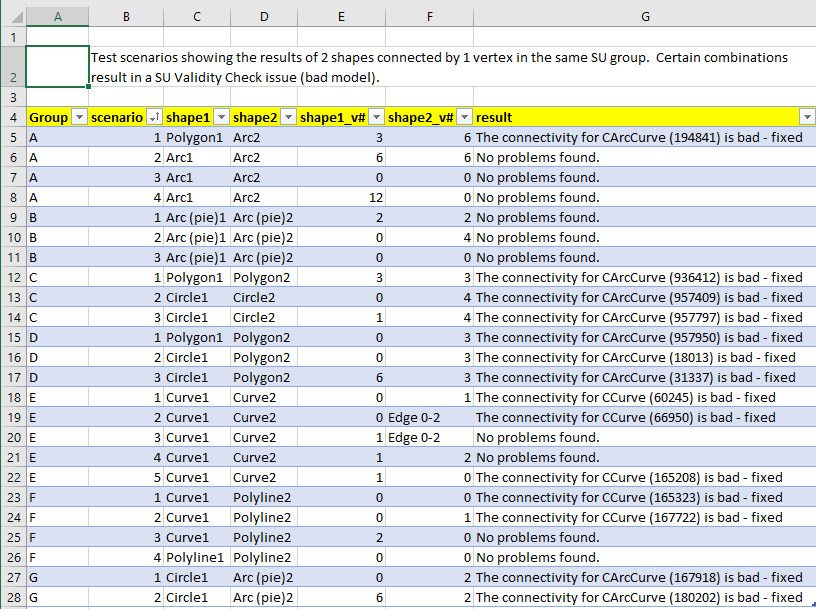
- An Excel file containing the test scenarios. Each test scenario shows the name of the shape and which vertex of the shape was used in the single point connection. Also the Validity Check results are included.
- The SketchUp file with the shapes referenced in the Excel file. Each of the shapes are in their own group. To demonstrate the issue, you'll need to explode both shapes in the test so they reside in the same group and then run the validity checker.
- The screen shots below.
For example, here are some screen shots:
First the Excel file test scenarios:
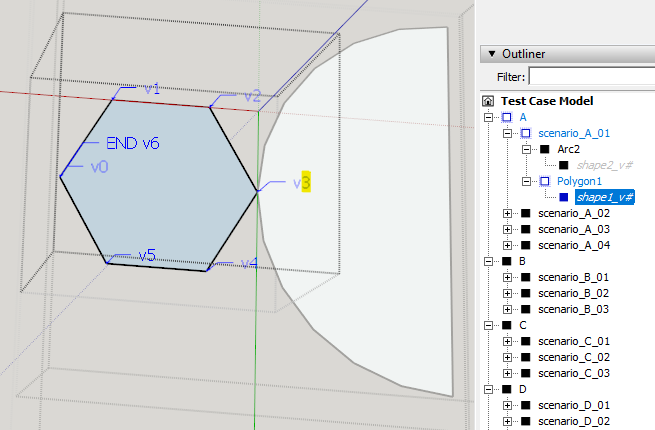
Sample of scenario A01, showing Polygon1's 3rd vertex (highlighted) connected to Arc2. This is reflected in row 5 of the Excel file.
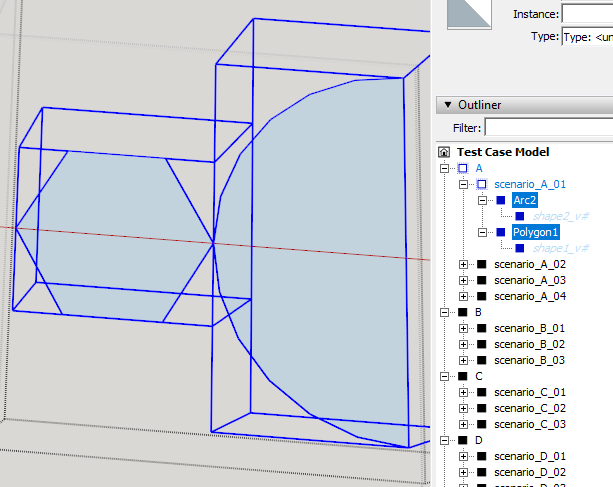
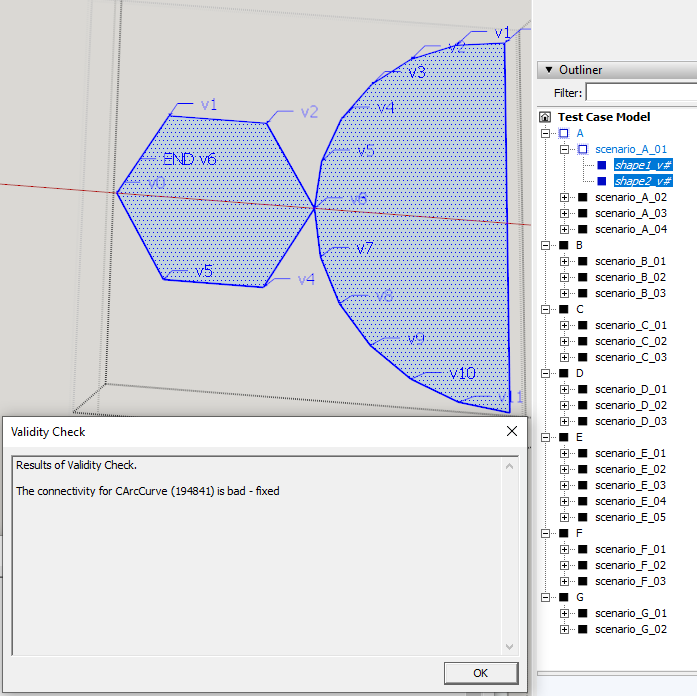
This screen shot shows the same Polygon1 and Arc2 groups highlighted. When these are exploded and the model validated, it results in a bad model.
Test scenario F01 objects were created from the ruby code below. Notice that the two objects (when exploded) will result in a connection at point [3,3,0] which is the first vertex for the Curve loop. This results in a bad model.
	points_a = []
	points_a.push(Geom::Point3d.new(3,3,0))
	points_a.push(Geom::Point3d.new(0,0,0))
	points_a.push(Geom::Point3d.new(6,0,0))
	points_a.push(Geom::Point3d.new(3,3,0))

	points_b = []
	points_b.push(Geom::Point3d.new(3,3,0))
	points_b.push(Geom::Point3d.new(3,6,0))

	model = Sketchup.active_model
	group_test_curves_scenario = model.entities.add_group
	group_test_curves_scenario.name = "scenario_F_01"

	group_a = group_test_curves_scenario.entities.add_group
	group_a.name = "Curve1"
	group_a.entities.add_curve(points_a)


	group_b = group_test_curves_scenario.entities.add_group
	group_b.name = "Polyline2"
	group_b.entities.add_curve(points_b)
If the points in the points_a array are replaced with these lines below, which rotate the points such that the first vertex is no longer the point of connection, then there are no issues when the groups are exploded. This was the code used to create Curve1 in scenario F03.
	points_a.push(Geom::Point3d.new(0,0,0))
	points_a.push(Geom::Point3d.new(6,0,0))
	points_a.push(Geom::Point3d.new(3,3,0))
	points_a.push(Geom::Point3d.new(0,0,0))
That concludes my testing. Let me know if there are any questions or if anything needs better/more clarification.
Thanks

Since there are no issues with Arc objects, I tried (via add_arc() method) to create a 360 degree Polygon. I soon realized my folly, in that this just created a circle since arc's are also comprised of ArcCurve edges. But an Arc is really just 2 straight non-curve edges connected to a Polyline (ArcCurve edges). So it's not a loop comprised solely of Curve/ArcCurve edges. And, since there are no issues joining multiple polylines, it makes sense that there wouldn't be any issue connecting Arcs. This makes my tests above for Arcs really just more tests of Polylines.
Therefore the testing seems to boil down to just Curve and ArcCurve objects and whether they participate in a closed loop (circle, ngon) or open loop (polyline).
To summarize ALL of the above:
-
Any loop comprised of ArcCurve or Curve edges connected by a single vertex to any other Curve or ArcCurve (regardless of whether it's a line or a loop) creates a bad model.
-
The only caveat for creating a bad model scenario, is that the single vertex for a Curve loop must be that loop's first vertex whereas for an ArcCurve loop it can be any vertex.
Sorry, wished I could have been that concise the first time.
Hmm....
I tried your first snippet:
	points_a = []
	points_a.push(Geom::Point3d.new(3,3,0))
	points_a.push(Geom::Point3d.new(0,0,0))
	points_a.push(Geom::Point3d.new(6,0,0))
	points_a.push(Geom::Point3d.new(3,3,0))

	points_b = []
	points_b.push(Geom::Point3d.new(3,3,0))
	points_b.push(Geom::Point3d.new(3,6,0))

	model = Sketchup.active_model
	group_test_curves_scenario = model.entities.add_group
	group_test_curves_scenario.name = "scenario_F_01"

	group_a = group_test_curves_scenario.entities.add_group
	group_a.name = "Curve1"
	group_a.entities.add_curve(points_a)


	group_b = group_test_curves_scenario.entities.add_group
	group_b.name = "Polyline2"
	group_b.entities.add_curve(points_b)
And I'm not seeing Fix Model reporting any issues in SU2017 or SU2019.
Does it happen with any model for you?


For the record, I've found a number of older issues like this. All related to closed curves. Looks to me that the validation check for this scenario isn't that useful. Opened an issue referring to the older cases to review the "rules" for valid closed curves.
Does anyone know why this problem still exists in v2023? Surely its a simple fix? My input on the bug : https://forums.sketchup.com/t/discrepancy-between-welded-curves-and-valid-curves/242901
