

 SimpleMobileTools
The app cannot see/manage the contacts on my SIM card (while other apps, like "Copy To Sim Card" can)
My phone is Motorola One 5G Ace, Android version 11. I am using the latest Simple Contacts Pro version: 6.18.1 Pro. installed from Play Store. My sim card operator is Freedom Mobile. The app cannot see/manage the contacts on my SIM card (while other apps, like "Copy To Sim Card" can).
As a source/display/storage for contacts, it finds three entries: "Phone Storage", "Phone Storage (not visible by other apps)" and (a mysterious ghosty) one called "Freedom Mobile" . See screenshot.

I have no idea what "Freedom Mobile" source/storage space is, but it is definitely not the contacts stored on my sim card. While Freedom Mobile matches my provider's name, it "contains" no sim card contacts (which I know are there because I stored them long time ago, and can access them with other apps). "Freedom Mobile" had initially only a single "contact" and nothing else (namely the support number for my mobile provider).
When I use a different app - for example "Copy To Sim Card" - it sees and can manage all the contacts stored on my SIM card. As well as the ones stored on the phone. See the screenshot.
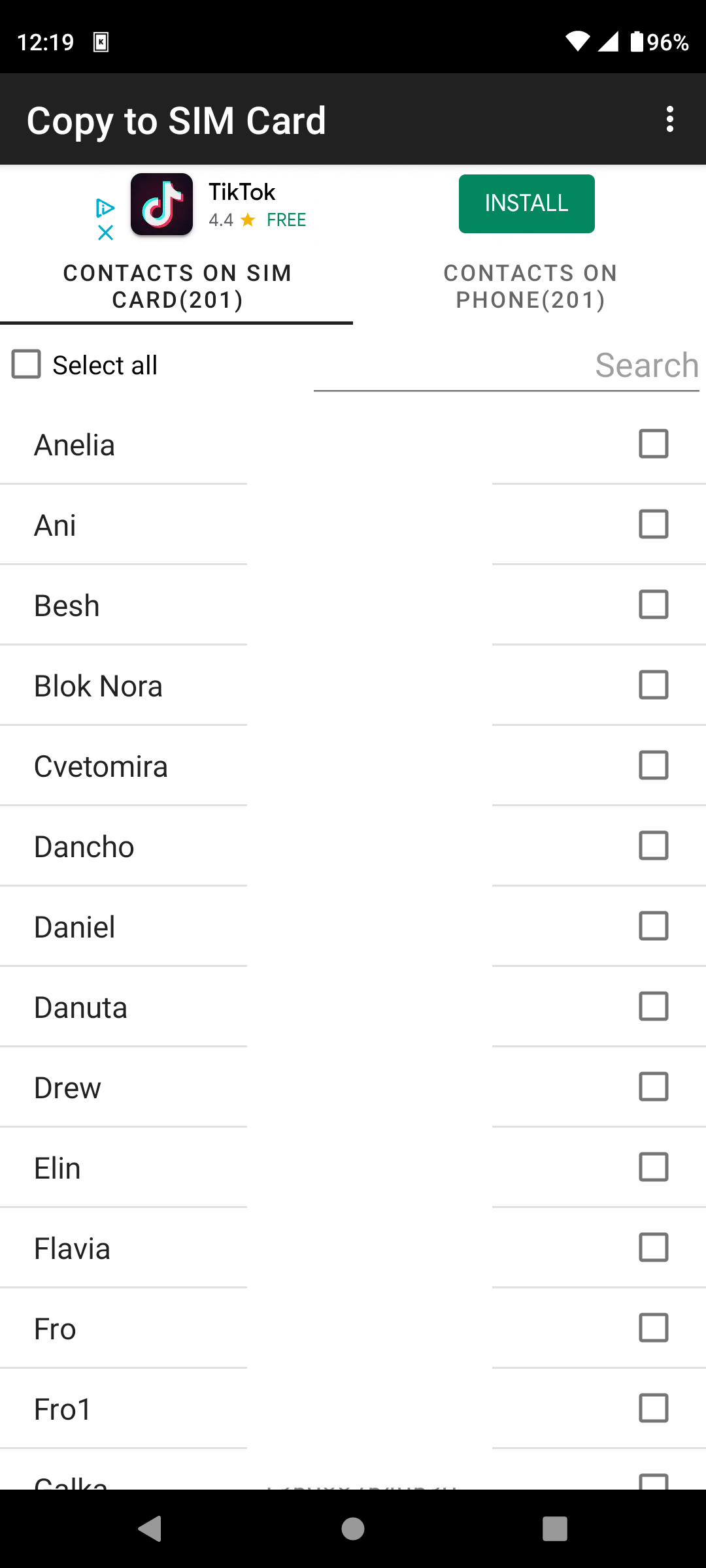
I did the following tests to investigate further.
I add/store a test contact named "Test contact" (only Name and Number) under "Freedom Mobile" area (using Simple Contacts Pro). The newly added contact seems to "persist" there with Simple Contacts Pro when I open/reopen the app (well, until I plug out the sim card, see more below). However "Copy To Sim Card" does not see the newly saved "Test Contact" neither under SIM nor PHONE.
I plug out physically the sim card. Simple Contacts Pro now sees only two categories "Phone Storage" and "Phone Storage (not visible by other apps)". "Copy To Sim Card" understandably sees no contacts in SIM, only the ones under the PHONE.
I plug back physically the sim card in. Now, Simple Contacts Pro now again sees all 3 sources/dests "Phone Storage", "Phone Storage (not visible by other apps)" and "Freedom Mobile". However, the "Test Contact" which I added under "Freedom Mobile" is no more there! Under "Freedom Mobile" Simple Contacts Pro again shows only a single contact entry, which is my mobile provider's support number.
So to recap, it looks like Simple Contacts Pro mistakenly shows some useless "Freedom Mobile" category instead of my SIM card contacts.... It "allows" to store contacts under this category, which however persist only until the sim card is plugged out i.e. it is not there further when the sim card is replugged back in. "Copy To Sim Card" while somewhat dumb, is entirely consistent: it shows only 2 categories SIM and PHONE, and properly manages contacts for these.
With regards to permissions during these tests: "Simple Contacts Pro" has all the permissions granted. For "Copy To Sim Card" I have enabled ONLY "contacts" permissions category (and have disabled "Camera", "Files and Media" and "Phone" categories). Under "all permissions", for "contacts" category "Copy To Sim Card" lists the same permissions as Simple Contacts Pro: find accounts on the device, read your contacts, modify your contacts. "Copy To Sim Card" has also the following extra "other app capabilities" which I can't control: have full network access, view network connections, Advertising ID permission, prevent phone from sleeping, run at startup, run foreground service.
Yet somehow "Copy To Sim Card" manages to properly read/store/delete/show my SIM card and PHONE contacts. While Simple Contacts Pro cannot manage my SIM card contacts (showing however some ghostly read-only "Freedom Mobile" source/storage/account with a single number in there whatever it is).
I also want to say BIG THANK YOU for the great stack of FOSS android apps (I've purchased all of them) which help me stay away from Google's spyware crap which came with my phone.
