

 SimpleMobileTools
Does not repeat the alarm on weekdays after the first sounding
Hello, first, i am a user of all your simple apps, and i like it
In this days i installed the simple clock for replace the original alarm in my cellphone and the first time works well. Then config the application to wake me up five days in the week, the first day runs ok, but the alarm was auto disabled for all days after i suspended the alarm while it was sounding.
I need to open the application every days, disable the alarm and the enable the alarm again for it sound the next day
how repeat the issue: I config one alarm with repeat for all days in the week (5 minutes in the futere), then the alarm works, i suspend the alarm like i should do every morning. Then, i wait to the next day and the alarm does not work. Or i check in the top bar of my cellphone where said when the next alarm to ring and i do not see anything
If i config 2 independient alarms one for Monday to Friday and other for saturday and sunday, when ring the first for example the monday, then i see in the top bar of my cellphone the next alarm is in saturday.
I think, when i suspend the alarm, the alarm is disable for ever.

I can confirm this on Android 9 (EMUI 9.1.0).
I've not waited until the next day though to see that it actually does not ring. After stopping it the first time it rings, the widget shows no alarms. If I open the application it shows it as enabled.

I can confirm this on Android (Pie), Resurrection Remix OS v7.0.1
This is ugrent task to fix this bug among all Simple Apps, IMO. People will late on their work and there may happen an undesirable consequences, you know...
Please, also take attention to the #143 issue. The app should understand (phone-global) power save exceptions (for "Greenify" or similar apps).
Thank you. Love your "Simple" bundle much.

sadly the Clock app isnt a priority for now, as it is just impossible to make it work reliably. There are too many manufacturer and device specific issues that need some user actions to set up. Even if you check Google Clock there are so many people complaining about it being unreliable. If Google cannot make their alarms work reliably, I definitely cannot.

I found what causes a breakage and what have to be fixed.
When the schedule is already set, then you HAVE an ICON in the STATUS BAR. It's a sign that alarm WILL work at the next day (100% reproduceable).
ISSUE:
When the alarm ring starts playing the sound, you stop it and expect the same behavior next day. BUT it's not.
REASON:
When the alarm starts, it's immidiately unload a schedule from the memory. And the ICON disappears from the STATUS BAR. It's a sign that alarm WILL NOT work at the next day in spite of your schedule preset.
You have to open/close the app manually once again (EVERY DAY), then the schedule will be self-reactivated. The ICON in the STATUS BAR will appear also (100% reproduceable).
WORKAROUND:
Fix the app to keep a schedule in the memory, if you have anything active in the schedule settings.
EXPECTED BAHAVIOR:
- The scheldule should continue working after ring event.
- The scheldule should be active always (if set).
- The ICON in the STATUS BAR must respect the schedule and always be visible.
Tested : Two same smartphones, Resurrection Remix OS v7.0.1 (Pie).
("Greenify" exceptions were set also for the Clock & Calendar: Shallow hibernations or system exceptions have no influence on this issue).
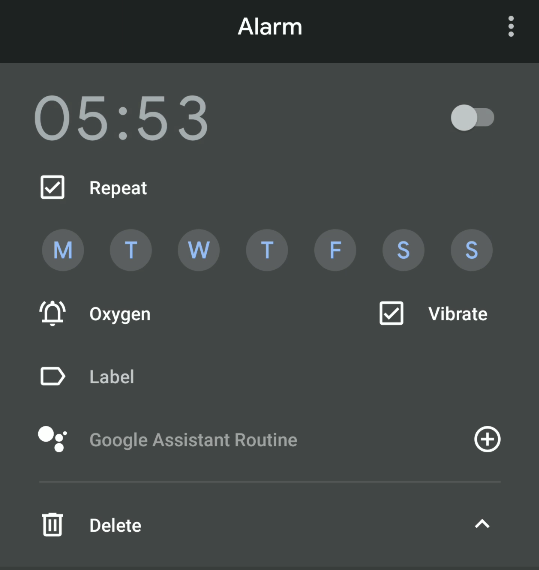
Simple Clock is simply missing this feature. I am using the Google Clock app because it has this feature. It has a check box for repeat. Checking this shows the days of the week so you can select which days the alarms repeat on. If this is not checked the alarm sounds and is disabled until you enable it manually.
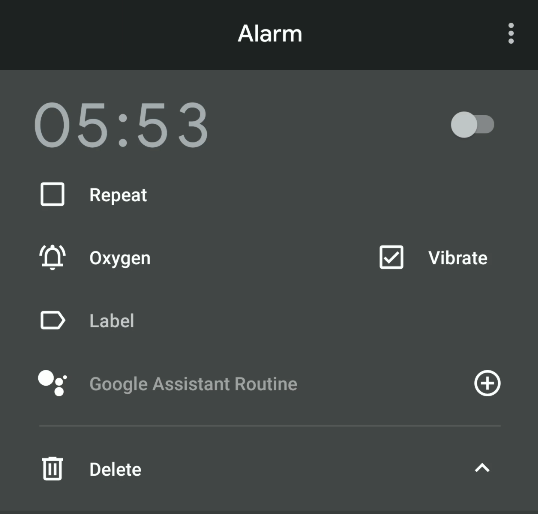
After ticking the repeat checkbox:

It appears that, at least for me on my devices, that this issue has been fixed with one or more of the multiple updates since I first noticed the problem.
