

 Shopify
[Bug]: CLI can't find dev stores
Please confirm that you have:
- [x] Searched existing issues to see if your issue is a duplicate. (If you’ve found a duplicate issue, feel free to add additional information in a comment on it.)
- [x] Reproduced the issue in the latest CLI version.
In which of these areas are you experiencing a problem?
App
Expected behavior
See dev stores
Actual behavior
│ Looks like you don't have any dev stores associated with coltrane's Dev Dashboard. Create one now
Even though for the authenticated account, I have created numerous dev stores with test data, experimental access, and more.
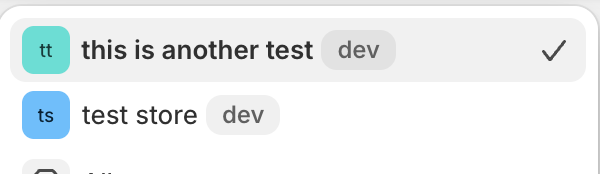
Verbose output
│ Looks like you don't have any dev stores associated with coltrane's Dev Dashboard. Create one now
Reproduction steps
npx shopify app dev
Operating System
mac os
Shopify CLI version (shopify --version)
3.84.1
Shell
iterm2
Node version (run node -v if you're not sure)
v23.11.0
What language and version are you using in your application?
node

Hello @ColtraneNadler. Can you try updating to the latest version of the CLI and re-authing? If you are still seeing this issue could you please share the output of running the app dev command with the --verbose flag.
Also, are the stores in question dev stores you created via the developer dashboard, or were they created in the Partners Dashboard?

Updated to latest version, and created the store from the developer dashboard. @jantnovi
2025-10-07T19:36:23.858Z: Running command app dev
2025-10-07T19:36:23.860Z: Running system process in background:
  · Command: /opt/homebrew/Cellar/node/23.11.0/bin/node /opt/homebrew/Cellar/node/23.11.0/bin/shopify notifications list --ignore-errors
  · Working directory: /Users/coltrane/Documents/Apps/shopify-app
2025-10-07T19:36:23.865Z: Notifications to show: 0
2025-10-07T19:36:23.874Z: Reading cached app information for directory /Users/coltrane/Documents/Appsshopify-app...
2025-10-07T19:36:23.874Z: Reading the content of file at shopify.app.toml...
2025-10-07T19:36:23.876Z: Reading the content of file at shopify.app.toml...
2025-10-07T19:36:23.877Z: Ensuring that the user is authenticated with the App Management API with the following scopes:
[]

2025-10-07T19:36:23.877Z: Getting session store...
2025-10-07T19:36:23.878Z: Getting current session ID...
2025-10-07T19:36:23.878Z: Validating existing session against the scopes:
[
  "openid",
  "https://api.shopify.com/auth/shop.admin.graphql",
  "https://api.shopify.com/auth/shop.admin.themes",
  "https://api.shopify.com/auth/partners.collaborator-relationships.readonly",
  "https://api.shopify.com/auth/shop.storefront-renderer.devtools",
  "https://api.shopify.com/auth/partners.app.cli.access",
  "https://api.shopify.com/auth/destinations.readonly",
  "https://api.shopify.com/auth/organization.store-management",
  "https://api.shopify.com/auth/organization.on-demand-user-access",
  "https://api.shopify.com/auth/organization.apps.manage"
]
For applications:
{
  "appManagementApi": {
    "scopes": []
  },
  "businessPlatformApi": {
    "scopes": []
  }
}

2025-10-07T19:36:23.878Z: - Token validation -> It's expired: false
2025-10-07T19:36:23.880Z: Sending "BusinessPlatform" GraphQL request:
  query UserInfo {
  currentUserAccount {
    uuid
    email
    organizations(first: 2) {
      nodes {
        name
        __typename
      }
      __typename
    }
    __typename
  }
}

With request headers:
 - User-Agent: Shopify CLI; v=3.85.5
 - Keep-Alive: timeout=30
 - Sec-CH-UA-PLATFORM: darwin
 - Content-Type: application/json

to https://destinations.shopifysvc.com/destinations/api/2020-07/graphql
2025-10-07T19:36:23.884Z: Sending "App Management" GraphQL request:
  query ActiveAppReleaseFromApiKey($apiKey: String!) {
  app: appByKey(key: $apiKey) {
    ...AppVersionInfo
    __typename
  }
}

fragment ReleasedAppModule on AppModule {
  uuid
  userIdentifier
  handle
  config
  target
  specification {
    identifier
    externalIdentifier
    name
    managementExperience
  }
}

fragment AppVersionInfo on App {
  id
  key
  organizationId
  activeRoot {
    clientCredentials {
      secrets {
        key
      }
    }
    grantedShopifyApprovalScopes
  }
  activeRelease {
    id
    version {
      name
      appModules {
        ...ReleasedAppModule
      }
    }
  }
}

With variables:
{
  "apiKey": "*****"
}

With request headers:
 - User-Agent: Shopify CLI; v=3.85.5
 - Keep-Alive: timeout=30
 - Sec-CH-UA-PLATFORM: darwin
 - Content-Type: application/json

to https://app.shopify.com/app_management/unstable/graphql.json
2025-10-07T19:36:24.343Z: Request to https://app.shopify.com/app_management/unstable/graphql.json completed in 459 ms
With response headers:
 - content-type: application/json; charset=utf-8
 - server-timing: processing;dur=169, verdict_flag_enabled;desc="count=4";dur=0.475, _y;desc="a75a86d2-a233-4a6f-bc40-0f53541a6663", _s;desc="ab12b1d2-b22c-48eb-8fbf-010cdcebe0d9", cfRequestDuration;dur=357.000113
 - x-request-id: f8e44934-9f55-4f4b-8146-60990ff7a21a-1759865784

2025-10-07T19:36:24.345Z: Sending "BusinessPlatform" GraphQL request:
  query FindOrganizations($organizationId: OrganizationID!) {
  currentUserAccount {
    organization(id: $organizationId) {
      id
      name
      __typename
    }
    __typename
  }
}

With variables:
{
  "organizationId": "Z2lkOi8vb3JnYW5pemF0aW9uL09yZ2FuaXphdGlvbi8xMzE0Njk1NTU="
}

With request headers:
 - User-Agent: Shopify CLI; v=3.85.5
 - Keep-Alive: timeout=30
 - Sec-CH-UA-PLATFORM: darwin
 - Content-Type: application/json

to https://destinations.shopifysvc.com/destinations/api/2020-07/graphql
2025-10-07T19:36:24.349Z: Sending "App Management" GraphQL request:
  query fetchSpecifications($organizationId: ID!) {
  specifications(organizationId: $organizationId) {
    name
    identifier
    externalIdentifier
    features
    uidStrategy {
      appModuleLimit
      isClientProvided
      __typename
    }
    validationSchema {
      jsonSchema
      __typename
    }
    __typename
  }
}

With variables:
{
  "organizationId": "gid://shopify/Organization/131469555"
}

With request headers:
 - User-Agent: Shopify CLI; v=3.85.5
 - Keep-Alive: timeout=30
 - Sec-CH-UA-PLATFORM: darwin
 - Content-Type: application/json

to https://app.shopify.com/app_management/unstable/graphql.json
2025-10-07T19:36:24.683Z: Request to https://app.shopify.com/app_management/unstable/graphql.json completed in 334 ms
With response headers:
 - content-type: application/json; charset=utf-8
 - server-timing: processing;dur=170, verdict_flag_enabled;desc="count=4";dur=0.463, _y;desc="45da2f9f-cefd-4563-a7de-09bc4c7ba279", _s;desc="dfdec961-96c2-45ed-bd4b-7aafc3952e4e", cfRequestDuration;dur=271.999836
 - x-request-id: 370166b1-507b-44f0-b540-eee9e8020f8b-1759865784

2025-10-07T19:36:24.691Z: The following extension specifications were defined locally but not found in the remote specifications: channel_config, tax_calculation
2025-10-07T19:36:24.691Z: The following extension specifications were found in the remote specifications but not defined locally: admin_app, app_link, app_nav_item, bulk_action, checkout_script_tag, flow_action_definition, flow_trigger_definition, flow_trigger_discovery_webhook, manage_marketplaces, marketing_action, marketing_activity_extension, merchandising_create_publication, merchandising_fulfillment_variant_details, ping_message_callback, pos_link, product_configuration_link, resource_publication_settings, retail_cart_promotion, retail_product_recommendation, subscription_link
2025-10-07T19:36:24.693Z: Reading the content of file at .gitignore...
2025-10-07T19:36:24.879Z: Reading the content of file at extensions/semantic-schema/shopify.extension.toml...
2025-10-07T19:36:24.880Z: Reading the content of file at package.json...
2025-10-07T19:36:24.880Z: Reading the content of file at package.json...
2025-10-07T19:36:24.881Z: Running system process:
  · Command: npm prefix
  · Working directory: /Users/coltrane/Documents/Apps/shopify-app

2025-10-07T19:36:24.981Z: Obtaining the dependency manager in directory /Users/coltrane/Documents/Apps/shopify-app...
2025-10-07T19:36:24.982Z: Reading the content of file at package.json...
2025-10-07T19:36:24.982Z: Reading the content of file at .shopify/project.json...
2025-10-07T19:36:24.984Z: Reading the content of file at shopify.web.toml...
2025-10-07T19:36:24.986Z: Notifications to show: 0
2025-10-07T19:36:24.986Z: Reading cached app information for directory /Users/coltrane/Documents/Apps/shopify-app...
2025-10-07T19:36:24.987Z: Storing app information for directory /Users/coltrane/Documents/Apps/shopify-app:{
  "appId": "fe764a27e5bd111beae2369ccdb40e3e",
  "title": "semantic-commerce",
  "directory": "/Users/coltrane/Documents/Apps/shopify-app",
  "orgId": "131469555"
}
2025-10-07T19:36:24.995Z: Sending "BusinessPlatform" GraphQL request:
  query ListAppDevStores($searchTerm: String) {
  organization {
    id
    name
    accessibleShops(
      filters: {field: STORE_TYPE, operator: EQUALS, value: "app_development"}
      search: $searchTerm
    ) {
      edges {
        node {
          id
          externalId
          name
          storeType
          primaryDomain
          shortName
          __typename
        }
        __typename
      }
      pageInfo {
        hasNextPage
        __typename
      }
      __typename
    }
    currentUser {
      organizationPermissions
      __typename
    }
    __typename
  }
}

With variables:
{}

With request headers:
 - User-Agent: Shopify CLI; v=3.85.5
 - Keep-Alive: timeout=30
 - Sec-CH-UA-PLATFORM: darwin
 - Content-Type: application/json

to https://destinations.shopifysvc.com/organizations/api/unstable/organization/131469555/graphql
2025-10-07T19:36:25.162Z: Request to https://destinations.shopifysvc.com/organizations/api/unstable/organization/131469555/graphql completed in 166 ms
With response headers:
 - cache-control: max-age=0, private, must-revalidate
 - content-type: application/json; charset=utf-8
 - etag: W/"2064f63ac04bc82de90bb0eb5481f62a"
 - server-timing: processing;dur=61, socket_queue;dur=2.165, util;dur=0.08, cfRequestDuration;dur=105.999947
 - x-request-id: cef980a3-9673-4d26-838b-c674e7557496-1759865785

╭─ info ───────────────────────────────────────────────────────────────────────────────────────────────────────────────────────────────╮
│                                                                                                                                      │
│  Looks like you don't have any dev stores associated with coltrane's Dev Dashboard. Create one now                                   │
│                                                                                                                                      │
╰──────────────────────────────────────────────────────────────────────────────────────────────────────────────────────────────────────╯

Similar issue, started occurring after updating to latest version of cli, because my old version stopped working (it didn't let me continue to use it and forced me to update):
shopify app dev

╭─ error ────────────────────────────────────────────────────────────────────────────────────────────────────────────────────────────────────────────╮
│                                                                                                                                                    │
│  Could not find Store for domain (my_test_store).myshopify.com in Organization (my org name).                                               │
│                                                                                                                                                    │
╰────────────────────────────────────────────────────────────────────────────────────────────────────────────────────────────────────────────────────╯
I have verified that my test store subdomain works (it is password protected because it is test), and I have logged in correctly to my account.

Solved this by clearing the cookies in the inspect > application tab. Once i logged in the dev stores had disappeared. Created a new store and its working fine now.
Solved this by clearing the cookies in the inspect > application tab. Once i logged in the dev stores had disappeared. Created a new store and its working fine now.
this does not work... as the data is fetched from their api not stored in system.

Temporary fix that worked for me is to get added as a store staff to the store , it will show up in dev dashboard

Removing the .shopify folder seemed to help in my case before running shopify app dev again - more specifically .shopify/project.json file.
