

 SharePoint
SPFX ListViewCommandSet not loading always in list webpart
Target SharePoint environment
SharePoint Online
What SharePoint development model, framework, SDK or API is this about?
💥 SharePoint Framework
Developer environment
Windows
What browser(s) / client(s) have you tested
- [ ] 💥 Internet Explorer
- [X] 💥 Microsoft Edge
- [X] 💥 Google Chrome
- [ ] 💥 FireFox
- [ ] 💥 Safari
- [ ] mobile (iOS/iPadOS)
- [ ] mobile (Android)
- [ ] not applicable
- [ ] other (enter in the "Additional environment details" area below)
Additional environment details
- browser version: newest version of edge and chrome
- SPFx version: 1.15.2
Describe the bug / error
I have a SPFX Extension with ListViewCommandSet. It is installed in a site collection on a customer tenant. There is a quicklink webpart with links to pages on which the SharePoint list webpart is installed. Sometimes the commands are visible and sometimes not. Sometimes pressing F5 and refreshing the pages helps, sometimes it takes a while or even needs a CTRL + F5.
I checked and the commands are there, the code is loaded and even the _onListViewStateChanged is triggered. In this method the command is set to visible = true. At the end of the _onListViewStateChanged the raiseOnChange method is called. But it seems like the internal _raiseOnChange is undefined.
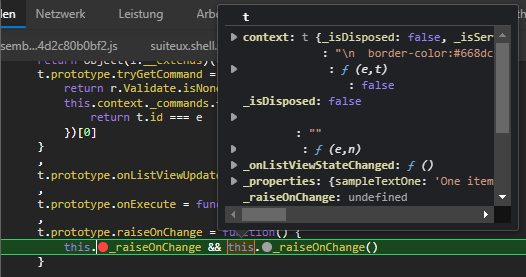
Steps to reproduce
As said, its hard to reproduce but you can try:
- Create a page with for example quicklinks to another page
- On the other page place a list webpart
- Install a ListViewCommandSet extension.
- Visit the 2nd page via the first page.
- Try again until the button not appears
Expected behavior
I would expect that the extension is always loading correctly and the commands are always displayed.

Thank you for reporting this issue. We will be triaging your incoming issue as soon as possible.

@diabhoil - could you please clarify a bit the logic you have in the command set?
Are you setting visibility to false in the onInit and then updating it in _onListViewStateChanged?
Or is it set to true initially?

@AJIXuMuK Yes in the onInit it is set to false, and only when a row is selected we want the command to show up. My colleague informed me that sometimes the onInit is not executed at all. Haven't checked that but I've read something similar in closed issues from 2019/2020. Like here for example: #5707. It seems that the list webpart + extensions is somehow buggy for us :(
@diabhoil - I was playing with this for a while on different tenants using default scaffolded solution, and unable to repro :(. I've tried Quick links, browser's back button, quick nav menu - the buttons are always displayed according to the logic.
Is there a chance you could share your solution/code with me. And even better - environment where you're experiencing the issue. You can do that using my email: [email protected]
@AJIXuMuK - Thank you for the work. I was doing some testing myself in the meantime. I could reproduce the error only with our solution (in different tenants) but not with a clean solution. So I guess the best approach is to copy the code in a new blank solution. Our failing solution is based on SPFX v1.15.0 and upgraded to v1.15.2 (following the steps Office 365 CLI was telling us). Maybe we did something wrong there.
If that fails I'll have to talk to my manager and the project lead. I need permissions first, before sending you the code.
After several attempts to reproduce the issue in a clean dev tenant I am almost sure that there is a problem with the solution or other solutions installed in the tenant. I would now assume that there is basically no problem with the SPFX extension in this case. Therefore I close the issue now. Thx @AJIXuMuK for the help :)
Issues that have been closed & had no follow-up activity for at least 7 days are automatically locked. Please refer to our wiki for more details, including how to remediate this action if you feel this was done prematurely or in error: Issue List: Our approach to locked issues