
SCTornadoTCP
 SCTornadoTCP copied to clipboard
 SergioChan
A TCP Server and Client based on tornado
tornado-TCP
A TCP Server and Client based on tornado.
Written specifically for the server-to-server internal request.
Current Version
Alpha Version 0.1.1
License
MIT License
Structure
The server can be represented by the Architecture diagram below:
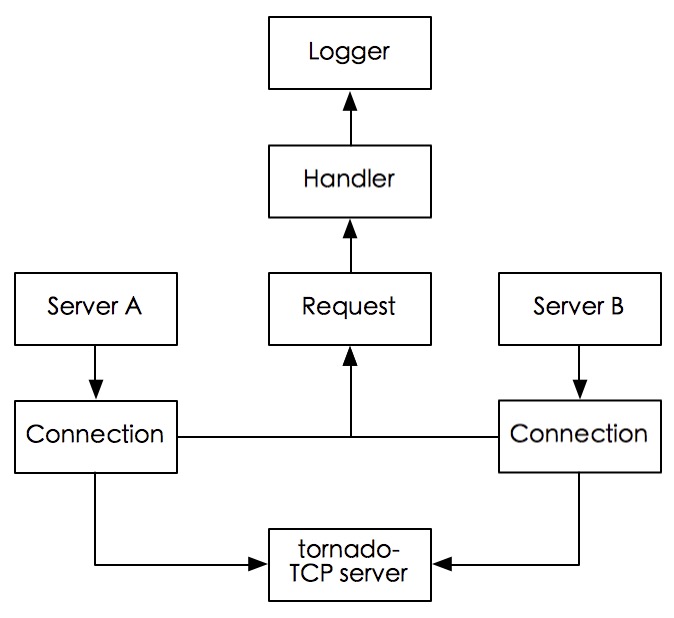
Server
You can start the server by command Python Manage.py.
Connection
Any other server that was connected to this tornado-TCP server will be represented as a client-server. Each client-server will maintain a TCP connection with tornado-TCP server. If the connection will be used very frequently, it's better not to close it. Keeping an IOStream for the connection will make the communication in the server-side Local Area Network faster than typical HTTP request.
Connection is the base Class for server and client communication.Each connection between tornado-TCP server and client-server will be maintained by a Connection instance.
Connection will read the request from IOStream and handle the requests. When a request handling is over, the Connection will automatically read the stream to get the next request. As the source code shown below:
def handle_request(self, data):
    tmp_body = data[:-1]

    request = Request(address=self._address, Body=tmp_body)
    handler = urls.Handler_mapping.get(request.cmdid)

    handler_instance = handler()

    if isinstance(handler_instance,BaseHandler):
        try:
            handler_instance.process(request=request)
            self._stream.write(handler_instance.res)
        except Exception as e:
            baseLogger.error(e.message)

    self.read_request()
Handler
Handler is the class type for processing the request object. You can sub-class your own Handler from BaseHandler to implement custom processing method. This is the sample of TestHandler:
@urls.handler(constant.TEST_CMDID)
class TestHandler(BaseHandler):

	def process(self,request):
        if isinstance(request, Request):
            print request.params
        else:
            raise TypeError
Notice the decorator @urls.handler which is used to add mapping between cmdId and Handler. The definition of this decorator is in the urls.py. Each custom Handler should decorated by this decorator.
Request
Request is the basic object type in the IOStream. Each Request is delimited by a delimiter '\n'.Request is transported in a serialization mode, using normal json type.
To extend Request, define a subclass and there is no need to override anything.
Request has following parameters:
-
1.
address: simple ip address combined with port number representing the request origin server. -
2.
rawBody: raw content of the request body -
3.
cmdid: command id defines in Command -
4.
timestamp: the date when request was sent -
5.
params: a dict that storage all the data it takes
##Logger
You can custom your logger_name,logger_level, logger_format_file, logger_format_console and logger_path.This provides developers ability to custom different loggers for different handlers. You can specify different log files to store logs from different loggers.
 SergioChan