

 SerenityOS
Font Editor: Can't get the window small enough
Earlier I could set Font Editor to basically any size.
Right now this is the smallest I can resize the window:
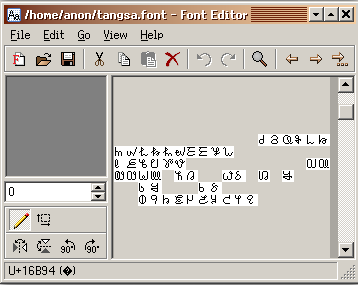
This is an issue because Unicode often align their charts with similar characters on each row:
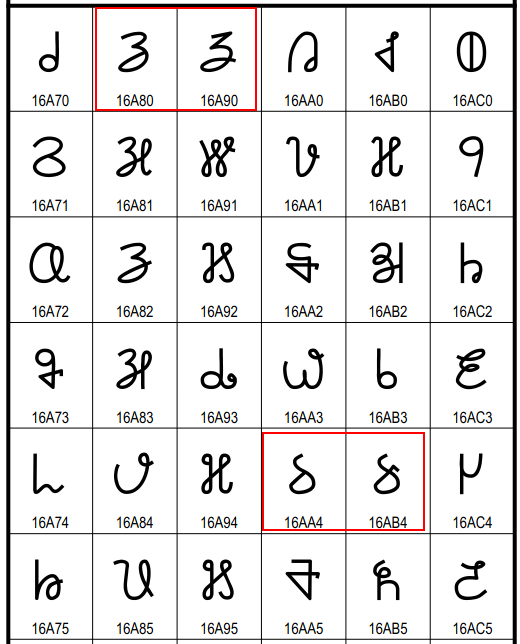
Now the smallest size shows 18 glyphs on each line when I want 16 on each line on some charts that align glyphs :-/

I would not really call this a bug, this (afaik) is the new layout working as intended. It's stopping you from shrinking the the window to the point where the toolbar does not fit in the window (horizontally), or to the point where the thing on the left does not fit (vertically).
To fix this I think the toolbar would have to be updated to work the way saved tabs do in Browser, where it gets a little arrow to scroll it left/right when the window is too small (which I think would be more of an enhancement rather than a bug fix).

Or have an option to set the number of glyphs per row independent of the window size.
@MacDue It's kinda weird when software limits how you can resize your window, I think most users(like me) understand that if I make a window very small I can't see all the buttons and stuff. I expect basically overflow: hidden and not some weird hamburger menu or workaround.
If the expectation is that most users does not want to make a window smaller then what could display the UI, then I guess this is good functionality. But it would still be good with a "I'm a big boy and can resize the windows myself"-mode, something like holding crtl while resizing to ignore the sizing constraints and just hide the overflow...
But yeah, I'm still annoyed that I can't resize windows in Firefox anymore to try out some media queries smaller then 468px or whatever the threshold is. 😂
P.s. in Firefox you press Ctrl+Shift+M to open the "Responsive Design Mode" that allows you to easily resize the page to any dimension :^)
But either way I'm sure this is not a bug and the layout system working as @frhun designed it (pinged)
As MacDue said, this is intended behaviour. If you ever run into a situation where you think you can't shrink a window enough, I don't think its the solution to have ui elements just outside the visible area. And again, as he said, the solution here would be adding collapsing toolbars. For other elements the solution here could be to put them in a ScrollableContainerWidget, but I don't see any Widget where that would really work from a UI standpoint. Just to reiterate, there is no point in having a window being so small that it's unusable, and imho it's even useless in most cases to have disappearing toolbar entries. Because if a toolbar entry is there, it probably is needed for the application to function, and if it's not needed for the application to function, why is it even there in the first place.
One thing I do see as a problem is the possibility of windows growing beyond the maximum available screen size. The solution for that problem would be adding scrolling to windowserver.
