
serenity
 serenity copied to clipboard
 SerenityOS
PixelPaint: Add a way to scale an image or layer arbitrarily
This would let you change the image/layer's size by stretching or shrinking it.
The main way to do this would be a dialog box that asks you for the desired size. Here's an example from GIMP. You don't have to copy this of course, but it works pretty well.
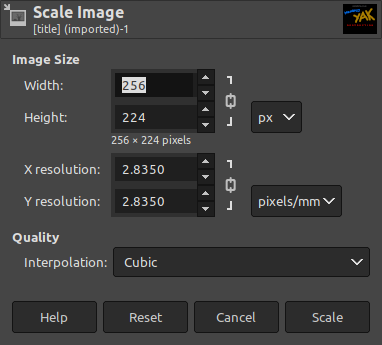
A click-and-drag Scale tool might be nice too but that's not a requirement. :^)


This ticket is extremely similar to #11862 . Could we potentially edit the title/description to make it a bit more distinct?
I will shortly have a PR for #11862 which will implement a dialog box for resizing an image or a layer. Could we change this ticket to be more specific to the click-and-drag scenario (no dialog box)?
This ticket is extremely similar to #11862 . Could we potentially edit the title/description to make it a bit more distinct?
I will shortly have a PR for #11862 which will implement a dialog box for resizing an image or a layer. Could we change this ticket to be more specific to the click-and-drag scenario (no dialog box)?
Sorry for the confusion! This is about scaling: changing the image size by stretching it. (In GIMP: Image > Scale Image) That other issue is about changing the canvas size without modifying the image itself. (GIMP: Image > Canvas Size, or how cropping works.)
EDIT: Actually, I guess they don't have to be separate concepts, but that's what I'm used to. Hmmm.
Ah, I see what you mean. In the language I'm used to (I pretty much only use paint.net, which treats layers slightly differently) this ticket is referring to "resize image", and the other ticket is referring to "resize canvas."
My confusion is cleared up, I think it's worth having two tickets for this.
