

 SensorsIot
Nextcloud-> Error while first login
Hello, since a few days I started to set up Nextcloud according the mentioned video for Andreas and the documentation. But everytime when I try to start working with nextcloud, I run into a failure.
Nextcloud answers my try to initialize and register the admin accout with following message:
Error while trying to create admin user: Failed to connect to the database: An exception occurred in driver: SQLSTATE[HY000] [1045] Access denied for user 'nextcloud'@'nextcloud.IOTstack_NextCloud' (using password: YES)
I used a fresh Raspberry OS Configuration, used the mentioned command to curl IOTstack from Github, installed docker and docker compose per menue, than I copied Andreas overwrite file, inserted the passwords, removed the wireguard commands, build the stack with mariadb, nextcloud, portainer ce and started docker, everything with the menu.
Maybe one more intersting fact, at the first page of nextcloud, started with Serverip:9321 there is no option to change between the databases, only after the first try to put in username and password, I got the "picture" which is part of the video and the documentation page.
Thanks for all
Best regard Sven

I'll have my RPi setup in a few days to troubleshoot this (nextcloud doesn't work well on WSL due to file permissions).
In the meantime, can you post your docker-compose.yml file here? I will check over it and run it on my RPi.

Hello Slyke, here my compose file:
version: '3.6'
services:
  nextcloud:
    volumes:
    - ./volumes/nextcloud/html:/var/www/html


    image: nextcloud
    container_name: nextcloud
    ports:
    - "9321:80"
    restart: unless-stopped
    depends_on:
    - nextcloud_db
    links:
    - nextcloud_db
    networks:
    - iotstack_nw
    - nextcloud_internal
    environment:
    - MYSQL_HOST=nextcloud_db
    - MYSQL_PASSWORD=IOtSt4ckmySqlDbPw       # %randomMySqlPassword% is overwritten during preBuild hook
    - MYSQL_DATABASE=nextcloud
    - MYSQL_USER=nextcloud
    logging:
      options:
        max-size: "5m"
        max-file: "3"
  nextcloud_db:
    environment:
    - MYSQL_ROOT_PASSWORD=_mysql_root_pw_
    - MYSQL_PASSWORD=_mysql_pw_
    - MYSQL_DATABASE=nextcloud
    - MYSQL_USER=nextcloud

    image: linuxserver/mariadb
    container_name: nextcloud_db
    volumes:
    - ./volumes/nextcloud/db:/var/lib/mysql
    restart: unless-stopped
    networks:
    - nextcloud_internal
    logging:
      options:
        max-size: "5m"
        max-file: "3"
  mariadb:
    environment:
    - MYSQL_ROOT_PASSWORD=_mysql_root_pw_
    - MYSQL_PASSWORD=_mysql_pw_
    - MYSQL_DATABASE=nextcloud
    - MYSQL_USER=nextcloud
    image: linuxserver/mariadb
    container_name: mariadb
    volumes:
    - ./volumes/mariadb/config:/config
    ports:
    - "3306:3306"
    restart: unless-stopped
    networks:
    - iotstack_nw
    logging:
      options:
        max-size: "5m"
        max-file: "3"
  portainer-ce:
    container_name: portainer-ce
    image: portainer/portainer-ce
    restart: unless-stopped
    ports:
    - "8000:8000"
    - "9000:9000"
    volumes:
    - /var/run/docker.sock:/var/run/docker.sock
    - ./volumes/portainer-ce/data:/data
networks:
  iotstack_nw: # Exposed by your host.
    # external: true
    name: IOTstack_Net
    driver: bridge
    ipam:
      driver: default
      config:
      - subnet: 192.16.238.0/24
        # - gateway: 192.16.238.1

  iotstack_nw_internal: # For interservice communication. No access to outside
    name: IOTstack_Net_Internal
    driver: bridge
    internal: true
    ipam:
      driver: default
      config:
      - subnet: 192.16.230.0/24
        # - gateway: 192.16.238.1
  vpn_nw: # Network specifically for VPN
    name: IOTstack_VPN
    driver: bridge
    ipam:
      driver: default
      config:
      - subnet: 192.18.200.0/24
        # - gateway: 192.18.200.1

  nextcloud_internal: # Network for NextCloud service
    name: IOTstack_NextCloud
    driver: bridge
    internal: true

  # default:
  #   external: true
  #   name: iotstack_nw

  # hosts_nw:
  #   driver: hosts
Hey @Sven2303
The line
- MYSQL_PASSWORD=_mysql_pw_
in nextcloud_db needs to match
- MYSQL_PASSWORD=IOtSt4ckmySqlDbPw
in nextcloud.
Also, not sure if you're using MardiDB for something else, but if not, you don't need to include it for Nextcloud, nextcloud_db is actually an internal MariaDB setup and configured for Nextcloud in IOTstack already.
Hey Slyke, I changed the password as you mentioned and now I was able to create the admin user, but I wasn't able to chose the database, as shown in the documentation and the video. Do you know, how I can check if this was done in the background?
Should your tip be inserted into Alexanders overwrite file or be included into the documentation?
But until now, thanks for your help and the fast response.
Hello, I'm having this problem now. I have been running Nextcloud before without problems, but now have a new install that will not allow to create the admin user. Here is the section of docker-compose regarding nextcloud with mariadb. As you can see I have the same password in all the required sections. When I go to create the admin user I get the same error message:-
Error while trying to create admin user: Failed to connect to the database: An exception occurred in driver: SQLSTATE[HY000] [1045] Access denied for user 'nextcloud'@'nextcloud.IOTstack_NextCloud' (using password: YES)
version: '3.6'
services:
nextcloud:
volumes:
- ./volumes/nextcloud/html:/var/www/html
- /Disk1:/Disk1
image: nextcloud
container_name: nextcloud
ports:
- "9321:80"
restart: unless-stopped
depends_on:
- nextcloud_db
links:
- nextcloud_db
networks:
- iotstack_nw
- nextcloud_internal
environment:
- MYSQL_HOST=nextcloud_db
- MYSQL_PASSWORD=_my_password
- MYSQL_DATABASE=nextcloud
- MYSQL_USER=nextcloud
nextcloud_db: environment: - MYSQL_ROOT_PASSWORD=mysql_root_pw - MYSQL_PASSWORD=_my_password - MYSQL_DATABASE=nextcloud - MYSQL_USER=nextcloud
image: linuxserver/mariadb
container_name: nextcloud_db
volumes:
- ./volumes/nextcloud/db:/config
restart: unless-stopped
networks:
- nextcloud_internal
mariadb: environment: - MYSQL_ROOT_PASSWORD=mysql_root_pw - MYSQL_PASSWORD=_my_password - MYSQL_DATABASE=nextcloud - MYSQL_USER=nextcloud image: linuxserver/mariadb container_name: mariadb volumes: - ./volumes/mariadb/config:/config ports: - "3306:3306" restart: unless-stopped networks: - iotstack_nw
Sorry a bit of a newbie at posting and can't get all the output into a nice blue box!!

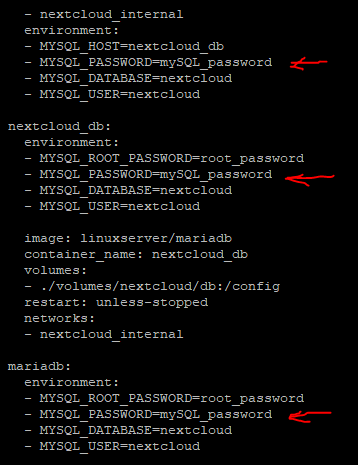
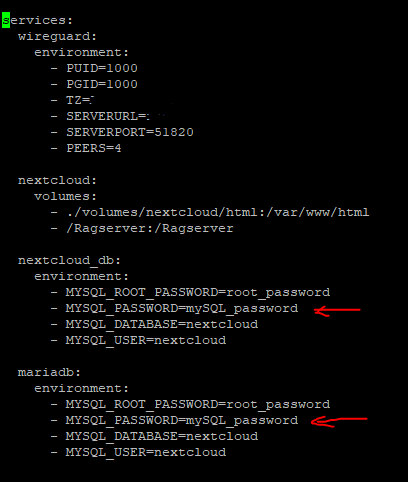
The first image is Docker-compose.yml file and the second image is compose-override.yml file.
[SOLVED] Okay so i had the same issue. I spent a lot of time in trying out everything. Apparently, there is some issue with the compose-override.yml file and docker-compose.yml file. To resolve this you need to check for the password in both compose-override.yml file and docker-compose.yml file you need to set the same password for MYSQL_PASSWORD in all the three places (nextcloud, nextcloud_db and Mariadb).You may need to check both the compose-override.yml file and docker-compose.yml file to see if the password is same. Because for some reason the override file does not entirely override the docker-compose file. (For some reason IOtSt4ckmySqlDbPw is set in docker-compose.yml file).
Once you have ensured all the passwords are same, run ./menu.sh and restart docker. then open webadmin page of nextcloud enter nextcloud as user (admin) and password as whatever password you have set in all the three places. The password for the maria DB will automatically be entered by the container. That's it you are done. The nextcloud page should now register user and open the main page.

Confirming that the password in the docker-compose.yml file ( IOtSt4ckmySqlDbPw) is incorrect. Followed Ragziesoft's instructions and is now AOK
