

 Semantic-Org
Data visible under sticky Table.HeaderCell with sorted property.
Bug Report
Adding local className 'sticky' to Table.HeaderCell works just fine. Sorting the sortable table is working as well.
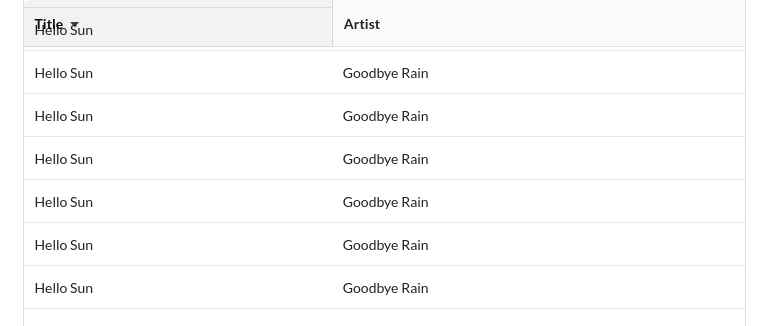
However, when I add property sorted = ascending (or descending) to obtain the up/down carets on the column titles, the scrolling data becomes visible under the column title being sorted.
Also, as I hover over each column title, the background shows through, then becomes opaque as the column title losses focus. (It appears that the sorted column has permanent focus much the same way as if it was being hovered over.)
This is somewhat related to #3563 which references https://codesandbox.io/s/rnzxo99kq
Steps
Expected Result
The scrolling table data would be obscured by the column title, just as it is when the sorted property is not present.
Actual Result
The scrolling data is visible under the column title of the column that is being used for sorting.
Version
2.0.1
Testcase
https://codesandbox.io/s/u6h8z

👋 Thanks for opening your first issue here! If you're reporting a 🐞 bug, please make sure you've completed all the fields in the issue template so we can best help.
We get a lot of issues on this repo, so please be patient and we will get back to you as soon as we can.
![welcome[bot] avatar](https://avatars.githubusercontent.com/in/4141?v=4 "Published by a pub.dev verified publisher")
I am having this exact same issue. Did you come up with a work around?

You'll have to remove the opacity from the table header cell background. Here's how we did it: https://github.com/ICTU/quality-time/blob/c0f6698da35f80a3cfe9b63734fb53c2d34abd86/components/frontend/src/subject/SubjectTable.css#L27
