
selenium-ide
 selenium-ide copied to clipboard
 SeleniumHQ
Verify Field Placeholders using Selenium IDE
I want to verify the placeholders in all fields on my webpage before I populate them. The verifyAttribute and assertAttribute are not in the Command Dropdown. Can someone explain why these are not present? Additionally, how do I validate placeholders without this command?
I am also open to using a workaround like storeAttribute and then validating the value stored in this attribute but I am not sure how to do that either.
Example:
Validate the Full Address field has a placeholder of "Search Address ..."

Expected behaviour
Verification required to check the placeholder in the text field matches the placeholder I put in the value field

Environment
Selenium IDE Version: Googel Chrome Browser Version 83.0.4103.97 (Official Build) (64-bit)

verifyAttribute and assertAttribute are old comands from the old IDE. They are Not avaible in the new IDE (you can add them via a Pull Request of you want)
store value won‘t work because the „placeholder“ is not an value.
try store attribute, see my example
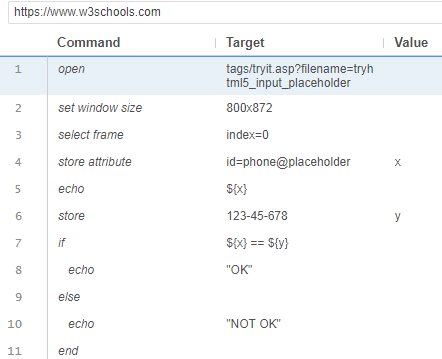
store attribute with placeholder.side.txt

I'm reopening because I feel like we should have a dedicated command for it.

Other than echo, is there a way to let the test fail like the verify command when the condition doesn't satisfy, and then it can still move onto the next test after? Appreciate it!
verifyAttribute and assertAttribute are old comands from the old IDE. They are Not avaible in the new IDE (you can add them via a Pull Request of you want)
store value won‘t work because the „placeholder“ is not an value.
try store attribute, see my example

@zcai2023 - Sorry, we've talked about it before. A try-catch thing would be very useful:
https://github.com/SeleniumHQ/selenium-ide/issues/1668
