

 ScratchAddons
New Addon: `stage-monitor`
Resolves #3590 Resolves #1680 (The transparent values part, custom fonts is a different issue)
Changes
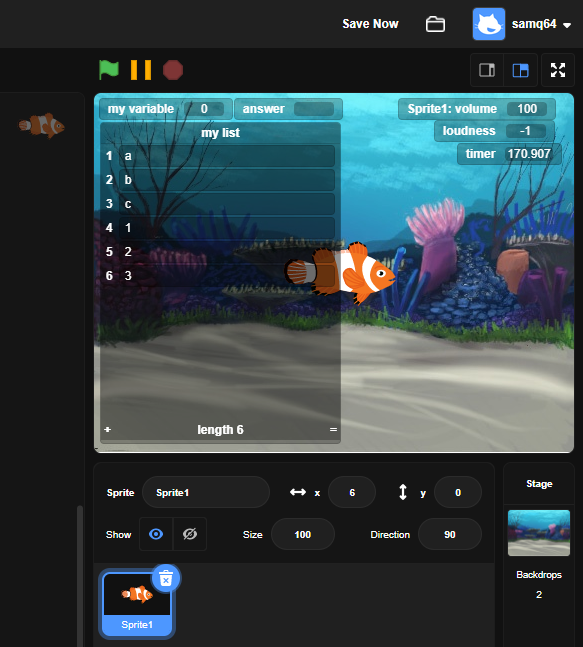
Adds a new addon that allows customizing the colour and border radius of stage monitors and their values. This PR also removes monitors from the editor-dark-mode effect stage setting.
Reason for changes
Some people don't like the orange colour of variable monitors. This addon also allows customizing stage monitors to make them look pretty cool be adding transparency.
Tests
Tested on Chromium 115.

This PR also removes monitors from the editor-dark-mode effect stage setting.
They should still be affected by dark mode if this addon is not enabled.

I think it should also allow changing the border radius of the stage montiros, like to make it look like the early Scratch 3 mockup

I think it should also allow changing the border radius of the stage montiros, like to make it look like the early Scratch 3 mockup
I don't think I could make monitors look exactly like in the mockup by changing just the border radius. Would this be close enough?

This PR also removes monitors from the editor-dark-mode effect stage setting.
They should still be affected by dark mode if this addon is not enabled.
I guess I could split the monitor css into a different file, but I'm not sure how to make it only run if an add-on is disabled.
I'm marking this as a draft because I found a couple of minor bugs and am going to add a radius setting. I'll also try to implement mxmou's suggestion.
This PR also removes monitors from the editor-dark-mode effect stage setting.
They should still be affected by dark mode if this addon is not enabled.
I guess I could split the monitor css into a different file, but I'm not sure how to make it only run if an add-on is disabled.
Using "if", but that isn't necessary here, just make sure this addon is after editor-dark-mode in addons.json.
For the normal readout, the border radius should probably affect both the monitor itself and the value.
I finally got GitHub Desktop working again! It wouldn't let me login for some reason.
Using
"if", but that isn't necessary here, just make sure this addon is aftereditor-dark-modeinaddons.json.
Done.
For the normal readout, the border radius should probably affect both the monitor itself and the value.
I was going to make it two separate settings.
This PR also removes monitors from the editor-dark-mode effect stage setting.
They should still be affected by dark mode if this addon is not enabled.
I disagree -- the project player isn't actually part of the editor, and putting project-player-specific settings in editor addons is relatively confusing.
Related to this point: https://github.com/ScratchAddons/ScratchAddons/issues/3014 https://github.com/ScratchAddons/ScratchAddons/issues/3899#issuecomment-995268806

This PR also removes monitors from the editor-dark-mode effect stage setting.
They should still be affected by dark mode if this addon is not enabled.
I disagree -- the project player isn't actually part of the editor, and putting project-player-specific settings in editor addons is relatively confusing.
Related to this point: #3014 #3899 (comment)
I think it makes sense for monitors and other elements on the stage to match the color scheme of the editor though. Ideally they would be affected by editor dark mode in the editor and full screen mode and by website dark mode on the project page.
I don't really know the best way to do this, what options the addon should have or what should effect what so I'll just mark this as a draft for now and come back to it later.
I think it makes sense for monitors and other elements on the stage to match the color scheme of the editor though. Ideally they would be affected by editor dark mode in the editor and full screen mode and by website dark mode on the project page.
That's not what currently happens, right? Do we think we should open a discussion about this? We could also discuss whether full screen should be handled by editor dark mode or website dark mode.

I think it makes sense for monitors and other elements on the stage to match the color scheme of the editor though. Ideally they would be affected by editor dark mode in the editor and full screen mode and by website dark mode on the project page.
That's not what currently happens, right?
The colour of monitors is always set with editor-dark-mode's effect stage setting and then overwritten by this addon regardless if the user is in the editor or not.
I think it makes sense for monitors and other elements on the stage to match the color scheme of the editor though. Ideally they would be affected by editor dark mode in the editor and full screen mode and by website dark mode on the project page.
That's not what currently happens, right? Do we think we should open a discussion about this? We could also discuss whether full screen should be handled by editor dark mode or website dark mode.
I agree about opening a discussion.
See https://github.com/ScratchAddons/ScratchAddons/discussions/4863 for discussion on the blocking topic.
If it is decided to create a theme addon for the project player, it would likely be built off of this addon.
@Samq64 As the PR author, would you be okay with this?

Just a heads-up, the monitors normally use their block colour. If you show a motion reporter, they will be blue. Ideally they should be affected by custom block colours.

Just a heads-up, the monitors normally use their block colour. If you show a motion reporter, they will be blue. Ideally they should be affected by custom block colours.
That should be done in editor-theme3 and then this addon should be moved below it so it overrides its colours.

Let's remove the border radius setting and just the 2 colour settings so it's less confusing to the user if or when we decide we want to upgrade this into a customizable project player colours addon in the future.
Why? Change them to "Monitor border radius"
Sure I guess the option can stay in this addon for now.